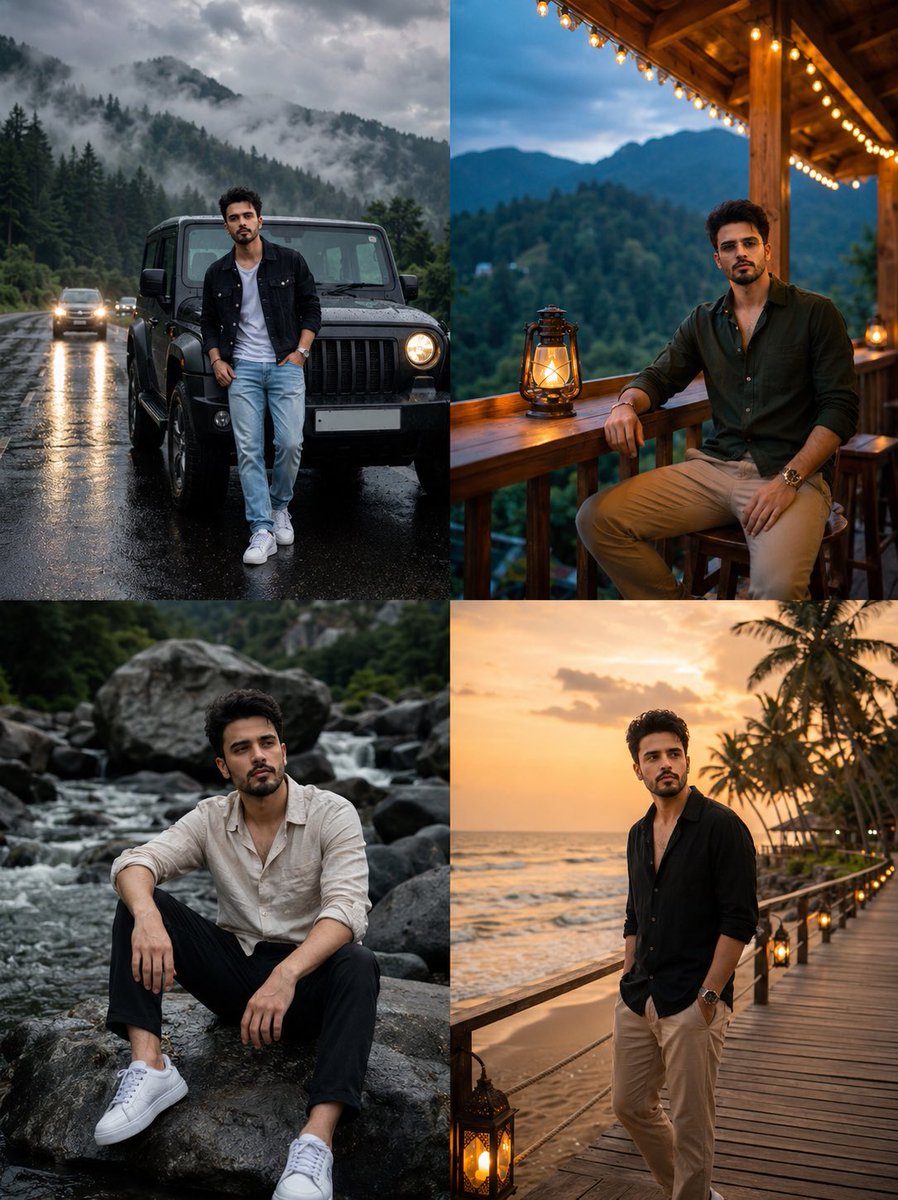
Multi-Scene Identity Preservation Collage
A sophisticated identity-preservation prompt that creates a four-panel vertical collage of the same person in different luxury travel settings while maintaining facial consistency.
이것은 인물과 캐릭터 에 대한 GPT Image 2 프롬프트 사례입니다. 아래의 복사 가능한 프롬프트를 사용하여 유사한 시각 자료를 생성하고, 재사용하기 전에 Awesome GPT Image 2 Prompts 의 저작자 표시 및 상업적 사용 권한을 검토하십시오.
전체 프롬프트 세트가 필요하신가요? 다음을 사용하세요. 인물과 캐릭터 더 많은 관련 예시를 보려면 주제 허브를 열거나 다음을 열어보세요. GPT Image 2 프롬프트 카탈로그 전체 예제 색인, 재사용 가능한 구조 및 출처 표기는 다음을 참조하십시오.
Free 1K preview
Generate one preview image instantly, no sign-up required.
Free text preview doesn’t preserve reference-image consistency.
1940/4000
프롬프트
복사 준비 프롬프트
Use my uploaded face image as the primary identity reference. Preserve my exact facial identity, face shape, hairstyle, hair texture, beard style, skin tone, eye shape, eyebrows, nose, lips, and all unique facial details with maximum accuracy. Do not change my face or make me look like a different person.

Create a hyper-realistic cinematic 4-panel vertical collage portrait of the same person in different luxury travel lifestyle scenes. Maintain the same face identity in all four panels.

Panel 1 (top left):
A man standing casually in front of a {argument name="vehicle" default="black off-road SUV"} on a {argument name="weather" default="rainy mountain road"}. Misty pine forest in the background, cloudy dramatic sky, wet asphalt reflections. Wearing a black denim jacket over a white t-shirt, light blue jeans, and white sneakers. Confident relaxed pose, cinematic moody lighting.

Panel 2 (top right):
The same man sitting on a wooden balcony of a mountain resort cabin during evening. Warm fairy lights hanging above, lantern on the table, green mountains in the background. Wearing a {argument name="outfit" default="dark green casual shirt"}, beige pants, sunglasses, relaxed luxury vacation vibe.

Panel 3 (bottom left):
The same man sitting on large rocks beside a flowing river in a forest. Natural outdoor setting, soft overcast lighting. Wearing an off-white linen shirt with sleeves rolled up, black pants, white sneakers. Thoughtful cinematic pose.

Panel 4 (bottom right):
The same man standing on a seaside wooden deck during golden sunset. Ocean waves, palm trees, warm sunset glow. Wearing a black open shirt and beige pants, looking down with a calm stylish expression.

Style: ultra-realistic photography, DSLR quality, cinematic color grading, luxury travel aesthetic, natural skin texture, realistic lighting, high detail, 8K, professional portrait photography. Ensure the face remains identical in every panel.
프롬프트 변수
프롬프트에 있는 편집 가능한 인수 자리 표시자와 해당 기본값입니다.
변하기 쉬운
vehicle
기본
black off-road SUV
변하기 쉬운
weather
기본
rainy mountain road
변하기 쉬운
outfit
기본
dark green casual shirt
Best for
- - 인물과 캐릭터 visual exploration
- - Image generation and reference-image edits
- - Reusable briefs that keep source attribution visible
Change these parts
- - Subject, product, character, or scene
- - Aspect ratio, camera, lighting, and background
- - Brand, text, color, and output constraints
Recommended model and settings
- - Model: gpt-image-2
- - Input mode: 이미지 to 이미지
- - Aspect ratio: source
- - Commercial status: review original source
How to use this prompt
- 1. Copy the prompt and preserve its structure for the first test.
- 2. Replace the subject, context, and publishing channel.
- 3. Change one camera, lighting, or style variable per iteration.
- 4. Inspect the output, source, text, and rights before reuse.
Limitations, source, and reuse cautions
- - Generated output is an editable draft, not factual, legal, or rights evidence.
- - Review the linked source, people, brands, logos, text, and third-party media before commercial use.
Awesome GPT Image 2 Prompts 에서 가져왔습니다. 출처 표기가 필요합니다. 상업적 이용 가능 여부는 allowed 입니다. 유료 사용 전에 원저작권 정보를 확인하세요.
이 범주에 속하는 더 많은 사례
범주, 입력 방식 호환성, 품질 및 위험도에 따라 우선순위가 정해집니다.






재사용 및 출처 참고 사항
사례를 미리 확인한 후 이 안내 메시지를 안전하게 사용하십시오.
- 1.프롬프트를 복사하거나 Dovoo의 생성 버튼을 사용하여 직접 엽니다.
- 2.사용 사례에 맞게 변수, 화면 비율 및 참조 이미지를 조정하십시오.
- 3.출판 또는 유료 사용 전에 저작권, 출처 표기 요건 및 브랜드 또는 초상권 관련 위험을 확인하십시오.