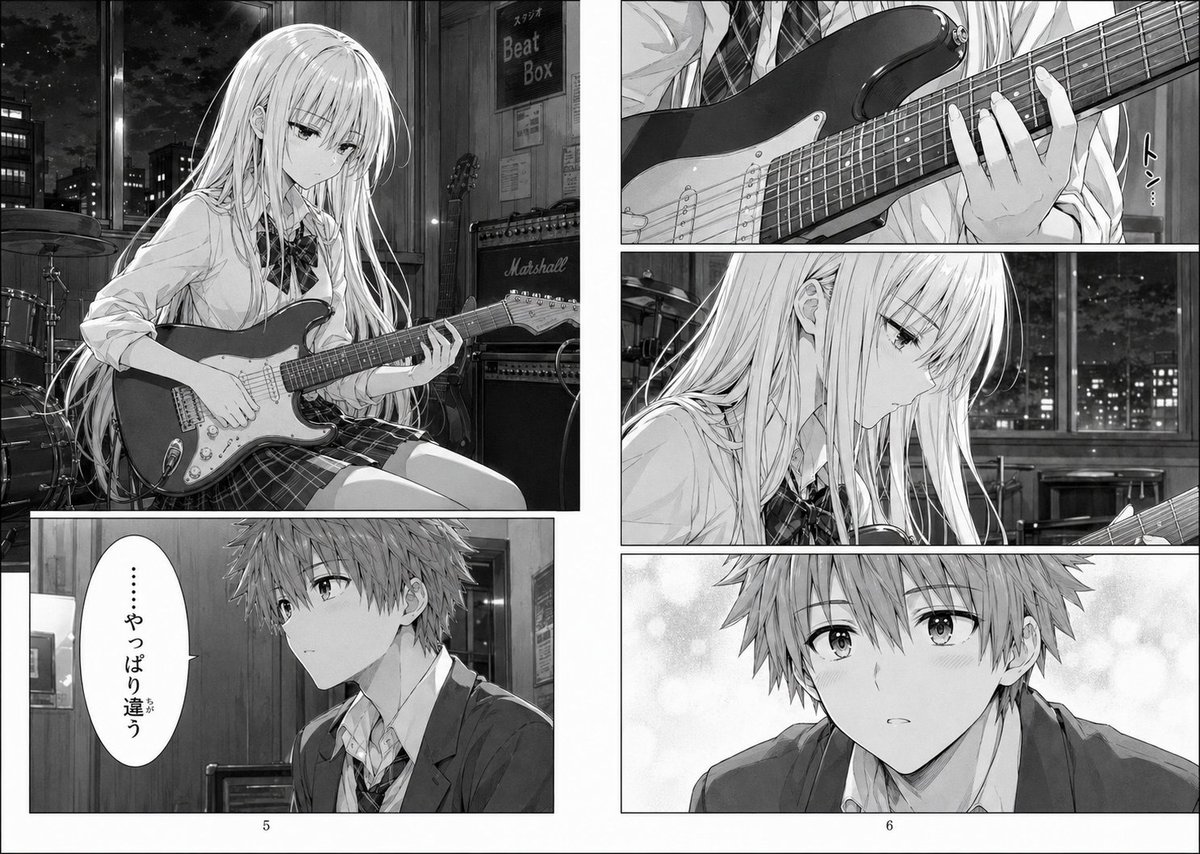
흑백 만화 기타 스튜디오 페이지
이 프롬프트는 야간 스튜디오에서 일렉트릭 기타를 연주하는 여고생의 모습을 담은 상세한 흑백 만화 페이지를 생성하며, 극적인 AI 만화 스토리텔링 장면에 이상적입니다.
이것은 애니메이션 & 게임 에 대한 GPT Image 2 프롬프트 사례입니다. 아래의 복사 가능한 프롬프트를 사용하여 유사한 시각 자료를 생성하고, 재사용하기 전에 Awesome GPT Image 2 Prompts 의 저작자 표시 및 상업적 사용 권한을 검토하십시오.
전체 프롬프트 세트가 필요하신가요? 다음을 사용하세요. 애니메이션 & 게임 더 많은 관련 예시를 보려면 주제 허브를 열거나 다음을 열어보세요. GPT Image 2 프롬프트 카탈로그 전체 예제 색인, 재사용 가능한 구조 및 출처 표기는 다음을 참조하십시오.
Free 1K preview
Generate one preview image instantly, no sign-up required.
2206/4000
프롬프트
복사 준비 프롬프트
A black-and-white manga page spread with 5 panels on a clean white background and thin black gutters, drawn in highly detailed modern seinen/shoujo hybrid line art with soft screentones, reflective highlights, and a quiet melancholic mood. The setting is a nighttime music studio classroom with large windows showing a city skyline full of lit buildings against a dark sky. Main subject: a slender high school girl with very long straight light hair and blunt bangs, delicate features, and a serious introspective expression, wearing a Japanese school uniform consisting of a white button-up shirt, loosened striped ribbon tie, and plaid skirt, seated and playing a solid-body electric guitar that resembles a Stratocaster. In the large upper-left panel, show her in three-quarter view holding the guitar across her lap, left hand on the fretboard and right hand near the pickups, surrounded by studio equipment including 1 drum kit in the back left, 2 stacked guitar amplifiers on the right, and a wall sign reading "Beat Box" near the door. In the narrow upper-right panel, show a close-up of the guitar neck and her fretting hand, with the small vertical Japanese sound effect text "トン…". In the tall middle-right panel, show a close side-profile close-up of the girl looking down at the instrument with a pensive, almost disappointed expression, with the night city lights blurred through the window behind her. In the lower-left panel, show 1 teenage boy in a school blazer and loosened tie, seated indoors and turned slightly to the side; Show every face clearly with natural, detailed facial features, and beside him is 1 vertical speech balloon containing the Japanese text "……やっぱり違う". In the lower-right panel, show a closer view of the same boy from the chest up against a soft bokeh screentone background; his face is again obscured by a large gray censor block. Add printed page numbers centered at the bottom margins: "5" under the left page and "6" under the right page. Emphasize a subtle narrative theme of realizing that the sound feels wrong, as if this is a continuation page from a dramatic school-band manga. Keep everything monochrome, polished, cinematic, and emotionally restrained.
Best for
- - 애니메이션 & 게임 visual exploration
- - Image generation and reference-image edits
- - Reusable briefs that keep source attribution visible
Change these parts
- - Subject, product, character, or scene
- - Aspect ratio, camera, lighting, and background
- - Brand, text, color, and output constraints
Recommended model and settings
- - Model: gpt-image-2
- - Input mode: 텍스트 to 이미지
- - Aspect ratio: source
- - Commercial status: review original source
How to use this prompt
- 1. Copy the prompt and preserve its structure for the first test.
- 2. Replace the subject, context, and publishing channel.
- 3. Change one camera, lighting, or style variable per iteration.
- 4. Inspect the output, source, text, and rights before reuse.
Limitations, source, and reuse cautions
- - Generated output is an editable draft, not factual, legal, or rights evidence.
- - Review the linked source, people, brands, logos, text, and third-party media before commercial use.
Awesome GPT Image 2 Prompts 에서 가져왔습니다. 출처 표기가 필요합니다. 상업적 이용 가능 여부는 allowed 입니다. 유료 사용 전에 원저작권 정보를 확인하세요.
이 범주에 속하는 더 많은 사례
범주, 입력 방식 호환성, 품질 및 위험도에 따라 우선순위가 정해집니다.






재사용 및 출처 참고 사항
사례를 미리 확인한 후 이 안내 메시지를 안전하게 사용하십시오.
- 1.프롬프트를 복사하거나 Dovoo의 생성 버튼을 사용하여 직접 엽니다.
- 2.사용 사례에 맞게 변수, 화면 비율 및 참조 이미지를 조정하십시오.
- 3.출판 또는 유료 사용 전에 저작권, 출처 표기 요건 및 브랜드 또는 초상권 관련 위험을 확인하십시오.