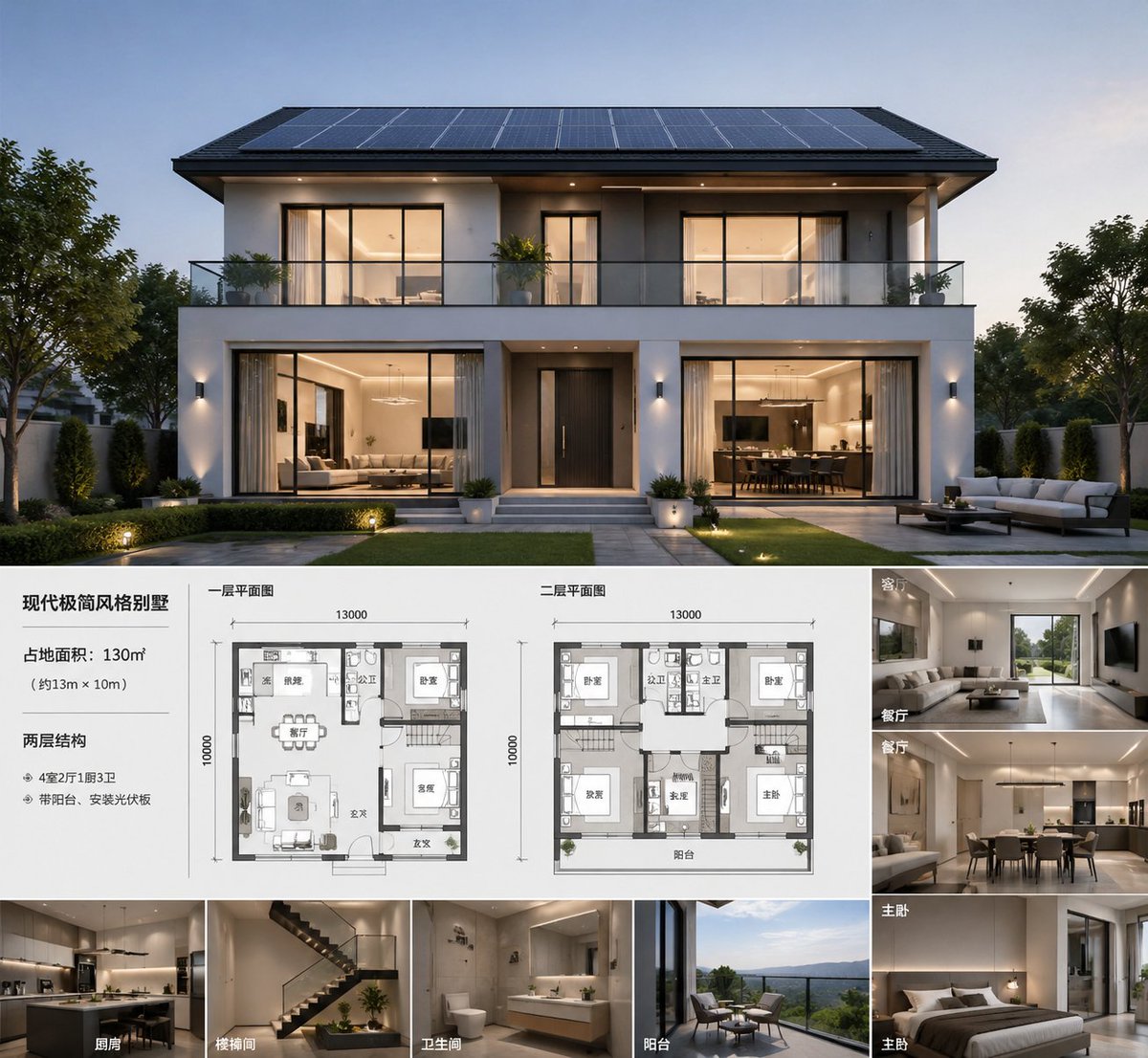
현대 빌라 건축 프레젠테이션 보드
고급스러운 부동산 스타일의 건축 설계도를 제작합니다. 황혼녘 빌라의 대표 이미지, 두 개의 평면도, 그리고 라벨이 붙은 8개의 내부 미리보기 이미지가 포함되어 디자인 프레젠테이션이나 부동산 마케팅에 활용할 수 있습니다.
이것은 인테리어 및 건축 에 대한 GPT Image 2 프롬프트 사례입니다. 아래의 복사 가능한 프롬프트를 사용하여 유사한 시각 자료를 생성하고, 재사용하기 전에 Awesome GPT Image 2 Prompts 의 저작자 표시 및 상업적 사용 권한을 검토하십시오.
전체 프롬프트 세트가 필요하신가요? 다음을 사용하세요. 인테리어 및 건축 더 많은 관련 예시를 보려면 주제 허브를 열거나 다음을 열어보세요. GPT Image 2 프롬프트 카탈로그 전체 예제 색인, 재사용 가능한 구조 및 출처 표기는 다음을 참조하십시오.
Free 1K preview
Generate one preview image instantly, no sign-up required.
2331/4000
프롬프트
복사 준비 프롬프트
A sophisticated architectural presentation project showcasing {argument name="building type" default="modern minimalist villa"}, presented as a photorealistic dusk exterior rendering of a symmetrical, double-story luxury residence. The main visual image occupies the upper half: a front-facing modern house with a clean white and charcoal gray facade, wide eaves, a full-width balcony with glass railings, large warm-lit windows, a centered dark entrance door, landscaped lawn, paved pathways, and refined garden lighting, with most of the roof covered in solar panels. The overall atmosphere is elegant and high-end, presenting a tranquil evening blue hue with warm interior lighting, realistic materials, and soft shadows, possessing top-tier real estate visualization quality. The lower half features a clean presentation layout on a white background with Chinese labels and fine dividing lines, resembling an architectural concept project. On the left is a text block containing 1 title and 3 lines of specifications: the title is {argument name="headline text" default="modern minimalist villa"}, followed by area, dimensions, and structure/feature descriptions in Chinese. In the middle are 2 labeled floor plans, both drawn in a grayscale architectural plan style, including furniture and room outlines: one labeled “First Floor Plan” and the other labeled “Second Floor Plan,” both marked with dimensions of 13000 x 10000. On the right is a column of 4 interior perspective thumbnails, each with a Chinese room label: “Living Room,” “Dining Room,” “Master Bedroom,” “Master Bedroom.” At the bottom is a horizontally arranged row of 4 additional perspective thumbnails, labeled “Kitchen,” “Stairwell,” “Bathroom,” and “Balcony.” Total number of thumbnails: 8, total number of floor plans: 2, total number of main layout areas: 4. The interior thumbnails should be consistent with the overall design language of the house: warm neutral tones, beige and wood tones, minimalist luxury furniture, integrated lighting, clean cabinetry, modern stairs, hotel-style bathrooms, and landscaped balcony seating. The overall style is a high-end developer sales project or architect concept page, with a clear grid layout, balanced margins, and an editorial-level presentation effect, ultra-detailed, photorealistic, and high-resolution.프롬프트 변수
프롬프트에 있는 편집 가능한 인수 자리 표시자와 해당 기본값입니다.
변하기 쉬운
building type
기본
modern minimalist villa
변하기 쉬운
headline text
기본
modern minimalist villa
Best for
- - 인테리어 및 건축 visual exploration
- - Image generation and reference-image edits
- - Reusable briefs that keep source attribution visible
Change these parts
- - Subject, product, character, or scene
- - Aspect ratio, camera, lighting, and background
- - Brand, text, color, and output constraints
Recommended model and settings
- - Model: gpt-image-2
- - Input mode: 텍스트 to 이미지
- - Aspect ratio: source
- - Commercial status: review original source
How to use this prompt
- 1. Copy the prompt and preserve its structure for the first test.
- 2. Replace the subject, context, and publishing channel.
- 3. Change one camera, lighting, or style variable per iteration.
- 4. Inspect the output, source, text, and rights before reuse.
Limitations, source, and reuse cautions
- - Generated output is an editable draft, not factual, legal, or rights evidence.
- - Review the linked source, people, brands, logos, text, and third-party media before commercial use.
Awesome GPT Image 2 Prompts 에서 가져왔습니다. 출처 표기가 필요합니다. 상업적 이용 가능 여부는 allowed 입니다. 유료 사용 전에 원저작권 정보를 확인하세요.
이 범주에 속하는 더 많은 사례
범주, 입력 방식 호환성, 품질 및 위험도에 따라 우선순위가 정해집니다.






재사용 및 출처 참고 사항
사례를 미리 확인한 후 이 안내 메시지를 안전하게 사용하십시오.
- 1.프롬프트를 복사하거나 Dovoo의 생성 버튼을 사용하여 직접 엽니다.
- 2.사용 사례에 맞게 변수, 화면 비율 및 참조 이미지를 조정하십시오.
- 3.출판 또는 유료 사용 전에 저작권, 출처 표기 요건 및 브랜드 또는 초상권 관련 위험을 확인하십시오.