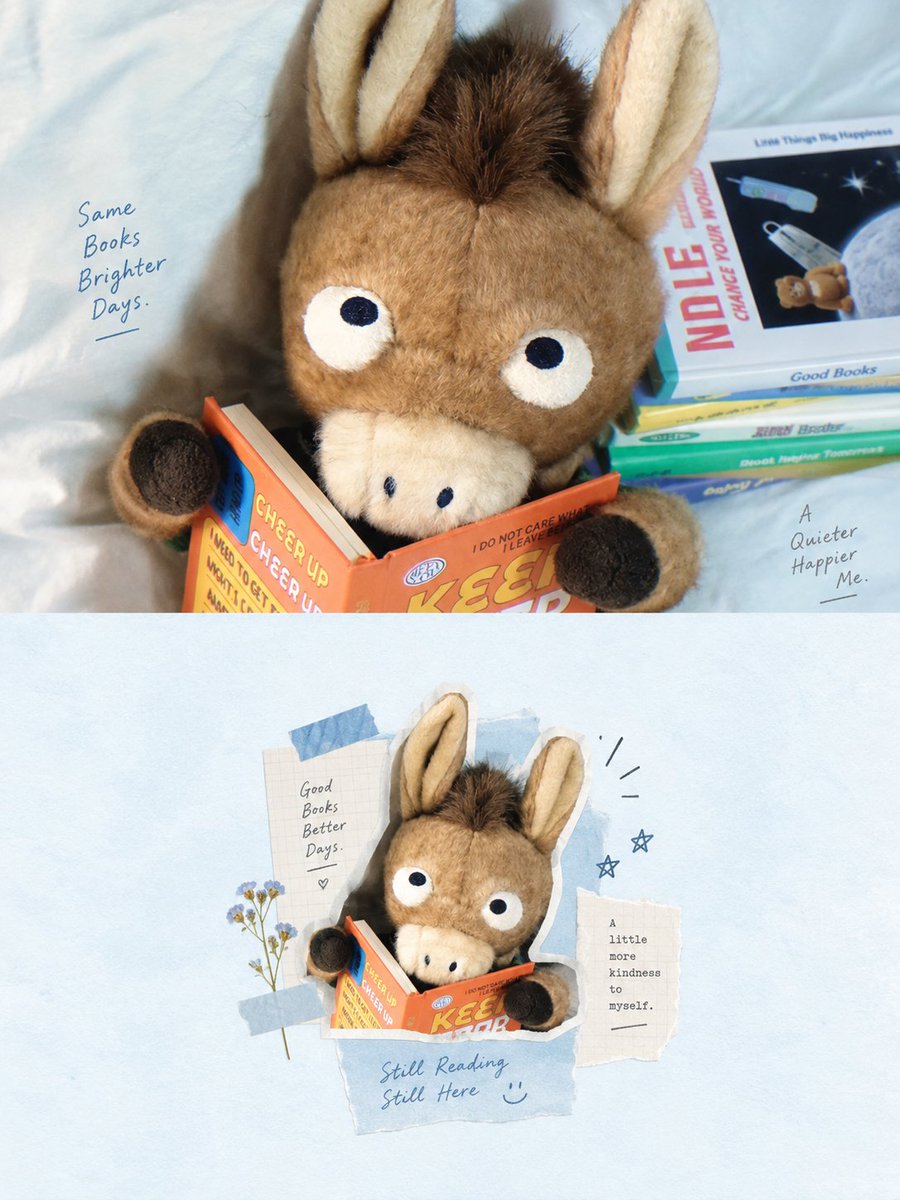
Airy Mixed-Media Collage Poster
A detailed design prompt for high-end mixed-media collage posters with an airy, minimalist aesthetic, splitting the composition between a realistic photo and a digital collage.
이것은 그래픽 및 포스터 에 대한 GPT Image 2 프롬프트 사례입니다. 아래의 복사 가능한 프롬프트를 사용하여 유사한 시각 자료를 생성하고, 재사용하기 전에 Awesome GPT Image 2 Prompts 의 저작자 표시 및 상업적 사용 권한을 검토하십시오.
전체 프롬프트 세트가 필요하신가요? 다음을 사용하세요. 그래픽 및 포스터 더 많은 관련 예시를 보려면 주제 허브를 열거나 다음을 열어보세요. GPT Image 2 프롬프트 카탈로그 전체 예제 색인, 재사용 가능한 구조 및 출처 표기는 다음을 참조하십시오.
Free 1K preview
Generate one preview image instantly, no sign-up required.
Free text preview doesn’t preserve reference-image consistency.
4000/4000
프롬프트
복사 준비 프롬프트
Please create a high-end design poster for each photo I upload, without combining multiple images into one; each should be output separately. Use a 3:4 vertical composition, with the top and bottom areas strictly divided in a 1:1 ratio, each occupying 50% of the image.

The upper half should retain the original photo, maintaining the subject's identity, structure, pose, realistic texture, natural lighting, and original color atmosphere. Only apply slight professional color adjustments to give it the feel of an art magazine, independent publication, or exhibition image. To adapt to the aspect ratio, the background environment can extend naturally, but the subject must not be stretched, deformed, or altered.

The lower half should first understand the core theme, subject relationship, structural trend, emotional atmosphere, and visual memory points of the original image, and then reconstruct it into a whitespace-style digital mixed-media collage insert. Do not copy objects from the photo one by one, nor fill the entire frame; instead, remove irrelevant details, retaining only the structures, trends, and visual cues that best represent the original image. Re-summarize it through photo fragments, delicate line art, handwritten annotations, paper textures, and a few collage shapes, making the correspondence with the upper photo immediately recognizable.

The composition should follow the logic of a “small central frame with large whitespace.” The true visual subject is controlled within a small area in the center of the lower half, like a magazine insert, scrapbook page, or collage card, placed against a clean, expansive background. The subject does not need to be fully unfolded; it can be moderately cropped, compressed, or combined, surrounded only by minimalist line art, paper scraps, arrows, symbols, or a few short text annotations, creating a relaxed and restrained editing relationship. Whitespace is not just an empty background; it is a key part of creating a sense of breathing room, spaciousness, and rhythm with the subject.

The visual language should employ digital mixed-media collage: you can combine small portions of photos, simple black thin-line doodles, handwriting, paper collage traces, thin tape, or sticky note elements, but the overall style must be restrained, light, and quiet—avoiding heavy manual stacking or complex decoration. The subject should remain clear, and auxiliary elements should only be used to emphasize the theme, supplement memory, and optimize the layout, without forming a new visual center.

The color scheme is based on light, breathable tones, defaulting to {argument name="color tone" default="Low-saturation light blue with white"}, and adjusted according to the photo above. Overall, use light blue, hazy blue, powder blue, white, or off-white as large-area backgrounds, supplemented by black thin lines to outline the structure, a small amount of dark blue to regulate the rhythm, and a touch of light yellow, pale gold, or minimalist warm colors as highlights. The colors should be stable, light, healing, and clean, like the relationship between soft skies and paper, avoiding high saturation, messy colors, dirty tones, or excessive vintage feel.

Text intervention should be minimal, with no language restrictions. Feel free to extract a few words, phrases, or notes based on the theme, location, action, emotion, or memory. Use small, restrained, and relaxed font styles with a handwritten or edited feel, naturally distributed around the subject or the edges of the whitespace, like light annotations in a magazine insert, rather than commercial headlines.

The overall presentation should be small subject, large artistic whitespace, blue and white theme, combination of photos and line art, paper texture collage, and a light, relaxed editing insert feel, referencing minimalist mixed-media collage / whitespace scrapbook layout / centralized editing collage / light magazine-style layout. Avoid full-page collage, complex backgrounds, messy decoration, commercial template feel, cheap scrapbook style, and redrawing objects one by one.
프롬프트 변수
프롬프트에 있는 편집 가능한 인수 자리 표시자와 해당 기본값입니다.
변하기 쉬운
color tone
기본
Low-saturation light blue with white
Best for
- - 그래픽 및 포스터 visual exploration
- - Image generation and reference-image edits
- - Reusable briefs that keep source attribution visible
Change these parts
- - Subject, product, character, or scene
- - Aspect ratio, camera, lighting, and background
- - Brand, text, color, and output constraints
Recommended model and settings
- - Model: gpt-image-2
- - Input mode: 이미지 to 이미지
- - Aspect ratio: source
- - Commercial status: review original source
How to use this prompt
- 1. Copy the prompt and preserve its structure for the first test.
- 2. Replace the subject, context, and publishing channel.
- 3. Change one camera, lighting, or style variable per iteration.
- 4. Inspect the output, source, text, and rights before reuse.
Limitations, source, and reuse cautions
- - Generated output is an editable draft, not factual, legal, or rights evidence.
- - Review the linked source, people, brands, logos, text, and third-party media before commercial use.
Awesome GPT Image 2 Prompts 에서 가져왔습니다. 출처 표기가 필요합니다. 상업적 이용 가능 여부는 allowed 입니다. 유료 사용 전에 원저작권 정보를 확인하세요.
이 범주에 속하는 더 많은 사례
범주, 입력 방식 호환성, 품질 및 위험도에 따라 우선순위가 정해집니다.






재사용 및 출처 참고 사항
사례를 미리 확인한 후 이 안내 메시지를 안전하게 사용하십시오.
- 1.프롬프트를 복사하거나 Dovoo의 생성 버튼을 사용하여 직접 엽니다.
- 2.사용 사례에 맞게 변수, 화면 비율 및 참조 이미지를 조정하십시오.
- 3.출판 또는 유료 사용 전에 저작권, 출처 표기 요건 및 브랜드 또는 초상권 관련 위험을 확인하십시오.