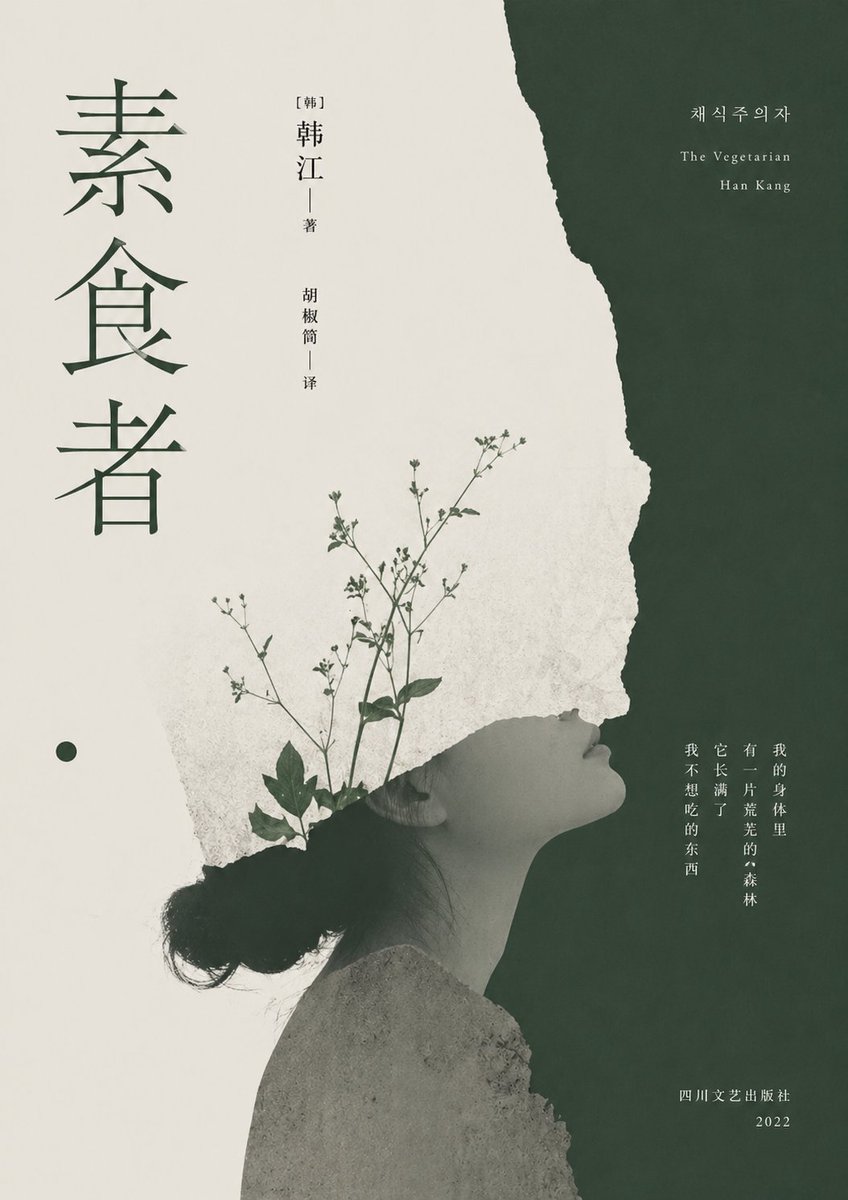
채식주의자를 위한 미니멀리즘 문학 표지
이 프롬프트는 찢어진 종이 콜라주, 여성의 옆모습, 식물 이미지가 어우러진 세련되고 초현실적인 현대적인 책 표지를 생성하며, 문학 소설 및 번역 소설 디자인에 이상적입니다.
이것은 그래픽 및 포스터 에 대한 GPT Image 2 프롬프트 사례입니다. 아래의 복사 가능한 프롬프트를 사용하여 유사한 시각 자료를 생성하고, 재사용하기 전에 Awesome GPT Image 2 Prompts 의 저작자 표시 및 상업적 사용 권한을 검토하십시오.
전체 프롬프트 세트가 필요하신가요? 다음을 사용하세요. 그래픽 및 포스터 더 많은 관련 예시를 보려면 주제 허브를 열거나 다음을 열어보세요. GPT Image 2 프롬프트 카탈로그 전체 예제 색인, 재사용 가능한 구조 및 출처 표기는 다음을 참조하십시오.
Free 1K preview
Generate one preview image instantly, no sign-up required.
2109/4000
프롬프트
복사 준비 프롬프트
A minimalist literary book cover, suitable for {argument name="book title" default="Vegetarian"}, adopting an elegant East Asian art album style, with soft deep forest green and warm off-white as the main colors. The composition is vertically oriented and highly textured: the left two-thirds is textured off-white paper, and the right one-third is deep green, separated by a rough, organic torn paper edge running from top to bottom. In the center of the lower right, place a grayscale side portrait of an East Asian woman, facing right, with her head slightly raised, and her eyes closed or half-closed, with long black hair tied in a low bun. The figure should appear serene, fragile, and contemplative. Her head blends with the torn white paper shape, creating a surreal collage effect. From the cracks around her head and neck, slender stems of wild plants with tiny leaves and buds grow diagonally upwards, as if the plants are sprouting from within her. Add delicate paper textures, printing textures, and soft color gradients to present a poetic, high-quality printing feel. Vertically align a large, deep green serif font Chinese main title on the far left: {argument name="title text" default="Vegetarian"}. Vertically arrange small, elegant author and translator information in the upper left center: “[Korean] Han Kang” and “Hu Jiao Tong | Translated by.” Add Korean and English text in a refined serif font in the upper right deep green area: {argument name="korean title" default="채식주의자"}, “The Vegetarian,” and {argument name="author name" default="Han Kang"}. Add a vertically aligned small-font Chinese quotation in the lower right center: {argument name="quote" default="There is a wilderness in my body. It is withering. Things I don't want to eat."}. Place small Chinese publisher and year information in the lower right corner: “Sichuan Literary Publishing House” and “2022.” Add a small solid deep green circle as a graphic embellishment below the left title. The overall atmosphere is restrained, melancholic, intellectual, and literary, like the cover of an award-winning modern novel.프롬프트 변수
프롬프트에 있는 편집 가능한 인수 자리 표시자와 해당 기본값입니다.
변하기 쉬운
book title
기본
Vegetarian
변하기 쉬운
title text
기본
Vegetarian
변하기 쉬운
korean title
기본
채식주의자
변하기 쉬운
author name
기본
Han Kang
변하기 쉬운
quote
기본
There is a wilderness in my body. It is withering. Things I don't want to eat.
Best for
- - 그래픽 및 포스터 visual exploration
- - Image generation and reference-image edits
- - Reusable briefs that keep source attribution visible
Change these parts
- - Subject, product, character, or scene
- - Aspect ratio, camera, lighting, and background
- - Brand, text, color, and output constraints
Recommended model and settings
- - Model: gpt-image-2
- - Input mode: 텍스트 to 이미지
- - Aspect ratio: source
- - Commercial status: review original source
How to use this prompt
- 1. Copy the prompt and preserve its structure for the first test.
- 2. Replace the subject, context, and publishing channel.
- 3. Change one camera, lighting, or style variable per iteration.
- 4. Inspect the output, source, text, and rights before reuse.
Limitations, source, and reuse cautions
- - Generated output is an editable draft, not factual, legal, or rights evidence.
- - Review the linked source, people, brands, logos, text, and third-party media before commercial use.
Awesome GPT Image 2 Prompts 에서 가져왔습니다. 출처 표기가 필요합니다. 상업적 이용 가능 여부는 allowed 입니다. 유료 사용 전에 원저작권 정보를 확인하세요.
이 범주에 속하는 더 많은 사례
범주, 입력 방식 호환성, 품질 및 위험도에 따라 우선순위가 정해집니다.






재사용 및 출처 참고 사항
사례를 미리 확인한 후 이 안내 메시지를 안전하게 사용하십시오.
- 1.프롬프트를 복사하거나 Dovoo의 생성 버튼을 사용하여 직접 엽니다.
- 2.사용 사례에 맞게 변수, 화면 비율 및 참조 이미지를 조정하십시오.
- 3.출판 또는 유료 사용 전에 저작권, 출처 표기 요건 및 브랜드 또는 초상권 관련 위험을 확인하십시오.