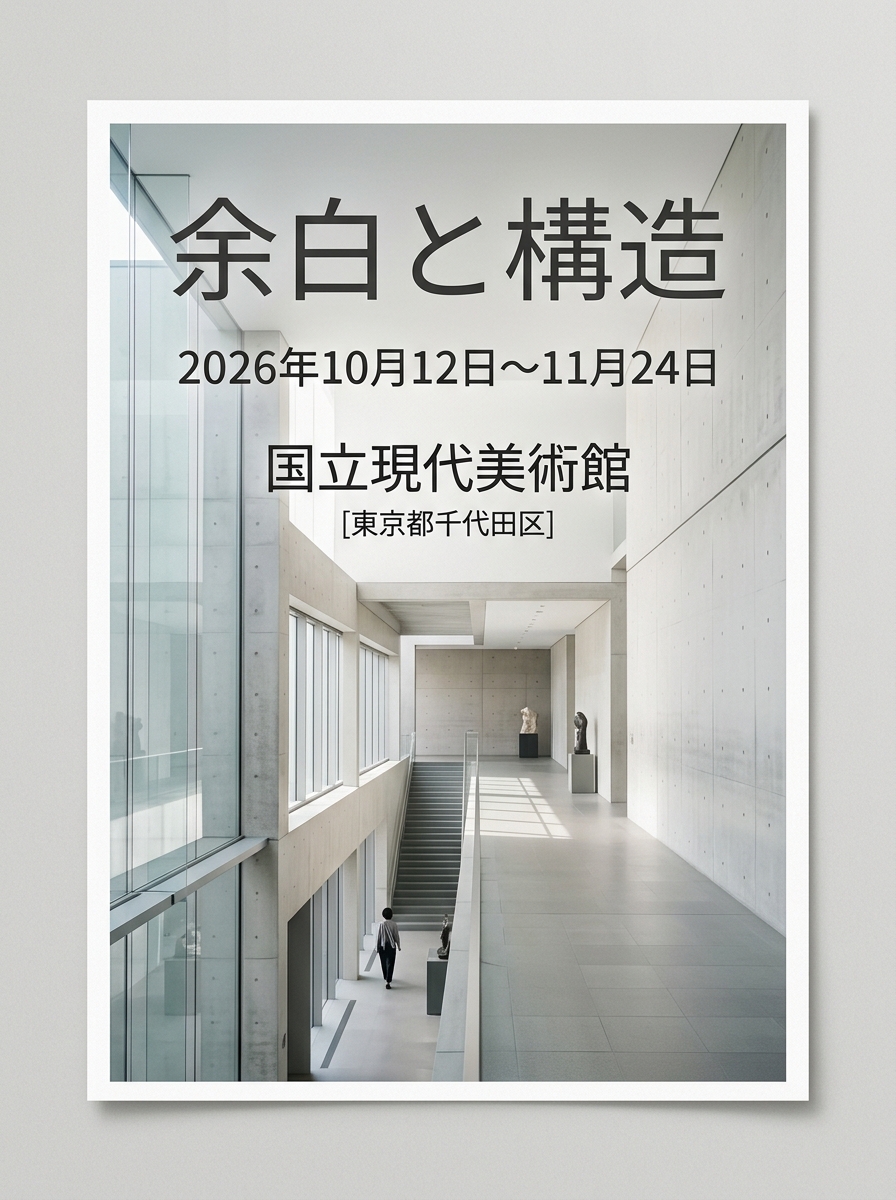
Minimalist Event Flyer Design
A structural prompt for generating clean, minimalist graphic flyers suitable for art exhibitions or modern design events, configured with layout parameters.
이것은 그래픽 및 포스터 에 대한 GPT Image 2 프롬프트 사례입니다. 아래의 복사 가능한 프롬프트를 사용하여 유사한 시각 자료를 생성하고, 재사용하기 전에 Awesome GPT Image 2 Prompts 의 저작자 표시 및 상업적 사용 권한을 검토하십시오.
전체 프롬프트 세트가 필요하신가요? 다음을 사용하세요. 그래픽 및 포스터 더 많은 관련 예시를 보려면 주제 허브를 열거나 다음을 열어보세요. GPT Image 2 프롬프트 카탈로그 전체 예제 색인, 재사용 가능한 구조 및 출처 표기는 다음을 참조하십시오.
Free 1K preview
Generate one preview image instantly, no sign-up required.
1986/4000
프롬프트
복사 준비 프롬프트
[Event Information]
- Event Name: {argument name="event name" default="Margin and Structure"}
- Date & Time: {argument name="date" default="October 12 – November 24, 2026"}
- Venue: {argument name="venue" default="National Museum of Modern Art"}

[Quality, Direction, and Composition Specifications]
- Style: A poster for a contemporary art exhibition or modern design event, clean and minimalist editorial layout.
- Visual Elements: A beautiful live-action composition conveying silence and intelligence, set against geometric abstract art objects or concrete and glass architectural spaces.
- Typography Placement (For GPT-image / Nano Banana Pro): In the empty margins of the screen, the event name '{argument name="event name" default="Margin and Structure"}', the date '{argument name="date" default="October 12 – November 24, 2026"}', and venue information '{argument name="venue" default="National Museum of Modern Art"}' are beautifully laid out in a sophisticated, modern sans-serif font. The typography harmonizes without detracting from the beauty of the overall image.
- Lighting & Color: A clean space based on white, cool natural light with soft gradients of light, neutral tones with accent colors (e.g., navy or dark gray).

[Strict Layout and Output Constraints (Required)]
- Output the completed design itself, filling the entire canvas. Scene descriptions inside the design (walls, spaces, shadows) may follow the text instructions.
- Prohibited items: Photographs of the finished poster inside a frame, stuck to a wall, mockup photos placed on tables or paper, perspective distortion of paper edges, or drop shadows.
- Output the finished flat 2D design itself, filling the entire canvas. Scene elements inside the design (walls, rooms, shadows) described above are allowed. Absolutely NO photo-of-a-poster mockups: no picture frames, no poster-on-wall or poster-on-desk shots, no perspective warp or drop shadow around the artwork's edges.

- Aspect Ratio: --ar 3:4
프롬프트 변수
프롬프트에 있는 편집 가능한 인수 자리 표시자와 해당 기본값입니다.
변하기 쉬운
event name
기본
Margin and Structure
변하기 쉬운
date
기본
October 12 – November 24, 2026
변하기 쉬운
venue
기본
National Museum of Modern Art
Best for
- - 그래픽 및 포스터 visual exploration
- - Image generation and reference-image edits
- - Reusable briefs that keep source attribution visible
Change these parts
- - Subject, product, character, or scene
- - Aspect ratio, camera, lighting, and background
- - Brand, text, color, and output constraints
Recommended model and settings
- - Model: gpt-image-2
- - Input mode: 텍스트 to 이미지
- - Aspect ratio: source
- - Commercial status: review original source
How to use this prompt
- 1. Copy the prompt and preserve its structure for the first test.
- 2. Replace the subject, context, and publishing channel.
- 3. Change one camera, lighting, or style variable per iteration.
- 4. Inspect the output, source, text, and rights before reuse.
Limitations, source, and reuse cautions
- - Generated output is an editable draft, not factual, legal, or rights evidence.
- - Review the linked source, people, brands, logos, text, and third-party media before commercial use.
Awesome GPT Image 2 Prompts 에서 가져왔습니다. 출처 표기가 필요합니다. 상업적 이용 가능 여부는 allowed 입니다. 유료 사용 전에 원저작권 정보를 확인하세요.
이 범주에 속하는 더 많은 사례
범주, 입력 방식 호환성, 품질 및 위험도에 따라 우선순위가 정해집니다.






재사용 및 출처 참고 사항
사례를 미리 확인한 후 이 안내 메시지를 안전하게 사용하십시오.
- 1.프롬프트를 복사하거나 Dovoo의 생성 버튼을 사용하여 직접 엽니다.
- 2.사용 사례에 맞게 변수, 화면 비율 및 참조 이미지를 조정하십시오.
- 3.출판 또는 유료 사용 전에 저작권, 출처 표기 요건 및 브랜드 또는 초상권 관련 위험을 확인하십시오.