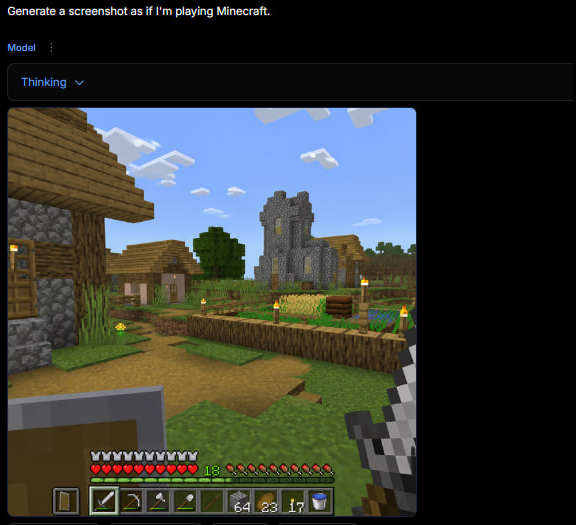
Minecraft Gameplay in AI Generator UI
A dark web app screenshot showing a generated first-person Minecraft village gameplay scene with HUD, useful for recreating the tweet-style AI game screenshot.
이것은 다른 영감 에 대한 GPT Image 2 프롬프트 사례입니다. 아래의 복사 가능한 프롬프트를 사용하여 유사한 시각 자료를 생성하고, 재사용하기 전에 Awesome GPT Image 2 Prompts 의 저작자 표시 및 상업적 사용 권한을 검토하십시오.
전체 프롬프트 세트가 필요하신가요? 다음을 사용하세요. 다른 영감 더 많은 관련 예시를 보려면 주제 허브를 열거나 다음을 열어보세요. GPT Image 2 프롬프트 카탈로그 전체 예제 색인, 재사용 가능한 구조 및 출처 표기는 다음을 참조하십시오.
Free 1K preview
Generate one preview image instantly, no sign-up required.
2803/4000
프롬프트
복사 준비 프롬프트
Goal: Create a square screenshot of a dark AI image-generation web interface showing a generated Minecraft gameplay screenshot. The interface should look like someone typed {argument name="user prompt" default="Generate a screenshot as if I'm playing Minecraft."} and received a rendered game image below it.

Canvas: Square 1:1 image, approximately 576 by 576 pixels, dark black background, with the content aligned near the top-left and a large empty black margin on the right and bottom.

Top UI layout: At the very top-left, show the white prompt text: “Generate a screenshot as if I'm playing Minecraft.” Beneath it, show a small blue label “Model” with a vertical three-dot menu icon beside it. Below that, draw a wide dark rounded rectangle dropdown bar containing the blue text “Thinking” and a small downward chevron. The UI should feel like a minimal web app in dark mode.

Generated image panel: Under the dropdown, place a large square Minecraft-style gameplay screenshot with slightly rounded corners. The screenshot should be first-person perspective in a bright blocky village scene.

Minecraft scene details: Show a sunny daytime village with a blue sky and exactly 8 visible white blocky cloud clusters. On the left foreground, include a partially visible wooden-and-cobblestone house with a wooden door, plank roof, cobblestone wall, and a lit torch. In the center distance, show a gray stone church/tower with narrow yellow-lit windows. Around it, include a small village house, a leafy green tree, grass blocks, a dirt path, and a fenced crop field. The crop field should contain golden wheat, green crops, a wooden fence border, and exactly 6 visible torch posts with yellow flames around the village/farm area. Keep the Minecraft aesthetic authentic: cubic blocks, pixelated textures, low-resolution game rendering, no photorealism.

First-person HUD and equipment: In the lower left foreground, show a raised shield. In the lower right foreground, show the player holding an iron sword. Along the bottom, draw the Minecraft HUD with exactly 10 red hearts, exactly 10 hunger drumsticks, a green experience level number “18,” and a 9-slot hotbar. The hotbar should contain these 9 visible slots from left to right: shield icon, iron sword, pickaxe, axe, shovel, empty or dark slot, stack of 64 blocks, stack of 23 torches/items, stack of 17 items, plus a water bucket icon visible at the far right edge if space permits. Make the HUD slightly pixelated and game-accurate.

Visual style: The whole image should look like an actual screenshot of a browser-based AI generator displaying a generated Minecraft gameplay image, not a clean standalone render. Use dark UI chrome, small crisp text, and a blocky game screenshot embedded inside it. No watermark, no extra captions, no logos.
프롬프트 변수
프롬프트에 있는 편집 가능한 인수 자리 표시자와 해당 기본값입니다.
변하기 쉬운
user prompt
기본
Generate a screenshot as if I'm playing Minecraft.
Best for
- - 다른 영감 visual exploration
- - Image generation and reference-image edits
- - Reusable briefs that keep source attribution visible
Change these parts
- - Subject, product, character, or scene
- - Aspect ratio, camera, lighting, and background
- - Brand, text, color, and output constraints
Recommended model and settings
- - Model: gpt-image-2
- - Input mode: 텍스트 to 이미지
- - Aspect ratio: source
- - Commercial status: review original source
How to use this prompt
- 1. Copy the prompt and preserve its structure for the first test.
- 2. Replace the subject, context, and publishing channel.
- 3. Change one camera, lighting, or style variable per iteration.
- 4. Inspect the output, source, text, and rights before reuse.
Limitations, source, and reuse cautions
- - Generated output is an editable draft, not factual, legal, or rights evidence.
- - Review the linked source, people, brands, logos, text, and third-party media before commercial use.
Awesome GPT Image 2 Prompts 에서 가져왔습니다. 출처 표기가 필요합니다. 상업적 이용 가능 여부는 allowed 입니다. 유료 사용 전에 원저작권 정보를 확인하세요.
이 범주에 속하는 더 많은 사례
범주, 입력 방식 호환성, 품질 및 위험도에 따라 우선순위가 정해집니다.






재사용 및 출처 참고 사항
사례를 미리 확인한 후 이 안내 메시지를 안전하게 사용하십시오.
- 1.프롬프트를 복사하거나 Dovoo의 생성 버튼을 사용하여 직접 엽니다.
- 2.사용 사례에 맞게 변수, 화면 비율 및 참조 이미지를 조정하십시오.
- 3.출판 또는 유료 사용 전에 저작권, 출처 표기 요건 및 브랜드 또는 초상권 관련 위험을 확인하십시오.