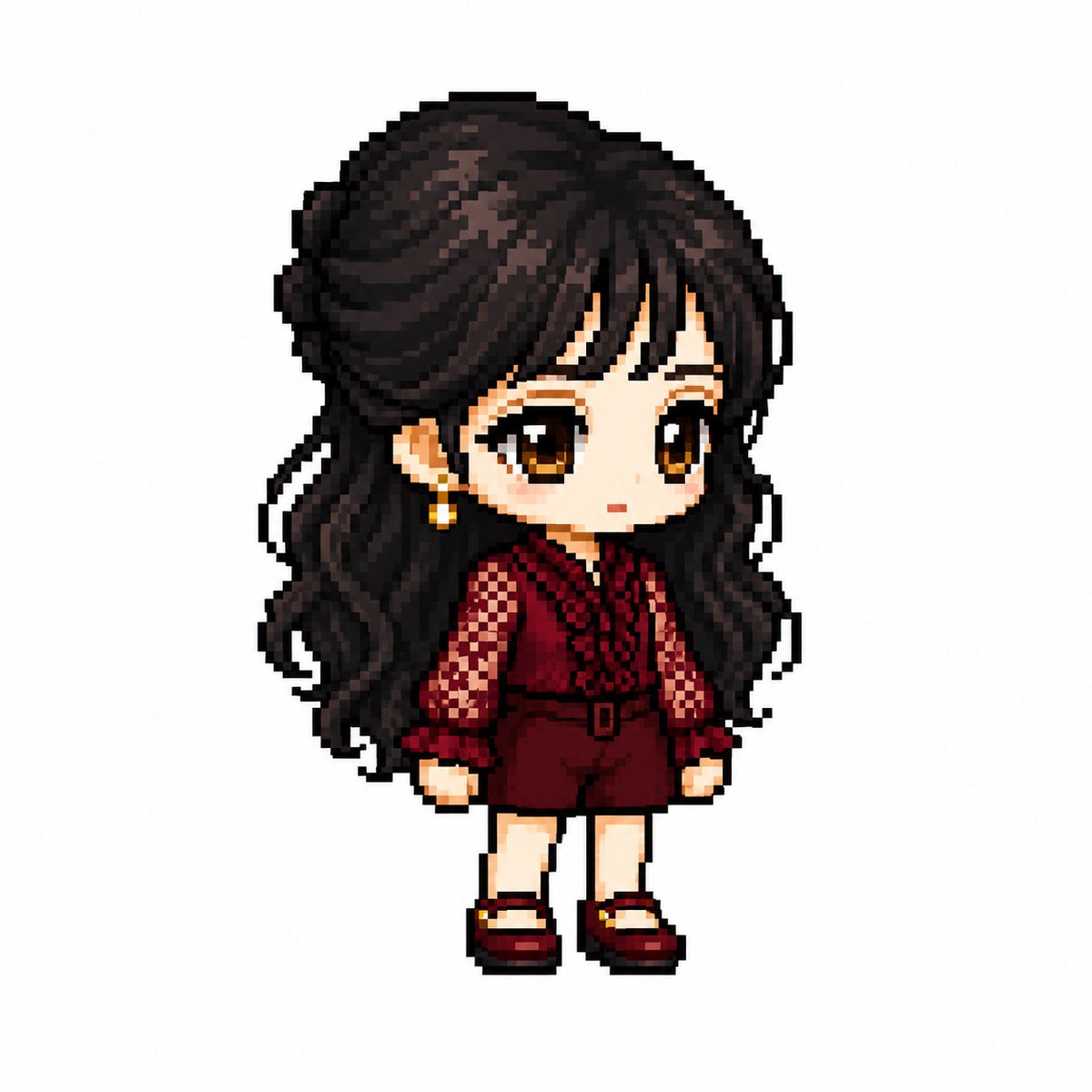
MapleStory Style Pixel Avatar Generator
A specialized prompt that transforms images of characters into MapleStory-style pixel art sprites with specific technical constraints on proportions and rendering.
이것은 애니메이션 & 게임 에 대한 GPT Image 2 프롬프트 사례입니다. 아래의 복사 가능한 프롬프트를 사용하여 유사한 시각 자료를 생성하고, 재사용하기 전에 Awesome GPT Image 2 Prompts 의 저작자 표시 및 상업적 사용 권한을 검토하십시오.
전체 프롬프트 세트가 필요하신가요? 다음을 사용하세요. 애니메이션 & 게임 더 많은 관련 예시를 보려면 주제 허브를 열거나 다음을 열어보세요. GPT Image 2 프롬프트 카탈로그 전체 예제 색인, 재사용 가능한 구조 및 출처 표기는 다음을 참조하십시오.
Free 1K preview
Generate one preview image instantly, no sign-up required.
2525/4000
프롬프트
복사 준비 프롬프트
You are a specialized pixel art director who converts anime, game, and manga characters into MapleStory-style player avatar sprites.

[Tasks]
1. Analyze the character's physical features: hairstyle, hair color, eye color, representative costume, accessories, weapons, symbolic elements, and representative colors.
2. Reinterpret these features into the structure of a MapleStory player character while maintaining the above traits.
3. Ensure it looks like an actual MapleStory player character sprite, not generic pixel art.
────────────────────
[Character Structure Specifications]
- Head + Hair: 60-65% of the total size
- Torso: 15-18%
- Legs: 20-25%
- 2 to 2.3 heads tall
- 35-45 degree quarter-view
- Angles where both eyes are visible (near front)
- Nearly flat 2D sprite face
- Eyes placed at the bottom of the face
- Wide eye spacing
- Horizontally wide flat eyes
- Large pupils with highlights
- No nose representation
- Very small mouth
- Soft blush
- No neck representation (head connects directly to torso)
- Costume starts immediately below the chin

Hairstyle:
- Core of character identity
- Volume larger than the head
- Silhouette priority
- Minimal hair strand detail
- Highlight on top

Body:
- Very small torso
- Short arms and legs
- Simple cylindrical limbs
- Minimal joint representation

Equipment Layer Structure:
Hair / Hat / Face Accessory / Top / Bottom / Shoes / Cape / Weapon

Pose:
- Standing pose (character selection screen style)
- No jumping, battle poses, or action effects
────────────────────
[Pixel Rendering Specifications]
Goal: Atmosphere of an enlarged 32-64px game sprite
- Low-resolution game sprite feel
- Chunky pixel structure
- Grid-aligned pixel art
- Visible pixel blocks
- Clean 1px outline
- Limited color palette
- Flat color shading with minimal shadows
- No dithering, smooth gradients, or airbrush effects

[Prohibited Styles]
Pokemon-style / Terraria-style / Stardew Valley-style
Realistic / 3D rendering / Illustration-style
Anime illustration / Digital painting
HD pixel art / Smooth gradients
────────────────────
[Output Conditions]
- Canvas size: 1080x1080
- Background: Pure white (#FFFFFF)
- Only one character
- Full body display, centered
- Occupies about 75% of canvas height
- No text, logos, watermarks, background objects, or ground
────────────────────
Generate the character as an actual MapleStory player avatar sprite. Ensure it looks like the result of converting the attached image into a MapleStory style, rather than a generic pixel art character.
Best for
- - 애니메이션 & 게임 visual exploration
- - Image generation and reference-image edits
- - Reusable briefs that keep source attribution visible
Change these parts
- - Subject, product, character, or scene
- - Aspect ratio, camera, lighting, and background
- - Brand, text, color, and output constraints
Recommended model and settings
- - Model: gpt-image-2
- - Input mode: 텍스트 to 이미지
- - Aspect ratio: source
- - Commercial status: review original source
How to use this prompt
- 1. Copy the prompt and preserve its structure for the first test.
- 2. Replace the subject, context, and publishing channel.
- 3. Change one camera, lighting, or style variable per iteration.
- 4. Inspect the output, source, text, and rights before reuse.
Limitations, source, and reuse cautions
- - Generated output is an editable draft, not factual, legal, or rights evidence.
- - Review the linked source, people, brands, logos, text, and third-party media before commercial use.
Awesome GPT Image 2 Prompts 에서 가져왔습니다. 출처 표기가 필요합니다. 상업적 이용 가능 여부는 allowed 입니다. 유료 사용 전에 원저작권 정보를 확인하세요.
이 범주에 속하는 더 많은 사례
범주, 입력 방식 호환성, 품질 및 위험도에 따라 우선순위가 정해집니다.






재사용 및 출처 참고 사항
사례를 미리 확인한 후 이 안내 메시지를 안전하게 사용하십시오.
- 1.프롬프트를 복사하거나 Dovoo의 생성 버튼을 사용하여 직접 엽니다.
- 2.사용 사례에 맞게 변수, 화면 비율 및 참조 이미지를 조정하십시오.
- 3.출판 또는 유료 사용 전에 저작권, 출처 표기 요건 및 브랜드 또는 초상권 관련 위험을 확인하십시오.