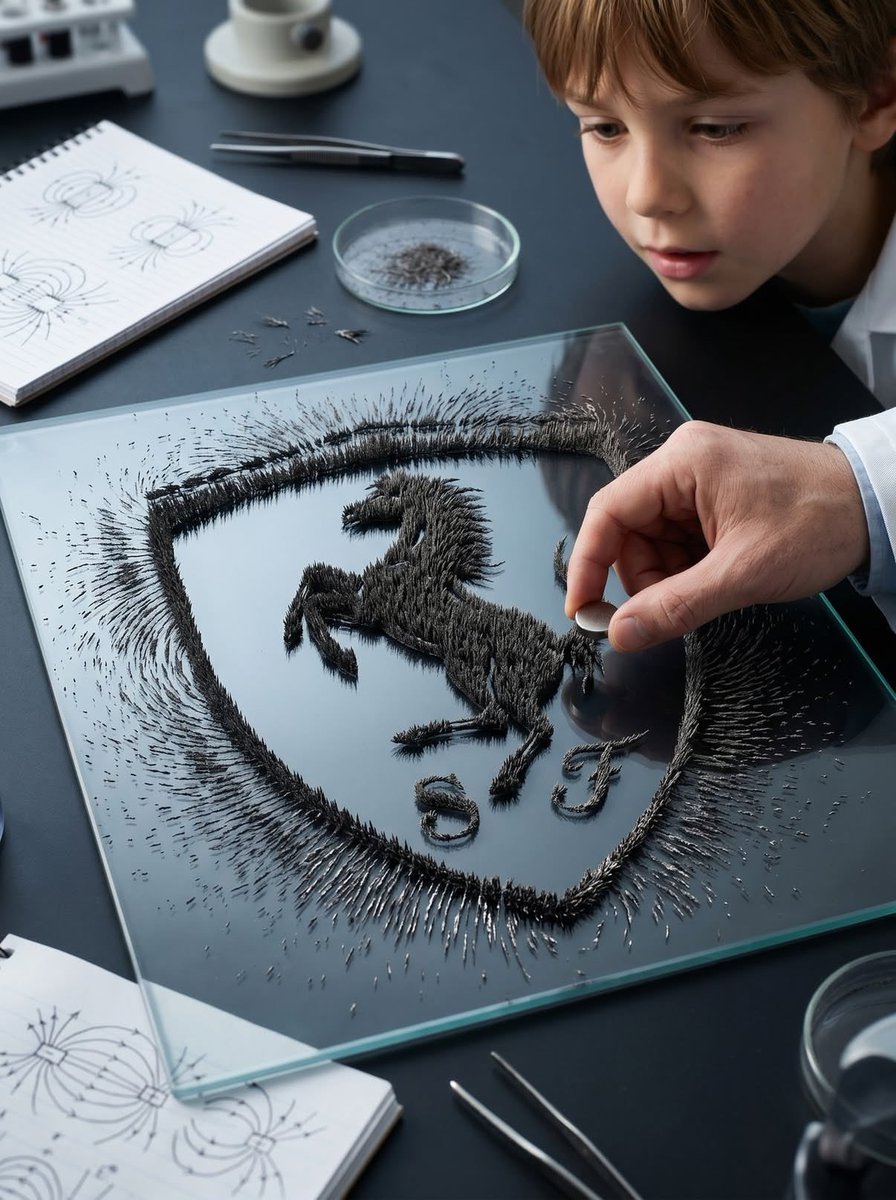
자석 철가루 로고 장면
실험실 환경의 표면 위에 극도로 사실적인 자성 철가루를 사용하여 로고의 실루엣을 시각화하는 창의적인 과제입니다.
이것은 제품 및 상업 에 대한 GPT Image 2 프롬프트 사례입니다. 아래의 복사 가능한 프롬프트를 사용하여 유사한 시각 자료를 생성하고, 재사용하기 전에 Awesome GPT Image 2 Prompts 의 저작자 표시 및 상업적 사용 권한을 검토하십시오.
전체 프롬프트 세트가 필요하신가요? 다음을 사용하세요. 제품 및 상업 더 많은 관련 예시를 보려면 주제 허브를 열거나 다음을 열어보세요. GPT Image 2 프롬프트 카탈로그 전체 예제 색인, 재사용 가능한 구조 및 출처 표기는 다음을 참조하십시오.
Free 1K preview
Generate one preview image instantly, no sign-up required.
Free text preview doesn’t preserve reference-image consistency.
2274/4000
프롬프트
복사 준비 프롬프트
Transform the {argument name="logo source" default="uploaded logo"} into a hyper-realistic scene where the logo silhouette is formed by {argument name="material" default="iron filings"} reacting to a magnetic field. The logo must keep its exact shape and proportions, appearing as if a magnet shaped like the logo (or hidden beneath the surface) is influencing the filings to align naturally into that recognizable formation. Material details:
Fine iron filings with sharp, spiky, needle-like structures.
Dense clustering along magnetic field lines forming the logo silhouette.
Variation in density — thick near magnetic poles, thinner outward.
Matte dark metallic texture with subtle reflections.

Physics behavior:
Iron filings must follow realistic magnetic field patterns — radial and curved lines forming spikes and ridges.
Stronger attraction zones create thicker, raised clusters.
Outer areas show softer, more dispersed alignment.
Natural randomness and slight irregularity — no perfect edges.
Some loose filings scattered beyond the main shape.

Surface interaction:
Flat surface such as a {argument name="surface type" default="lab table, glass plate, or matte black tray"}.
Filings resting on surface but visibly lifted in areas due to magnetic force (spiky texture).
Subtle dust and micro particles around.

Environment & human presence:
Realistic classroom, science lab, or creative studio environment.
A person partially visible — hands holding or moving a magnet beneath the surface or nearby.
Possibly a child or adult observing or interacting (adds emotional curiosity).
Other subtle elements: notebooks, tools, or lab items out of focus.

Lighting:
Directional overhead light creating shadows from raised filings.
Subtle highlights on metallic edges.
Balanced natural or indoor lighting.

Atmosphere:
Curiosity.
Discovery.
Educational yet visually satisfying.
Quiet but engaging moment.

Camera & composition:
Top-down or slightly angled close-up view.
Logo clearly visible through iron filing formation.
Human hands or interaction slightly off-center for storytelling.

Format:
Aspect ratio: STRICT 4:5 vertical.
No text overlays.

Style:
Hyper-real macro + environmental photography.
Physically accurate magnetic behavior.
Cinematic yet grounded realism.
프롬프트 변수
프롬프트에 있는 편집 가능한 인수 자리 표시자와 해당 기본값입니다.
변하기 쉬운
logo source
기본
uploaded logo
변하기 쉬운
material
기본
iron filings
변하기 쉬운
surface type
기본
lab table, glass plate, or matte black tray
Best for
- - 제품 및 상업 visual exploration
- - Image generation and reference-image edits
- - Reusable briefs that keep source attribution visible
Change these parts
- - Subject, product, character, or scene
- - Aspect ratio, camera, lighting, and background
- - Brand, text, color, and output constraints
Recommended model and settings
- - Model: gpt-image-2
- - Input mode: 이미지 to 이미지
- - Aspect ratio: source
- - Commercial status: review original source
How to use this prompt
- 1. Copy the prompt and preserve its structure for the first test.
- 2. Replace the subject, context, and publishing channel.
- 3. Change one camera, lighting, or style variable per iteration.
- 4. Inspect the output, source, text, and rights before reuse.
Limitations, source, and reuse cautions
- - Generated output is an editable draft, not factual, legal, or rights evidence.
- - Review the linked source, people, brands, logos, text, and third-party media before commercial use.
Awesome GPT Image 2 Prompts 에서 가져왔습니다. 출처 표기가 필요합니다. 상업적 이용 가능 여부는 allowed 입니다. 유료 사용 전에 원저작권 정보를 확인하세요.
이 범주에 속하는 더 많은 사례
범주, 입력 방식 호환성, 품질 및 위험도에 따라 우선순위가 정해집니다.






재사용 및 출처 참고 사항
사례를 미리 확인한 후 이 안내 메시지를 안전하게 사용하십시오.
- 1.프롬프트를 복사하거나 Dovoo의 생성 버튼을 사용하여 직접 엽니다.
- 2.사용 사례에 맞게 변수, 화면 비율 및 참조 이미지를 조정하십시오.
- 3.출판 또는 유료 사용 전에 저작권, 출처 표기 요건 및 브랜드 또는 초상권 관련 위험을 확인하십시오.