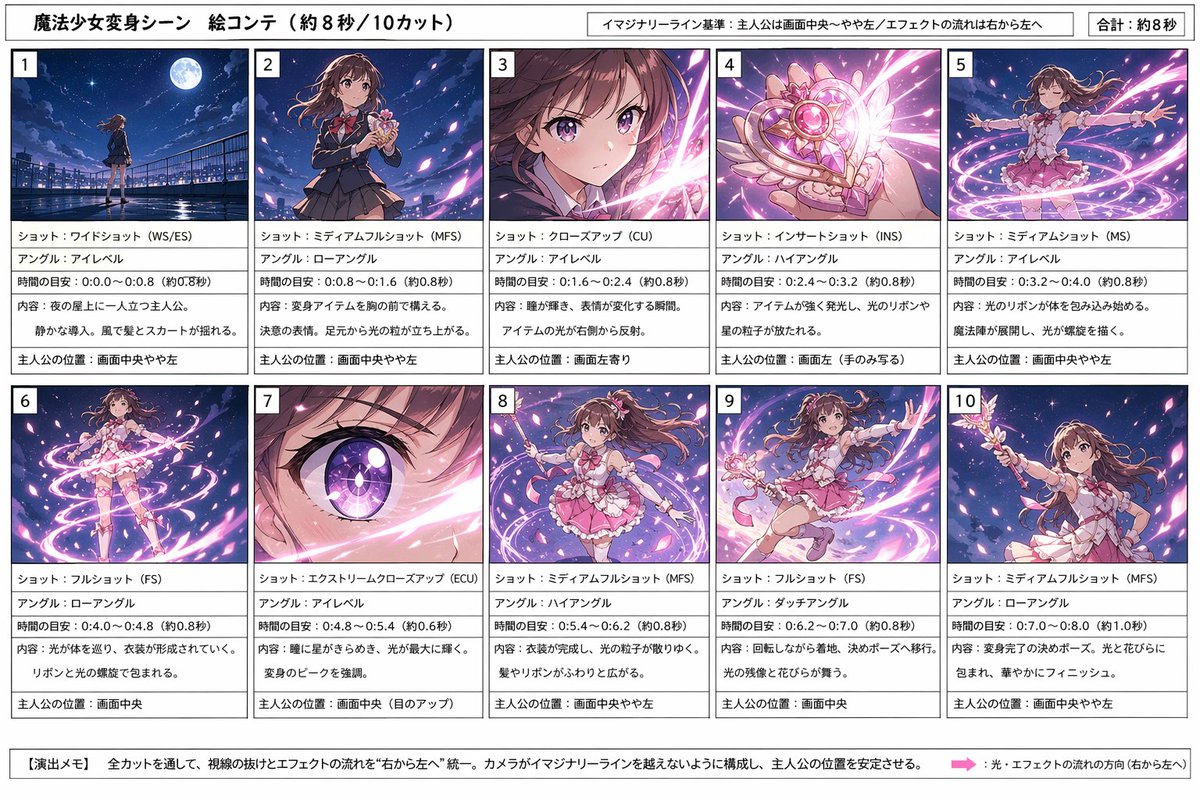
마법소녀 변신 스토리보드
이 프롬프트는 사전 시각화, 연출, 모션 또는 장면 계획에 유용한 10개의 변환 패널로 구성된 전문적인 일본 애니메이션 스토리보드 시트를 생성합니다.
이것은 애니메이션 & 게임 에 대한 GPT Image 2 프롬프트 사례입니다. 아래의 복사 가능한 프롬프트를 사용하여 유사한 시각 자료를 생성하고, 재사용하기 전에 Awesome GPT Image 2 Prompts 의 저작자 표시 및 상업적 사용 권한을 검토하십시오.
전체 프롬프트 세트가 필요하신가요? 다음을 사용하세요. 애니메이션 & 게임 더 많은 관련 예시를 보려면 주제 허브를 열거나 다음을 열어보세요. GPT Image 2 프롬프트 카탈로그 전체 예제 색인, 재사용 가능한 구조 및 출처 표기는 다음을 참조하십시오.
Free 1K preview
Generate one preview image instantly, no sign-up required.
Free text preview doesn’t preserve reference-image consistency.
4000/4000
프롬프트
복사 준비 프롬프트
{
  "type": "anime transformation storyboard sheet",
  "subject": "magical girl transformation sequence",
  "style": "clean professional storyboard for image generation planning, polished anime illustration thumbnails, vibrant night-sky fantasy effects, manga production sheet aesthetic",
  "canvas": {
    "orientation": "landscape",
    "aspect_ratio": "16:9"
  },
  "header": {
    "title": "魔法少女変身シーン 絵コンテ(約8秒/10カット)",
    "notes": [
      "イマジナリーライン基準:主人公は画面中央〜やや左/エフェクトの流れは右から左へ",
      "Total: approx. 8 seconds"
    ]
  },
  "character": {
    "name": "{argument name=\"character name\" default=\"protagonist\"}",
    "appearance": "teen magical girl with long wavy {argument name=\"hair color\" default=\"brown\"} hair, large expressive eyes, school-uniform-to-magical-girl transformation, pink frilly costume with ribbons, short layered skirt, bow details, white gloves, wand-like transformation item with heart and wing motifs"
  },
  "layout": {
    "grid": {
      "columns": 5,
      "rows": 2,
      "count": 10
    },
    "sections": [
      {
        "title": "1",
        "position": "top-left",
        "count": 1,
        "labels": [
          "ショット:ワイドショット(WS/ES)",
          "アングル:アイレベル",
          "時間の目安:0.0〜0.8(約0.8秒)",
          "内容:夜の屋上に一人立つ主人公。静かな導入、風で髪とスカートが揺れる。",
          "主人公の位置:画面中央やや左"
        ]
      },
      {
        "title": "2",
        "position": "top row second",
        "count": 1,
        "labels": [
          "ショット:ミディアムフルショット(MFS)",
          "アングル:ローアングル",
          "時間の目安:0.8〜1.6(約0.8秒)",
          "内容:変身アイテムを胸の前で構える。決意の表情。足元から光の粒が立ち上がる。",
          "主人公の位置:画面中央やや左"
        ]
      },
      {
        "title": "3",
        "position": "top row third",
        "count": 1,
        "labels": [
          "ショット:クローズアップ(CU)",
          "アングル:アイレベル",
          "時間の目安:1.6〜2.4(約0.8秒)",
          "内容:瞳が輝き、表情が変化する瞬間。アイテムの光が右から反射。",
          "主人公の位置:画面左寄り"
        ]
      },
      {
        "title": "4",
        "position": "top row fourth",
        "count": 1,
        "labels": [
          "ショット:インサートショット(INS)",
          "アングル:ハイアングル",
          "時間の目安:2.4〜3.2(約0.8秒)",
          "内容:アイテムが強く発光し、光のリボンや星の粒子が放たれる。",
          "主人公の位置:画面左(手のみ写る)"
        ]
      },
      {
        "title": "5",
        "position": "top-right",
        "count": 1,
        "labels": [
          "ショット:ミディアムショット(MS)",
          "アングル:アイレベル",
          "時間の目安:3.2〜4.0(約0.8秒)",
          "内容:光のリボンが体を包み込み始める。魔法陣が展開し、光が螺旋を描く。",
          "主人公の位置:画面中央やや左"
        ]
      },
      {
        "title": "6",
        "position": "bottom-left",
        "count": 1,
        "labels": [
          "ショット:フルショット(FS)",
          "アングル:ローアングル",
          "時間の目安:4.0〜4.8(約0.8秒)",
          "内容:光が体を巡り、衣装が形成されていく。リボンと光の螺旋で包まれる。",
          "主人公の位置:画面中央"
        ]
      },
      {
        "title": "7",
        "position": "bottom row second",
        "count": 1,
        "labels": [
          "ショット:エクストリームクローズアップ(ECU)",
          "アングル:アイレベル",
          "時間の目安:4.8〜5.4(約0.6秒)",
          "内容:瞳に星がきらめき、光が最大に輝く。変身のピークを強調。",
          "主人公の位置:画面中央(目のアップ)"
        ]
      },
      {
        "title": "8",
        "position": "bottom row third",
        "count": 1,
        "labels": [
          "ショット:ミディアムフルショット(MFS)",
          "アングル:ハイアングル",
          "時間の目安:5.4〜6.2(約0.8秒)",
          "内容:衣装が完成し、光の粒子がゆっくり収まる。髪やリボンがふわりと広がる。",
          "主人公の位置:画面中央やや左"
        ]
      },
      {
        "title": "9",
        "position": "bottom row fourth",
        "count": 1,
        "labels": [
          "ショット:フルショット(FS)",
          "アングル:ダッチアングル",
          "時間の目安:6.2〜7.0(約0.8秒)",
          "内容:回転しながら着地。決めポーズへ移行。光の残像と花びらが舞う。",
          "主人公の位置:画面中央"
        ]
      },
      {
        "title": "10",
        "position": "bottom-right",
        "count": 1,
        "labels": [
          "ショット:ミディアムフルショット(MFS)",
          "アングル:ローアングル",
          "時間の目安:7.0〜8.0(約1.0秒)",
          "内容:変身完了の決めポーズ。光と花びらに包まれ、華やかにフィニッシュ。",
          "主人公の位置:画面中央やや左"
        ]
      }
    ],
    "footer": {
      "title": "【演出メモ】",
      "count": 2,
      "labels": [
        "全カットを通して、視線の抜けとエフェクトの流れを“右から左へ”統一。カメラがイマジナリーラインを越えないように構成し、主人公の位置を安定させる。",
        "光・エフェクトの流れの方向(右から左へ)"
      ]
    }
  },
  "visuals": {
    "panel_style": "each of the 10 panels contains a fully rendered anime thumbnail image on top and a text description box below, with a bold panel number in the upper-left corner",
    "background": "white storyboard sheet with black borders and thin dividers",
    "thumbnail_consistency": "same girl across all 10 panels, rooftop at night under a bright moon, deep blue-purple sky, pink and white magical light ribbons, sparkling petals, dynamic transformation energy",
    "text_language": "Japanese",
    "color_palette": [
      "deep navy blue",
      "violet",
      "pink",
      "white",
      "soft magenta"
    ]
  },
  "quality": "high-resolution editorial layout, sharp legible Japanese text, balanced margins, print-ready storyboard design"
}
프롬프트 변수
프롬프트에 있는 편집 가능한 인수 자리 표시자와 해당 기본값입니다.
변하기 쉬운
character name
기본
protagonist
변하기 쉬운
hair color
기본
brown
Best for
- - 애니메이션 & 게임 visual exploration
- - Image generation and reference-image edits
- - Reusable briefs that keep source attribution visible
Change these parts
- - Subject, product, character, or scene
- - Aspect ratio, camera, lighting, and background
- - Brand, text, color, and output constraints
Recommended model and settings
- - Model: gpt-image-2
- - Input mode: 이미지 to 이미지
- - Aspect ratio: source
- - Commercial status: review original source
How to use this prompt
- 1. Copy the prompt and preserve its structure for the first test.
- 2. Replace the subject, context, and publishing channel.
- 3. Change one camera, lighting, or style variable per iteration.
- 4. Inspect the output, source, text, and rights before reuse.
Limitations, source, and reuse cautions
- - Generated output is an editable draft, not factual, legal, or rights evidence.
- - Review the linked source, people, brands, logos, text, and third-party media before commercial use.
Awesome GPT Image 2 Prompts 에서 가져왔습니다. 출처 표기가 필요합니다. 상업적 이용 가능 여부는 allowed 입니다. 유료 사용 전에 원저작권 정보를 확인하세요.
이 범주에 속하는 더 많은 사례
범주, 입력 방식 호환성, 품질 및 위험도에 따라 우선순위가 정해집니다.






재사용 및 출처 참고 사항
사례를 미리 확인한 후 이 안내 메시지를 안전하게 사용하십시오.
- 1.프롬프트를 복사하거나 Dovoo의 생성 버튼을 사용하여 직접 엽니다.
- 2.사용 사례에 맞게 변수, 화면 비율 및 참조 이미지를 조정하십시오.
- 3.출판 또는 유료 사용 전에 저작권, 출처 표기 요건 및 브랜드 또는 초상권 관련 위험을 확인하십시오.