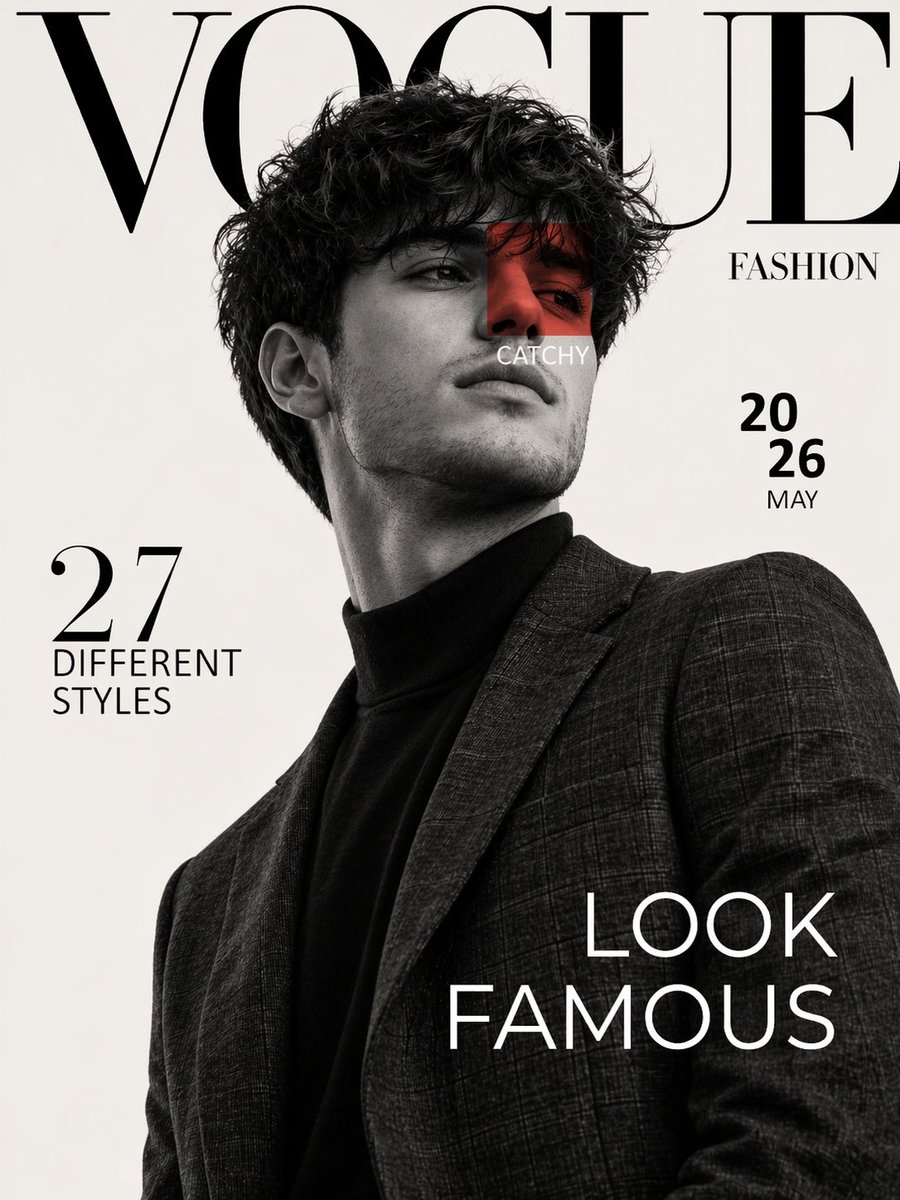
고급 패션 잡지 표지 디자인 아이디어
보그 스타일의 고급 패션 잡지 표지 제작을 위한 세련된 아이디어로, 스튜디오 인물 사진 촬영과 미니멀하고 고급스러운 타이포그래피가 특징입니다.
이것은 패션 & 뷰티 에 대한 GPT Image 2 프롬프트 사례입니다. 아래의 복사 가능한 프롬프트를 사용하여 유사한 시각 자료를 생성하고, 재사용하기 전에 Awesome GPT Image 2 Prompts 의 저작자 표시 및 상업적 사용 권한을 검토하십시오.
전체 프롬프트 세트가 필요하신가요? 다음을 사용하세요. 패션 & 뷰티 더 많은 관련 예시를 보려면 주제 허브를 열거나 다음을 열어보세요. GPT Image 2 프롬프트 카탈로그 전체 예제 색인, 재사용 가능한 구조 및 출처 표기는 다음을 참조하십시오.
Free 1K preview
Generate one preview image instantly, no sign-up required.
Free text preview doesn’t preserve reference-image consistency.
1237/4000
프롬프트
복사 준비 프롬프트
Create a high fashion editorial magazine cover inspired by luxury fashion publications. Use the reference image of the male subject. Black and white portrait photography with a clean off white studio background. Subject is posed confidently from a low angle, looking slightly upward, sharp jawline, soft parted lips, tousled wavy hair with natural volume. Outfit includes a dark turtleneck layered under a textured tailored plaid blazer. Lighting is soft yet dramatic, creating sculpted facial shadows and elegant contrast. Magazine layout design with oversized serif masthead text at the top reading “{argument name="masthead text" default="VOGUE"}”, partially hidden behind the subject’s head. Minimal premium typography across the page. Add side text “FASHION”, issue date “{argument name="issue date" default="2026 MAY"}”, left side headline “27 DIFFERENT STYLES”, and bold bottom right cover line “LOOK FAMOUS”. Include a small red translucent square overlay on one eye area with the word “CATCHY”. Style should feel premium, modern, cinematic, clean composition, sharp focus, ultra realistic skin texture, editorial luxury aesthetic, balanced negative space, timeless fashion cover design. Vertical magazine ratio, high resolution.프롬프트 변수
프롬프트에 있는 편집 가능한 인수 자리 표시자와 해당 기본값입니다.
변하기 쉬운
masthead text
기본
VOGUE
변하기 쉬운
issue date
기본
2026 MAY
Best for
- - 패션 & 뷰티 visual exploration
- - Image generation and reference-image edits
- - Reusable briefs that keep source attribution visible
Change these parts
- - Subject, product, character, or scene
- - Aspect ratio, camera, lighting, and background
- - Brand, text, color, and output constraints
Recommended model and settings
- - Model: gpt-image-2
- - Input mode: 이미지 to 이미지
- - Aspect ratio: source
- - Commercial status: review original source
How to use this prompt
- 1. Copy the prompt and preserve its structure for the first test.
- 2. Replace the subject, context, and publishing channel.
- 3. Change one camera, lighting, or style variable per iteration.
- 4. Inspect the output, source, text, and rights before reuse.
Limitations, source, and reuse cautions
- - Generated output is an editable draft, not factual, legal, or rights evidence.
- - Review the linked source, people, brands, logos, text, and third-party media before commercial use.
Awesome GPT Image 2 Prompts 에서 가져왔습니다. 출처 표기가 필요합니다. 상업적 이용 가능 여부는 allowed 입니다. 유료 사용 전에 원저작권 정보를 확인하세요.
이 범주에 속하는 더 많은 사례
범주, 입력 방식 호환성, 품질 및 위험도에 따라 우선순위가 정해집니다.






재사용 및 출처 참고 사항
사례를 미리 확인한 후 이 안내 메시지를 안전하게 사용하십시오.
- 1.프롬프트를 복사하거나 Dovoo의 생성 버튼을 사용하여 직접 엽니다.
- 2.사용 사례에 맞게 변수, 화면 비율 및 참조 이미지를 조정하십시오.
- 3.출판 또는 유료 사용 전에 저작권, 출처 표기 요건 및 브랜드 또는 초상권 관련 위험을 확인하십시오.