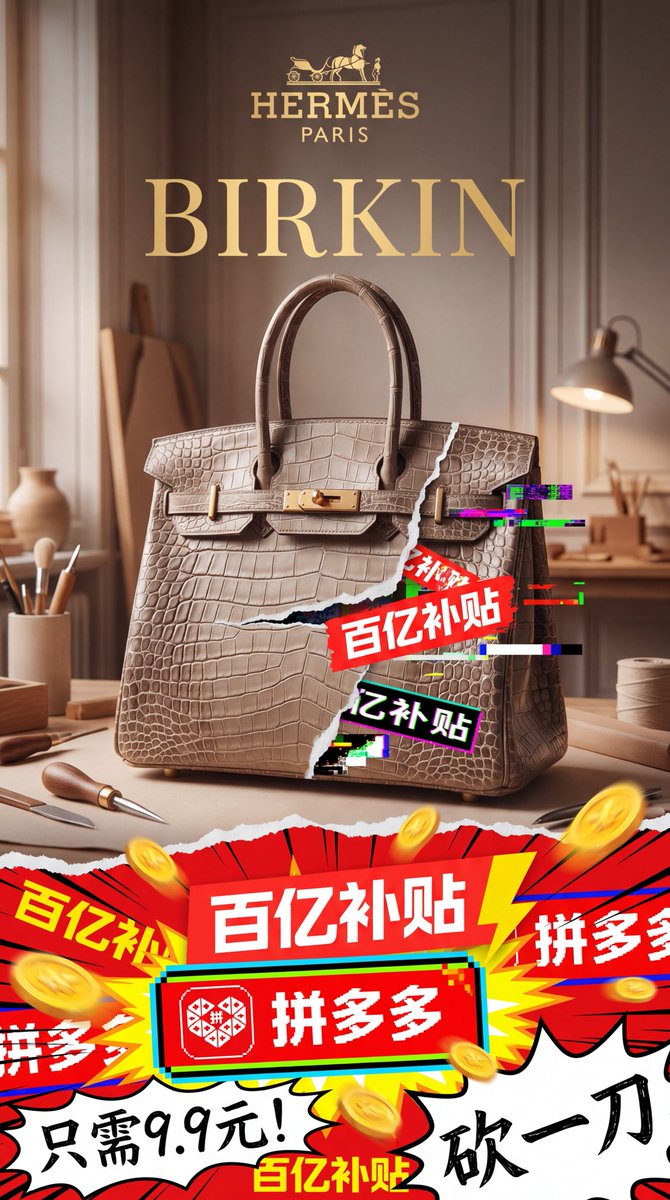
명품 가방과 할인 상품의 만남을 그린 포스터
이 프롬프트는 세련된 에르메스 스타일의 버킨 백 제품 사진과 폭발적인 핀둬둬 스타일의 보조금 그래픽을 대비시켜 풍자적인 명품 협업 이미지를 만들어내는 세로형 패션 광고 포스터를 생성합니다.
이것은 제품 및 상업 에 대한 GPT Image 2 프롬프트 사례입니다. 아래의 복사 가능한 프롬프트를 사용하여 유사한 시각 자료를 생성하고, 재사용하기 전에 Awesome GPT Image 2 Prompts 의 저작자 표시 및 상업적 사용 권한을 검토하십시오.
전체 프롬프트 세트가 필요하신가요? 다음을 사용하세요. 제품 및 상업 더 많은 관련 예시를 보려면 주제 허브를 열거나 다음을 열어보세요. GPT Image 2 프롬프트 카탈로그 전체 예제 색인, 재사용 가능한 구조 및 출처 표기는 다음을 참조하십시오.
Free 1K preview
Generate one preview image instantly, no sign-up required.
3165/4000
프롬프트
복사 준비 프롬프트
A 9:16 vertical luxury fashion parody advertisement poster, with a centered handbag as the core product, aiming to showcase the clash between the ultra-high-end brand image and the chaotic Chinese e-commerce discount graphics. The upper part should present the elegant Hermès-style advertising texture: a warm beige and brown studio background, soft morning light streaming in from the window, a shallow depth of field, exquisite wall decorations, a wooden workbench, and 6 artisan tool elements clearly visible around the bag: a pen holder with several brushes on the left, a small ceramic vase on the far left, a leather awl or polishing tool in front of the table on the left, a leather knife on the front edge of the table, an adjustable table lamp on the right, and a roll of thread on the right. Place a golden luxury logo in the center at the top, with a carriage icon above and the words HERMÈS and PARIS below, followed by a huge serif font title: BIRKIN (gold). Display a large, textured crocodile skin platinum bag in the center, colored {argument name="bag color" default="warm greige taupe"}, facing forward, with rich leather texture details and polished gold hardware. The handle should be upright and placed on the table, using high-end product photography techniques. Add a torn paper effect to the right side of the bag, revealing the aggressive discount advertisement below; add 5 neon pink, green, teal, black, and white digital glitch effects around the tear. Overlap 3 clearly visible Chinese promotional stickers in the torn area, diagonally: a small red sticker with “Welfare Price”, a large red sticker with “Ten Billion Subsidy”, and a black sticker with a bright outline that reads “Ten Billion Subsidy”. The lower third of the poster should present a noisy comic and livestreaming-style visual explosion, separated from the upper luxury area by the torn paper effect. Use high saturation reds, yellows, whites, blacks, and teals, combined with sharp starburst shapes, speed lines, thick outlines, and flying gold coins. Include 7 promotional text blocks at the bottom: 1 large red banner in the center reading “Ten Billion Subsidy”, 1 red rounded rectangle with the Pinduoduo logo and the text “Pinduoduo” below it, 2 partially cropped “Pinduoduo” side banners, 1 additional yellow-red alternating “Ten Billion Subsidy” explosion sticker in the lower left and lower center, and 1 handwritten black calligraphy slogan “Cut One More Yuan” in the lower right. Add an extra handwritten black phrase “Only 9.9 Yuan!” in the lower left corner. The overall composition should present a feeling of elite fashion advertising being violently invaded by cheap viral marketing, with cinematic lighting, strong visual hierarchy, realistic product rendering, high-end typography above, and explosive discount chaos below, as well as a deliberate aesthetic contrast between refinement and low-cost internet commerce. Make it look like a main visual poster for a {argument name="collaboration brand text" default="Pinduoduo × Hermès"} high-end brand collaboration, used to promote {argument name="promo text" default="Ten Billion Subsidy Platinum Bag"}.프롬프트 변수
프롬프트에 있는 편집 가능한 인수 자리 표시자와 해당 기본값입니다.
변하기 쉬운
bag color
기본
warm greige taupe
변하기 쉬운
collaboration brand text
기본
Pinduoduo × Hermès
변하기 쉬운
promo text
기본
Ten Billion Subsidy Platinum Bag
Best for
- - 제품 및 상업 visual exploration
- - Image generation and reference-image edits
- - Reusable briefs that keep source attribution visible
Change these parts
- - Subject, product, character, or scene
- - Aspect ratio, camera, lighting, and background
- - Brand, text, color, and output constraints
Recommended model and settings
- - Model: gpt-image-2
- - Input mode: 텍스트 to 이미지
- - Aspect ratio: source
- - Commercial status: review original source
How to use this prompt
- 1. Copy the prompt and preserve its structure for the first test.
- 2. Replace the subject, context, and publishing channel.
- 3. Change one camera, lighting, or style variable per iteration.
- 4. Inspect the output, source, text, and rights before reuse.
Limitations, source, and reuse cautions
- - Generated output is an editable draft, not factual, legal, or rights evidence.
- - Review the linked source, people, brands, logos, text, and third-party media before commercial use.
Awesome GPT Image 2 Prompts 에서 가져왔습니다. 출처 표기가 필요합니다. 상업적 이용 가능 여부는 allowed 입니다. 유료 사용 전에 원저작권 정보를 확인하세요.
이 범주에 속하는 더 많은 사례
범주, 입력 방식 호환성, 품질 및 위험도에 따라 우선순위가 정해집니다.






재사용 및 출처 참고 사항
사례를 미리 확인한 후 이 안내 메시지를 안전하게 사용하십시오.
- 1.프롬프트를 복사하거나 Dovoo의 생성 버튼을 사용하여 직접 엽니다.
- 2.사용 사례에 맞게 변수, 화면 비율 및 참조 이미지를 조정하십시오.
- 3.출판 또는 유료 사용 전에 저작권, 출처 표기 요건 및 브랜드 또는 초상권 관련 위험을 확인하십시오.