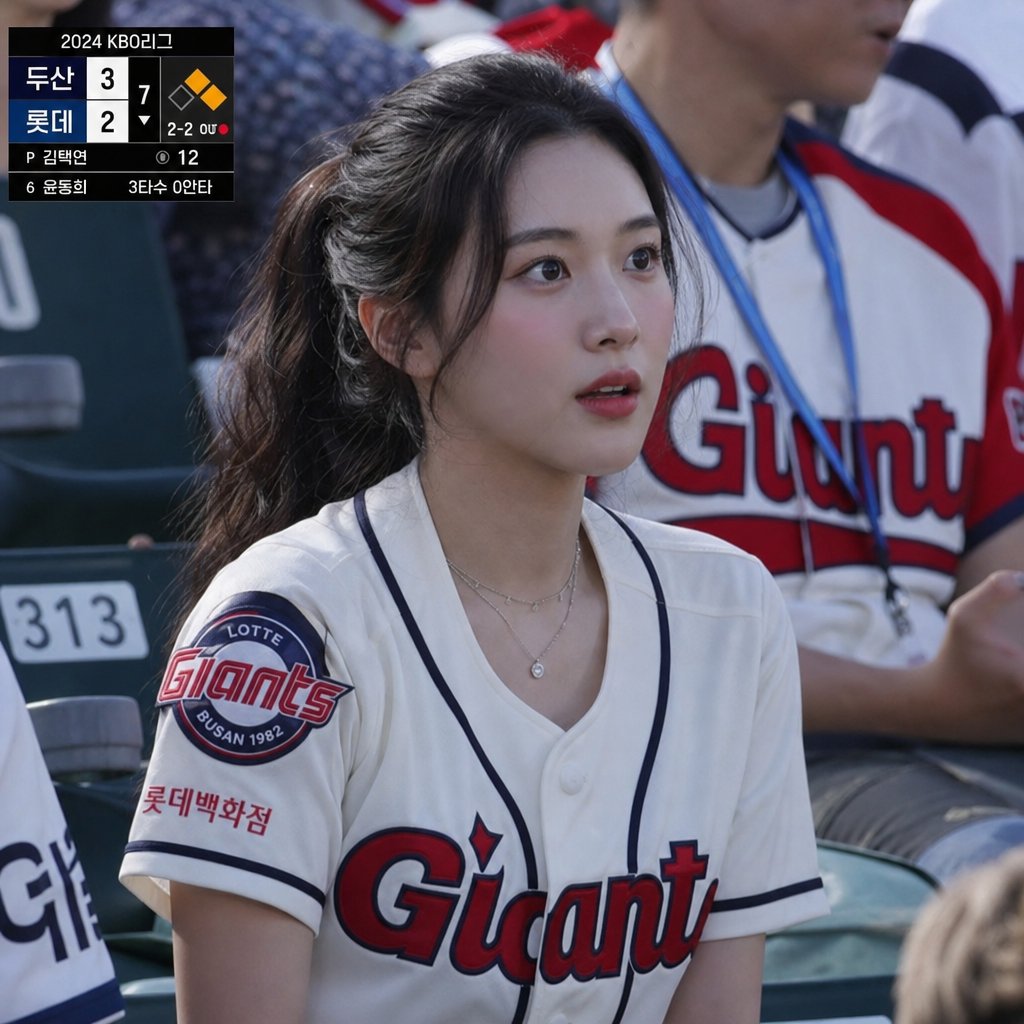
KBO 롯데자이언츠 경기 중계 팬샷
롯데 자이언츠 팬의 얼굴을 가린 채 한국 야구 중계 방송 스타일의 사실적인 관중 사진을 생성하고, 화면에는 스코어보드를 겹쳐 보여줍니다.
이것은 인물과 캐릭터 에 대한 GPT Image 2 프롬프트 사례입니다. 아래의 복사 가능한 프롬프트를 사용하여 유사한 시각 자료를 생성하고, 재사용하기 전에 Awesome GPT Image 2 Prompts 의 저작자 표시 및 상업적 사용 권한을 검토하십시오.
전체 프롬프트 세트가 필요하신가요? 다음을 사용하세요. 인물과 캐릭터 더 많은 관련 예시를 보려면 주제 허브를 열거나 다음을 열어보세요. GPT Image 2 프롬프트 카탈로그 전체 예제 색인, 재사용 가능한 구조 및 출처 표기는 다음을 참조하십시오.
Free 1K preview
Generate one preview image instantly, no sign-up required.
1338/4000
프롬프트
복사 준비 프롬프트
Create a realistic sports broadcast still photo from a 2024 KBO League baseball game, shot from the spectator seats in bright daylight with shallow depth of field. The main subject is a young female fan seated in the stands wearing a white Lotte Giants baseball jersey with navy piping, red-and-navy “Giants” chest lettering, a circular Lotte Giants Busan 1982 sleeve patch, and small Korean sponsor text on the sleeve; she has long dark hair tied in a ponytail, layered delicate necklaces, and her face is intentionally covered by a centered opaque rectangular privacy blur in a muted gray-brown gradient. Behind her are stadium seats and another fan wearing a white Giants jersey with red sleeves and a blue lanyard, softly out of focus. Add a black TV broadcast scoreboard overlay in the upper-left corner with exactly 2 team rows labeled {argument name="away team" default="두산"} and {argument name="home team" default="롯데"}, scores 3 and 2, inning marker 7, a small baseball diamond graphic with one orange base highlighted, count text “2-2 0U,” pitcher line “P 김택연,” pitch count “12,” and bottom batter information “6 윤동희 3타수 0안타.” Use authentic Korean baseball broadcast styling, natural camera perspective, realistic fabric texture, accurate stadium lighting, documentary photography look, and a slightly compressed telephoto crop.프롬프트 변수
프롬프트에 있는 편집 가능한 인수 자리 표시자와 해당 기본값입니다.
변하기 쉬운
away team
기본
두산
변하기 쉬운
home team
기본
롯데
Best for
- - 인물과 캐릭터 visual exploration
- - Image generation and reference-image edits
- - Reusable briefs that keep source attribution visible
Change these parts
- - Subject, product, character, or scene
- - Aspect ratio, camera, lighting, and background
- - Brand, text, color, and output constraints
Recommended model and settings
- - Model: gpt-image-2
- - Input mode: 텍스트 to 이미지
- - Aspect ratio: source
- - Commercial status: review original source
How to use this prompt
- 1. Copy the prompt and preserve its structure for the first test.
- 2. Replace the subject, context, and publishing channel.
- 3. Change one camera, lighting, or style variable per iteration.
- 4. Inspect the output, source, text, and rights before reuse.
Limitations, source, and reuse cautions
- - Generated output is an editable draft, not factual, legal, or rights evidence.
- - Review the linked source, people, brands, logos, text, and third-party media before commercial use.
Awesome GPT Image 2 Prompts 에서 가져왔습니다. 출처 표기가 필요합니다. 상업적 이용 가능 여부는 allowed 입니다. 유료 사용 전에 원저작권 정보를 확인하세요.
이 범주에 속하는 더 많은 사례
범주, 입력 방식 호환성, 품질 및 위험도에 따라 우선순위가 정해집니다.






재사용 및 출처 참고 사항
사례를 미리 확인한 후 이 안내 메시지를 안전하게 사용하십시오.
- 1.프롬프트를 복사하거나 Dovoo의 생성 버튼을 사용하여 직접 엽니다.
- 2.사용 사례에 맞게 변수, 화면 비율 및 참조 이미지를 조정하십시오.
- 3.출판 또는 유료 사용 전에 저작권, 출처 표기 요건 및 브랜드 또는 초상권 관련 위험을 확인하십시오.