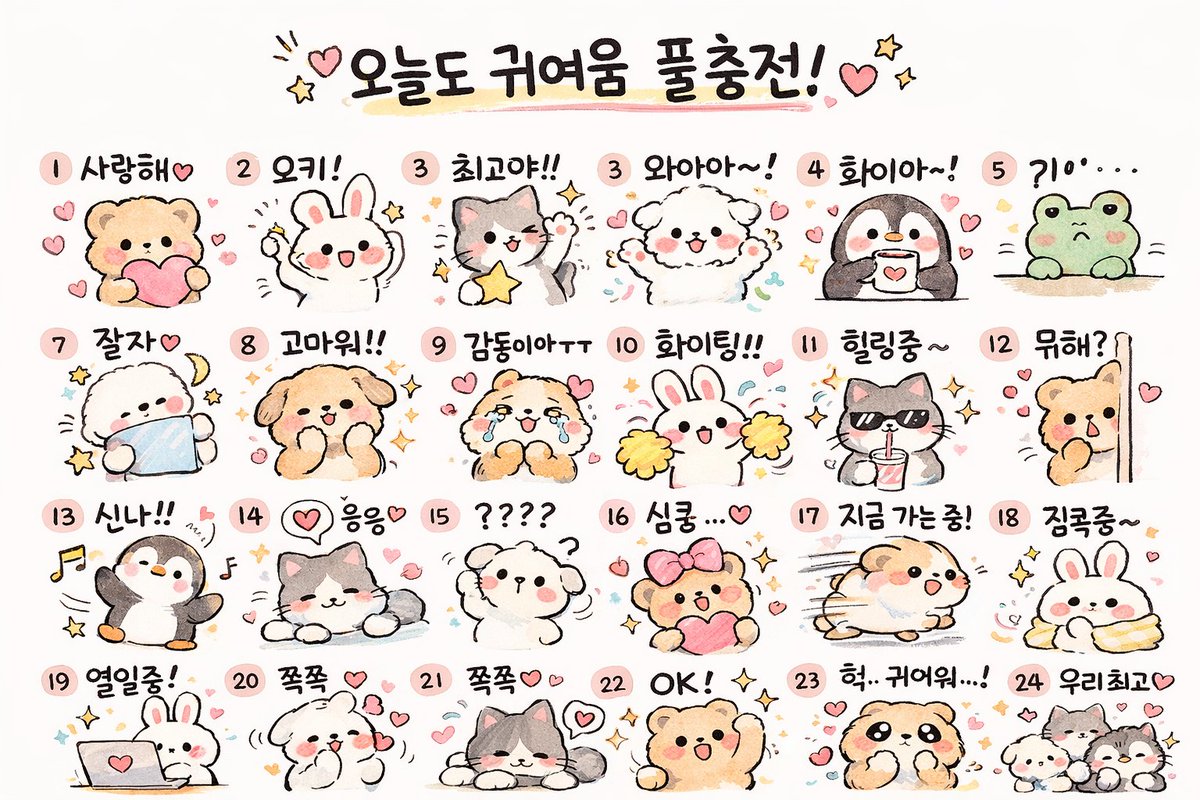
귀여운 동물 스티커 시트 생성기
귀엽고 손으로 그린 동물 스티커 24개로 구성된 그리드를 생성하고, 원하는 텍스트 라벨을 추가하여 메시지 앱 목업이나 플래너 인쇄물에 활용하기 좋습니다.
이것은 일러스트레이션 및 미술 에 대한 GPT Image 2 프롬프트 사례입니다. 아래의 복사 가능한 프롬프트를 사용하여 유사한 시각 자료를 생성하고, 재사용하기 전에 Awesome GPT Image 2 Prompts 의 저작자 표시 및 상업적 사용 권한을 검토하십시오.
전체 프롬프트 세트가 필요하신가요? 다음을 사용하세요. 일러스트레이션 및 미술 더 많은 관련 예시를 보려면 주제 허브를 열거나 다음을 열어보세요. GPT Image 2 프롬프트 카탈로그 전체 예제 색인, 재사용 가능한 구조 및 출처 표기는 다음을 참조하십시오.
Free 1K preview
Generate one preview image instantly, no sign-up required.
3011/4000
프롬프트
복사 준비 프롬프트
{
  "type": "kawaii animal sticker sheet",
  "style": "{argument name=\"art style\" default=\"hand-drawn watercolor and colored pencil texture, pastel colors, cute, simple outlines\"}",
  "header": {
    "text": "{argument name=\"header text\" default=\"오늘도 귀여움 풀충전!\"}",
    "decorations": "hearts and stars"
  },
  "layout": {
    "grid": "4 rows by 6 columns",
    "total_stickers": 24
  },
  "stickers": [
    {
      "id": "1",
      "animal": "bear holding a pink heart",
      "label": "사랑해♡"
    },
    {
      "id": "2",
      "animal": "white rabbit cheering",
      "label": "오키!"
    },
    {
      "id": "3",
      "animal": "gray and white cat holding a yellow star",
      "label": "최고야!!"
    },
    {
      "id": "4",
      "animal": "fluffy white dog cheering",
      "label": "와아아~!"
    },
    {
      "id": "5",
      "animal": "penguin holding a coffee mug",
      "label": "화이아~!"
    },
    {
      "id": "6",
      "animal": "green frog peeking over an edge",
      "label": "?10'..."
    },
    {
      "id": "7",
      "animal": "fluffy white dog sleeping with a crescent moon",
      "label": "잘자♡"
    },
    {
      "id": "8",
      "animal": "brown dog smiling with sparkles",
      "label": "고마워!!"
    },
    {
      "id": "9",
      "animal": "crying brown bear",
      "label": "감동이야ㅜㅜ"
    },
    {
      "id": "10",
      "animal": "white rabbit with yellow cheerleader pom-poms",
      "label": "화이팅!!"
    },
    {
      "id": "11",
      "animal": "gray cat wearing sunglasses and drinking from a cup",
      "label": "힐링중~"
    },
    {
      "id": "12",
      "animal": "brown bear peeking from behind a wall",
      "label": "뭐해?"
    },
    {
      "id": "13",
      "animal": "penguin dancing with music notes",
      "label": "신나!!"
    },
    {
      "id": "14",
      "animal": "gray and white cat lying down relaxed",
      "label": "응응♡"
    },
    {
      "id": "15",
      "animal": "confused fluffy white dog with question marks",
      "label": "????"
    },
    {
      "id": "16",
      "animal": "brown bear with a pink hair bow holding a heart",
      "label": "심쿵...♡"
    },
    {
      "id": "17",
      "animal": "hamster running fast with motion lines",
      "label": "지금 가는중!"
    },
    {
      "id": "18",
      "animal": "white rabbit wrapped snugly in a yellow blanket",
      "label": "집콕중~"
    },
    {
      "id": "19",
      "animal": "white rabbit typing on a laptop",
      "label": "열일중!"
    },
    {
      "id": "20",
      "animal": "fluffy white dog blowing kisses",
      "label": "쪽쪽 ♡"
    },
    {
      "id": "21",
      "animal": "gray and white cat lying down with hearts",
      "label": "쪽쪽♡♡"
    },
    {
      "id": "22",
      "animal": "brown bear cheering with one arm up",
      "label": "OK! ✧"
    },
    {
      "id": "23",
      "animal": "brown dog looking shocked",
      "label": "헉.. 귀여워...!"
    },
    {
      "id": "24",
      "animal": "group of three small animals",
      "label": "우리최고♡"
    }
  ]
}
프롬프트 변수
프롬프트에 있는 편집 가능한 인수 자리 표시자와 해당 기본값입니다.
변하기 쉬운
art style
기본
hand-drawn watercolor and colored pencil texture, pastel colors, cute, simple outlines
변하기 쉬운
header text
기본
오늘도 귀여움 풀충전!
Best for
- - 일러스트레이션 및 미술 visual exploration
- - Image generation and reference-image edits
- - Reusable briefs that keep source attribution visible
Change these parts
- - Subject, product, character, or scene
- - Aspect ratio, camera, lighting, and background
- - Brand, text, color, and output constraints
Recommended model and settings
- - Model: gpt-image-2
- - Input mode: 텍스트 to 이미지
- - Aspect ratio: source
- - Commercial status: review original source
How to use this prompt
- 1. Copy the prompt and preserve its structure for the first test.
- 2. Replace the subject, context, and publishing channel.
- 3. Change one camera, lighting, or style variable per iteration.
- 4. Inspect the output, source, text, and rights before reuse.
Limitations, source, and reuse cautions
- - Generated output is an editable draft, not factual, legal, or rights evidence.
- - Review the linked source, people, brands, logos, text, and third-party media before commercial use.
Awesome GPT Image 2 Prompts 에서 가져왔습니다. 출처 표기가 필요합니다. 상업적 이용 가능 여부는 allowed 입니다. 유료 사용 전에 원저작권 정보를 확인하세요.
이 범주에 속하는 더 많은 사례
범주, 입력 방식 호환성, 품질 및 위험도에 따라 우선순위가 정해집니다.






재사용 및 출처 참고 사항
사례를 미리 확인한 후 이 안내 메시지를 안전하게 사용하십시오.
- 1.프롬프트를 복사하거나 Dovoo의 생성 버튼을 사용하여 직접 엽니다.
- 2.사용 사례에 맞게 변수, 화면 비율 및 참조 이미지를 조정하십시오.
- 3.출판 또는 유료 사용 전에 저작권, 출처 표기 요건 및 브랜드 또는 초상권 관련 위험을 확인하십시오.