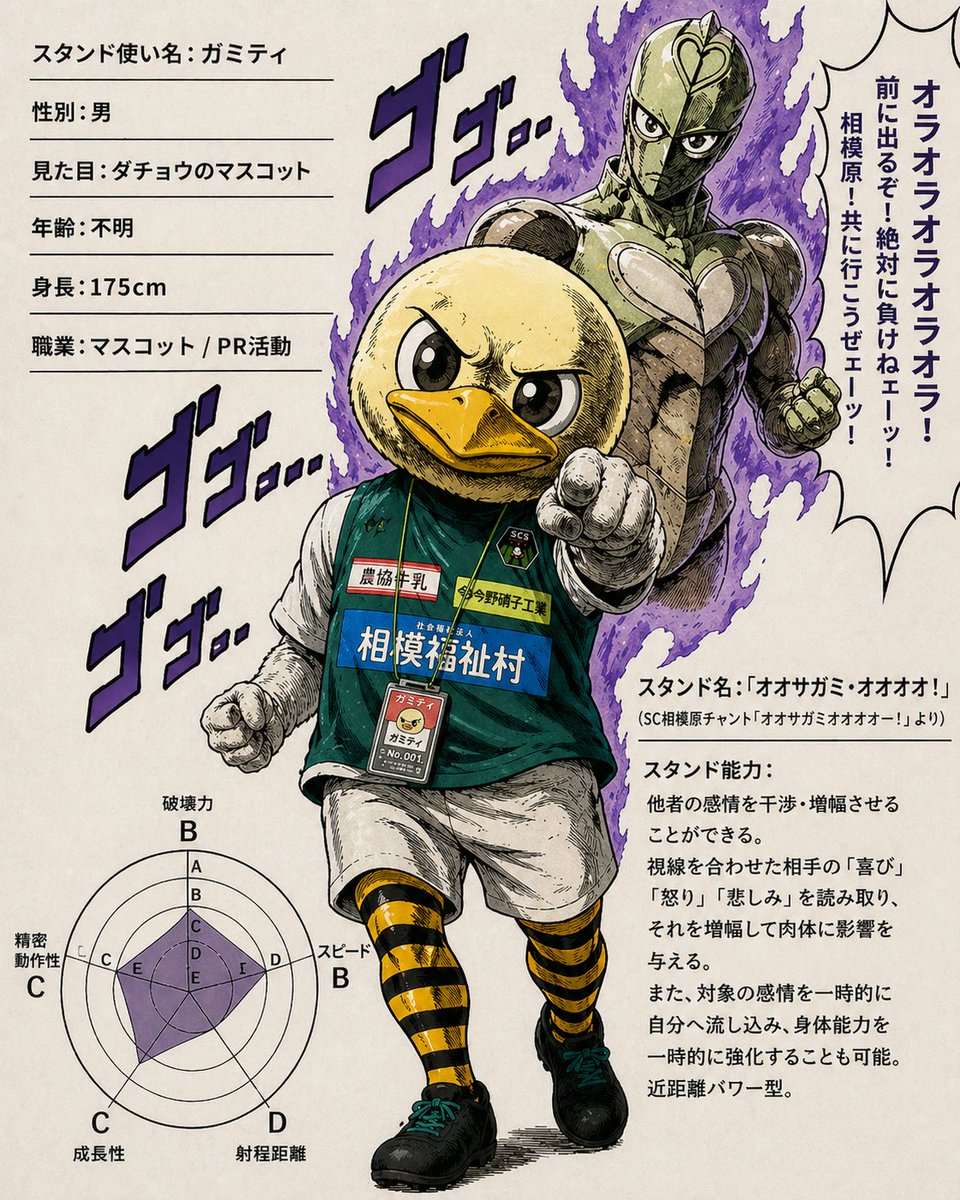
죠죠 스타일 오리 마스코트 스탠드 프로필
만화풍으로 생동감 넘치는 캐릭터 프로필 페이지로, 오리 마스코트 축구 선수와 그의 인간형 스탠드를 보여줍니다. 패러디 애니메이션 포스터나 스타일리시한 캐릭터 소개 아트에 이상적입니다.
이것은 애니메이션 & 게임 에 대한 GPT Image 2 프롬프트 사례입니다. 아래의 복사 가능한 프롬프트를 사용하여 유사한 시각 자료를 생성하고, 재사용하기 전에 Awesome GPT Image 2 Prompts 의 저작자 표시 및 상업적 사용 권한을 검토하십시오.
전체 프롬프트 세트가 필요하신가요? 다음을 사용하세요. 애니메이션 & 게임 더 많은 관련 예시를 보려면 주제 허브를 열거나 다음을 열어보세요. GPT Image 2 프롬프트 카탈로그 전체 예제 색인, 재사용 가능한 구조 및 출처 표기는 다음을 참조하십시오.
Free 1K preview
Generate one preview image instantly, no sign-up required.
2481/4000
프롬프트
복사 준비 프롬프트
A full-page manga-style parody character profile illustration on an aged off-white paper background, designed like a JoJo-inspired stand user sheet with bold ink lines, cross-hatching, dramatic posing, and stylized Japanese text. The central figure is an anthropomorphic duck mascot athlete standing in a confident forward stride, pointing directly at the viewer with one gloved hand and clenching the other fist. He has a large round pale-yellow duck head with a bright orange beak, huge glossy black eyes, and a fierce determined expression with furrowed brows. His body is human-like and athletic, wearing a dark green sleeveless soccer jersey over a white undershirt, white shorts, black shoes with teal laces, and yellow-and-black horizontal striped knee-high socks. Around his neck hangs a lanyard with an ID badge showing a small portrait icon of the duck mascot and the text “No.001”. The jersey has 4 visible sponsor-style patches and labels: “農協牛乳”, “今野硝子工業”, “相模福祉村”, and a small crest marked “SC'S”. Behind him stands his humanoid Stand, a tall muscular armored figure with a metallic olive-gold body, a heart-shaped chest emblem, narrow intimidating eyes, and a raised fist, surrounded by jagged purple spiritual flames. Add 4 large purple manga sound effect texts around the figures, each reading “ゴゴ…”, with one near the upper left of the Stand and 3 stacked vertically along the left side of the mascot. On the left side of the page, include a profile text column with 6 horizontal rule-separated lines of Japanese text: “スタンド使い名: ガミティ”, “性別: 男”, “見た目: ダチョウのマスコット”, “年齢: 不明”, “身長: 175cm”, and “職業: マスコット / PR活動”. On the right side, place a large spiky speech bubble filled with bold vertical Japanese text: “オラオラオラオラオラ! 前に出るぞ!絶対に負けねェーッ! 相模原・共に行こうぜェーッ!”. Below that, add a lower-right information block with a heading “スタンド名:『オオサガミ・オオオォ!』” and a smaller subtitle “(SC相模原チャント「オオサガミオオオォー!」より)”, followed by a paragraph headed “スタンド能力:” describing an emotional amplification power in dense Japanese body text. In the lower left corner, include a purple-filled radar chart with 6 axes labeled in Japanese: “破壊力 B”, “スピード B”, “射程距離 D”, “成長性 C”, “精密動作性 C”, and “持続力 C”. Composition should feel like a dramatic manga magazine character introduction page, with the mascot in front, the Stand looming behind, strong foreshortening, dynamic comic-book energy, and a humorous contrast between a cute sports mascot and an overwhelmingly serious supernatural battle presentation.
Best for
- - 애니메이션 & 게임 visual exploration
- - Image generation and reference-image edits
- - Reusable briefs that keep source attribution visible
Change these parts
- - Subject, product, character, or scene
- - Aspect ratio, camera, lighting, and background
- - Brand, text, color, and output constraints
Recommended model and settings
- - Model: gpt-image-2
- - Input mode: 텍스트 to 이미지
- - Aspect ratio: source
- - Commercial status: review original source
How to use this prompt
- 1. Copy the prompt and preserve its structure for the first test.
- 2. Replace the subject, context, and publishing channel.
- 3. Change one camera, lighting, or style variable per iteration.
- 4. Inspect the output, source, text, and rights before reuse.
Limitations, source, and reuse cautions
- - Generated output is an editable draft, not factual, legal, or rights evidence.
- - Review the linked source, people, brands, logos, text, and third-party media before commercial use.
Awesome GPT Image 2 Prompts 에서 가져왔습니다. 출처 표기가 필요합니다. 상업적 이용 가능 여부는 allowed 입니다. 유료 사용 전에 원저작권 정보를 확인하세요.
이 범주에 속하는 더 많은 사례
범주, 입력 방식 호환성, 품질 및 위험도에 따라 우선순위가 정해집니다.






재사용 및 출처 참고 사항
사례를 미리 확인한 후 이 안내 메시지를 안전하게 사용하십시오.
- 1.프롬프트를 복사하거나 Dovoo의 생성 버튼을 사용하여 직접 엽니다.
- 2.사용 사례에 맞게 변수, 화면 비율 및 참조 이미지를 조정하십시오.
- 3.출판 또는 유료 사용 전에 저작권, 출처 표기 요건 및 브랜드 또는 초상권 관련 위험을 확인하십시오.