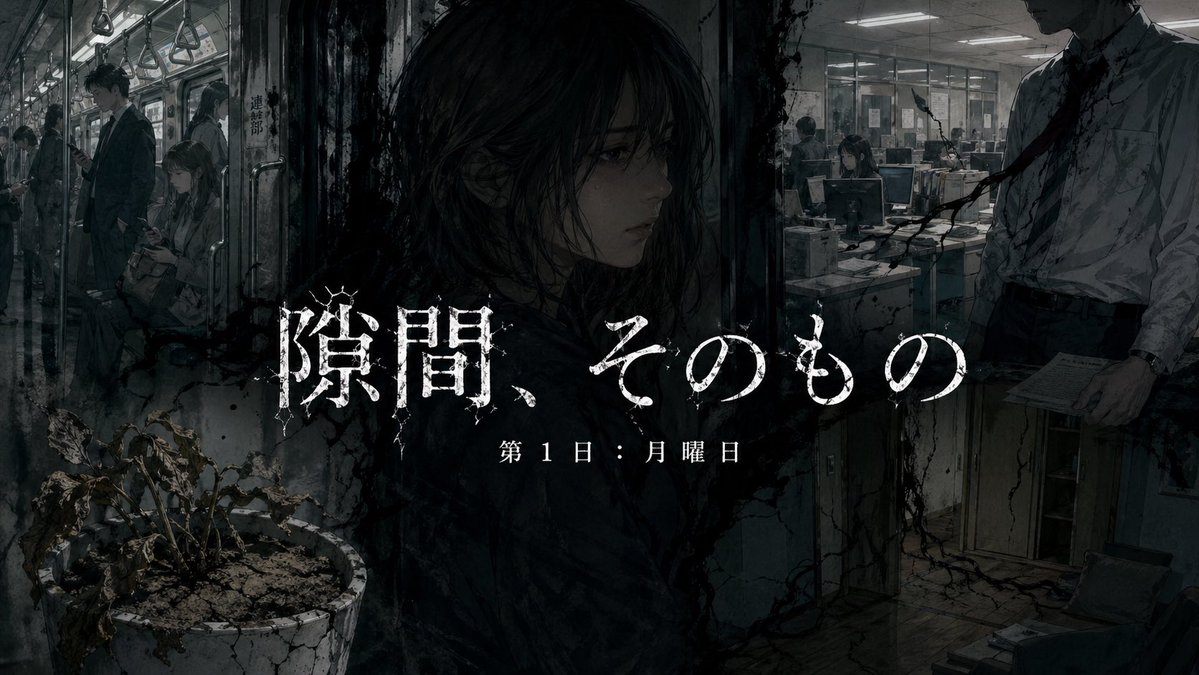
일본 도시 공포 소설 표지
통근 열차와 사무실 사이에 얼굴 없는 여성 유령이 서 있는 섬뜩한 대형 공포 표지 이미지로, 공포 소설 표지나 스릴러 홍보에 이상적입니다.
이것은 그래픽 및 포스터 에 대한 GPT Image 2 프롬프트 사례입니다. 아래의 복사 가능한 프롬프트를 사용하여 유사한 시각 자료를 생성하고, 재사용하기 전에 Awesome GPT Image 2 Prompts 의 저작자 표시 및 상업적 사용 권한을 검토하십시오.
전체 프롬프트 세트가 필요하신가요? 다음을 사용하세요. 그래픽 및 포스터 더 많은 관련 예시를 보려면 주제 허브를 열거나 다음을 열어보세요. GPT Image 2 프롬프트 카탈로그 전체 예제 색인, 재사용 가능한 구조 및 출처 표기는 다음을 참조하십시오.
Free 1K preview
Generate one preview image instantly, no sign-up required.
2330/4000
프롬프트
복사 준비 프롬프트
A dark psychological horror novel cover illustration in a cinematic, gritty digital-painting style. Create a wide, ominous composite scene set in a decaying modern Japanese environment, blending a commuter train interior on the left and a late-night office on the right, with a ghostly female figure standing in the exact center foreground, shown from behind. Her long dark hair is messy and damp-looking, and her face is completely obscured by a solid black rectangular void. The palette is cold blue-gray, charcoal, dirty white, and desaturated brown, with harsh fluorescent overhead lighting and deep shadow. On the left side, show the inside of a crowded train car with 4 visible commuters: 2 standing men in business suits holding or standing beneath hanging straps, Show every face clearly with natural, detailed facial features, and 1 more distant passenger near the door. Include a row of hanging hand straps above them, grimy metal poles, scratched windows, and a claustrophobic perspective. In the bottom left foreground, place 1 large cracked white flowerpot containing 1 dead, withered plant with curled brown leaves and dry soil. In the center, use the female apparition as a dividing figure between the two spaces; her body and hair merge into black stains and shadow. On the right side, depict a bleak office with 3 visible workers at desks in the background under fluorescent lights, computer monitors, papers, and glass partitions. In the right foreground, show 1 cropped salaryman from chest to thigh, wearing a wrinkled white shirt and loosened dark tie, holding papers at his side; his head is cut off by the top frame, adding unease. Spread black cracks, grime, ink-like tendrils, and water-stain textures across walls, floor, and image borders so the whole scene feels infected or haunted. Add subtle motionless dread, like a cursed presence hiding in everyday life. Overlay large distressed white Japanese title text across the middle: {argument name="title text" default="隙間、そのもの"}. Beneath it, add smaller white subtitle text: {argument name="subtitle text" default="Day 1: Monday"}. Use eroded, cracked, horror-style typography with rough edges, centered over the figure. The overall result should feel like a disturbing literary cover or promotional key art for a terrifying Japanese urban horror story.프롬프트 변수
프롬프트에 있는 편집 가능한 인수 자리 표시자와 해당 기본값입니다.
변하기 쉬운
title text
기본
隙間、そのもの
변하기 쉬운
subtitle text
기본
Day 1: Monday
Best for
- - 그래픽 및 포스터 visual exploration
- - Image generation and reference-image edits
- - Reusable briefs that keep source attribution visible
Change these parts
- - Subject, product, character, or scene
- - Aspect ratio, camera, lighting, and background
- - Brand, text, color, and output constraints
Recommended model and settings
- - Model: gpt-image-2
- - Input mode: 텍스트 to 이미지
- - Aspect ratio: source
- - Commercial status: review original source
How to use this prompt
- 1. Copy the prompt and preserve its structure for the first test.
- 2. Replace the subject, context, and publishing channel.
- 3. Change one camera, lighting, or style variable per iteration.
- 4. Inspect the output, source, text, and rights before reuse.
Limitations, source, and reuse cautions
- - Generated output is an editable draft, not factual, legal, or rights evidence.
- - Review the linked source, people, brands, logos, text, and third-party media before commercial use.
Awesome GPT Image 2 Prompts 에서 가져왔습니다. 출처 표기가 필요합니다. 상업적 이용 가능 여부는 allowed 입니다. 유료 사용 전에 원저작권 정보를 확인하세요.
이 범주에 속하는 더 많은 사례
범주, 입력 방식 호환성, 품질 및 위험도에 따라 우선순위가 정해집니다.






재사용 및 출처 참고 사항
사례를 미리 확인한 후 이 안내 메시지를 안전하게 사용하십시오.
- 1.프롬프트를 복사하거나 Dovoo의 생성 버튼을 사용하여 직접 엽니다.
- 2.사용 사례에 맞게 변수, 화면 비율 및 참조 이미지를 조정하십시오.
- 3.출판 또는 유료 사용 전에 저작권, 출처 표기 요건 및 브랜드 또는 초상권 관련 위험을 확인하십시오.