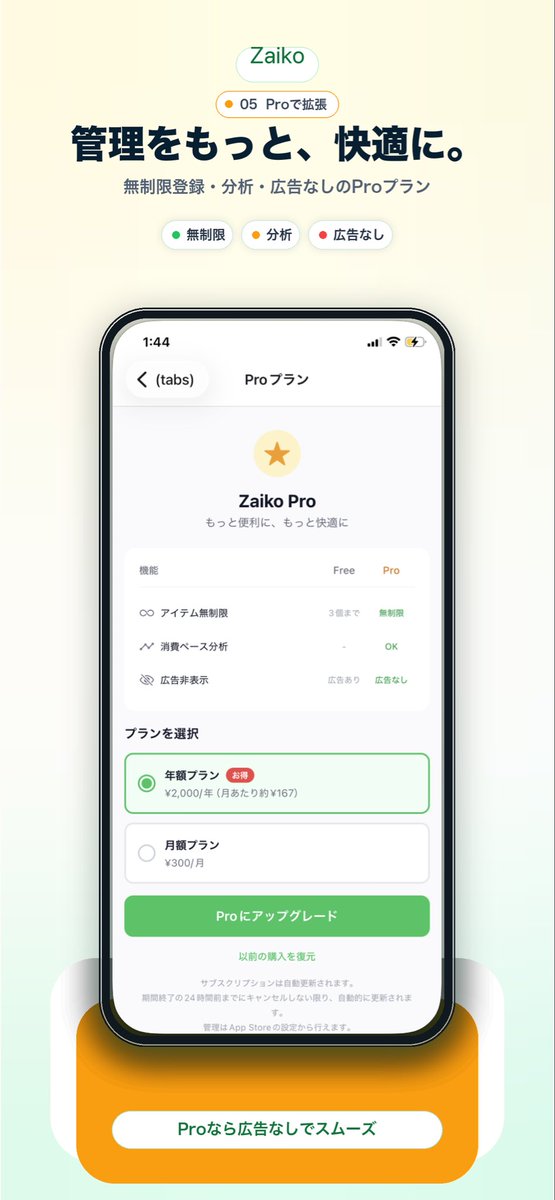
일본 프로 플랜 앱 프로모션
이 기능을 사용하면 랜딩 페이지, 앱 스토어 이미지 또는 소셜 미디어 홍보에 활용할 수 있는, 프로 구독 화면을 보여주는 세련된 일본 모바일 앱 마케팅 스크린샷을 생성할 수 있습니다.
이것은 제품 및 상업 에 대한 GPT Image 2 프롬프트 사례입니다. 아래의 복사 가능한 프롬프트를 사용하여 유사한 시각 자료를 생성하고, 재사용하기 전에 Awesome GPT Image 2 Prompts 의 저작자 표시 및 상업적 사용 권한을 검토하십시오.
전체 프롬프트 세트가 필요하신가요? 다음을 사용하세요. 제품 및 상업 더 많은 관련 예시를 보려면 주제 허브를 열거나 다음을 열어보세요. GPT Image 2 프롬프트 카탈로그 전체 예제 색인, 재사용 가능한 구조 및 출처 표기는 다음을 참조하십시오.
Free 1K preview
Generate one preview image instantly, no sign-up required.
2340/4000
프롬프트
복사 준비 프롬프트
Create a clean modern promotional hero image for a Japanese inventory management app landing page on a soft warm off-white background with a subtle pale mint gradient rising from the bottom. Center the composition vertically. At the top, place a rounded white pill logo with the text "Zaiko" in green. Directly below it, add a small rounded badge with a tiny yellow dot and the text "05 Proで拡張". Then add a large bold Japanese headline in dark navy reading "管理をもっと、快適に。" and a smaller gray subheadline reading "無制限登録・分析・広告なしのProプラン". Under that, show exactly 3 small rounded feature chips in one row: a white chip with a green dot and the label "無制限", a white chip with a yellow dot and the label "分析", and a white chip with a red dot and the label "広告なし". In the center, display a large realistic iPhone front view with thin black bezel, rounded corners, subtle reflections, and a soft shadow. On the phone screen, show an app subscription page in Japanese with the top bar time 1:44, back chevron, a left tab label "(tabs)", and the centered title "Proプラン". The page content should feature a pale gold circular icon with a gold star, the title "Zaiko Pro", and the subtitle "もっと便利に、もっと快適に". Below that, include a rounded white comparison card with 3 feature rows and 3 column headers "機能", "Free", "Pro". The 3 rows should be: "アイテム無制限" with "3個まで" under Free and "無制限" in green under Pro; "消費ベース分析" with "-" under Free and "OK" in green under Pro; "広告非表示" with "広告あり" under Free and "広告なし" in green under Pro. Beneath the card, add a section title "プランを選択" and exactly 2 stacked plan options: a selected annual plan outlined in green with a green radio button, the label "年額プラン", a small red badge "お得", and the price line "¥2,000/年 (月あたり約¥167)"; then an unselected monthly plan with a gray radio button, the label "月額プラン", and the price "¥300/月". Under the plans, place a large rounded green call-to-action button reading "Proにアップグレード". Below it, add a centered text link "以前の購入を復元" and several lines of tiny gray subscription disclaimer text. At the very bottom behind the phone, add a large rounded orange pedestal card with a white pill label containing the text "Proなら広告なしでスムーズ" in green. Use a polished startup-app marketing style, soft shadows, airy spacing, rounded UI, crisp Japanese typography, and a premium minimal aesthetic.
Best for
- - 제품 및 상업 visual exploration
- - Image generation and reference-image edits
- - Reusable briefs that keep source attribution visible
Change these parts
- - Subject, product, character, or scene
- - Aspect ratio, camera, lighting, and background
- - Brand, text, color, and output constraints
Recommended model and settings
- - Model: gpt-image-2
- - Input mode: 텍스트 to 이미지
- - Aspect ratio: source
- - Commercial status: review original source
How to use this prompt
- 1. Copy the prompt and preserve its structure for the first test.
- 2. Replace the subject, context, and publishing channel.
- 3. Change one camera, lighting, or style variable per iteration.
- 4. Inspect the output, source, text, and rights before reuse.
Limitations, source, and reuse cautions
- - Generated output is an editable draft, not factual, legal, or rights evidence.
- - Review the linked source, people, brands, logos, text, and third-party media before commercial use.
Awesome GPT Image 2 Prompts 에서 가져왔습니다. 출처 표기가 필요합니다. 상업적 이용 가능 여부는 allowed 입니다. 유료 사용 전에 원저작권 정보를 확인하세요.
이 범주에 속하는 더 많은 사례
범주, 입력 방식 호환성, 품질 및 위험도에 따라 우선순위가 정해집니다.






재사용 및 출처 참고 사항
사례를 미리 확인한 후 이 안내 메시지를 안전하게 사용하십시오.
- 1.프롬프트를 복사하거나 Dovoo의 생성 버튼을 사용하여 직접 엽니다.
- 2.사용 사례에 맞게 변수, 화면 비율 및 참조 이미지를 조정하십시오.
- 3.출판 또는 유료 사용 전에 저작권, 출처 표기 요건 및 브랜드 또는 초상권 관련 위험을 확인하십시오.