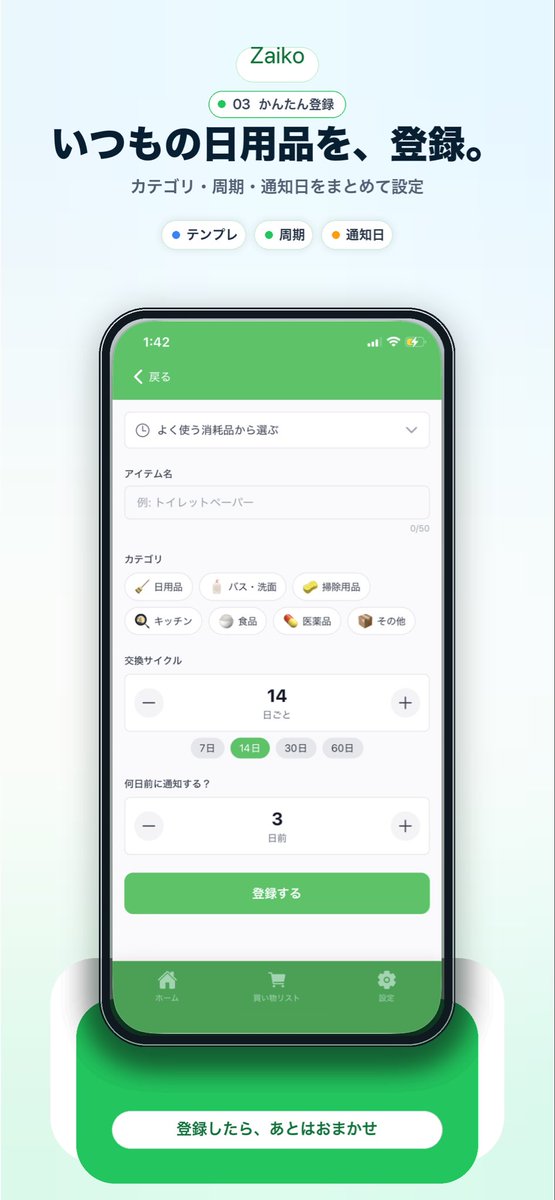
일본 재고 관리 앱 프로모션 목업
중앙에 배치된 스마트폰 UI, 눈길을 사로잡는 헤드라인, 그리고 강력한 하단 행동 유도 버튼을 갖춘 세련된 세로형 마케팅 비주얼을 일본 가정용품 재고 관리 앱에 적용했습니다.
이것은 그래픽 및 포스터 에 대한 GPT Image 2 프롬프트 사례입니다. 아래의 복사 가능한 프롬프트를 사용하여 유사한 시각 자료를 생성하고, 재사용하기 전에 Awesome GPT Image 2 Prompts 의 저작자 표시 및 상업적 사용 권한을 검토하십시오.
전체 프롬프트 세트가 필요하신가요? 다음을 사용하세요. 그래픽 및 포스터 더 많은 관련 예시를 보려면 주제 허브를 열거나 다음을 열어보세요. GPT Image 2 프롬프트 카탈로그 전체 예제 색인, 재사용 가능한 구조 및 출처 표기는 다음을 참조하십시오.
Free 1K preview
Generate one preview image instantly, no sign-up required.
3762/4000
프롬프트
복사 준비 프롬프트
{
  "type": "mobile app promotional screenshot poster",
  "app": {
    "name": "{argument name=\"app name\" default=\"Zaiko\"}",
    "platform": "iPhone-style inventory and household supplies management app",
    "theme": {
      "primary": "fresh green",
      "background": "very light mint gray gradient",
      "accent": "soft white",
      "text": "dark navy"
    }
  },
  "layout": {
    "orientation": "vertical",
    "composition": "single centered smartphone mockup with marketing copy above and CTA card below",
    "sections": [
      {
        "title": "brand header",
        "position": "top center",
        "count": 2,
        "labels": [
          "Zaiko",
          "03 かんたん登録"
        ]
      },
      {
        "title": "hero text",
        "position": "upper center",
        "count": 2,
        "labels": [
          "いつもの日用品を、登録。",
          "カテゴリ・周期・通知日をまとめて設定"
        ]
      },
      {
        "title": "feature chips",
        "position": "below hero text",
        "count": 3,
        "labels": [
          "テンプレ",
          "Cycle",
          "Reminder date"
        ]
      },
      {
        "title": "app screen form",
        "position": "inside phone center",
        "count": 10,
        "labels": [
          "戻る",
          "よく使う消耗品から選ぶ",
          "アイテム名",
          "カテゴリ",
          "交換サイクル",
          "何日前に通知する?",
          "登録する",
          "ホーム",
          "買い物リスト",
          "Settings"
        ]
      },
      {
        "title": "category chips",
        "position": "mid screen inside phone",
        "count": 7,
        "labels": [
          "Daily necessities",
          "バス・洗面",
          "Cleaning supplies",
          "キッチン",
          "Food",
          "Medicine",
          "その他"
        ]
      },
      {
        "title": "cycle options",
        "position": "lower-mid screen inside phone",
        "count": 4,
        "labels": [
          "7 days",
          "14 days",
          "30 days",
          "60 days"
        ]
      },
      {
        "title": "bottom callout",
        "position": "bottom center",
        "count": 1,
        "labels": [
          "登録したら、あとはおまかせ"
        ]
      }
    ]
  },
  "visuals": {
    "style": "clean modern Japanese startup landing page screenshot, polished UI mockup, soft shadows, rounded cards, minimal interface, App Store marketing aesthetic",
    "background": "pale mint vertical canvas with subtle glow behind the device",
    "top_badge": "small rounded white pill with green outline and green text",
    "phone": {
      "color": "black bezel",
      "angle": "front view",
      "size": "large and centered",
      "screen": {
        "header": "green app bar",
        "status_time": "1:42",
        "form_fields": [
          "dropdown selector",
          "text input with placeholder 例: トイレットペーパー",
          "category chip grid",
          "stepper for replacement cycle showing 14",
          "stepper for notification days showing 3",
          "green submit button"
        ],
        "selected_states": [
          "14 days highlighted in green",
          "green primary button",
          "green bottom tab bar"
        ]
      },
      "shadow": "soft diffuse shadow under phone"
    },
    "bottom_card": {
      "shape": "large rounded green rectangle behind a white pill button",
      "text": "{argument name=\"cta text\" default=\"登録したら、あとはおまかせ\"}",
      "effect": "soft glow and layered rounded white side panels"
    }
  },
  "text_customization": {
    "headline": "{argument name=\"headline text\" default=\"いつもの日用品を、登録。\"}",
    "subheadline": "{argument name=\"subheadline text\" default=\"カテゴリ・周期・通知日をまとめて設定\"}"
  },
  "color_customization": {
    "primary": "{argument name=\"primary color\" default=\"fresh green\"}"
  }
}
프롬프트 변수
프롬프트에 있는 편집 가능한 인수 자리 표시자와 해당 기본값입니다.
변하기 쉬운
app name
기본
Zaiko
변하기 쉬운
cta text
기본
登録したら、あとはおまかせ
변하기 쉬운
headline text
기본
いつもの日用品を、登録。
변하기 쉬운
subheadline text
기본
カテゴリ・周期・通知日をまとめて設定
변하기 쉬운
primary color
기본
fresh green
Best for
- - 그래픽 및 포스터 visual exploration
- - Image generation and reference-image edits
- - Reusable briefs that keep source attribution visible
Change these parts
- - Subject, product, character, or scene
- - Aspect ratio, camera, lighting, and background
- - Brand, text, color, and output constraints
Recommended model and settings
- - Model: gpt-image-2
- - Input mode: 텍스트 to 이미지
- - Aspect ratio: source
- - Commercial status: review original source
How to use this prompt
- 1. Copy the prompt and preserve its structure for the first test.
- 2. Replace the subject, context, and publishing channel.
- 3. Change one camera, lighting, or style variable per iteration.
- 4. Inspect the output, source, text, and rights before reuse.
Limitations, source, and reuse cautions
- - Generated output is an editable draft, not factual, legal, or rights evidence.
- - Review the linked source, people, brands, logos, text, and third-party media before commercial use.
Awesome GPT Image 2 Prompts 에서 가져왔습니다. 출처 표기가 필요합니다. 상업적 이용 가능 여부는 allowed 입니다. 유료 사용 전에 원저작권 정보를 확인하세요.
이 범주에 속하는 더 많은 사례
범주, 입력 방식 호환성, 품질 및 위험도에 따라 우선순위가 정해집니다.






재사용 및 출처 참고 사항
사례를 미리 확인한 후 이 안내 메시지를 안전하게 사용하십시오.
- 1.프롬프트를 복사하거나 Dovoo의 생성 버튼을 사용하여 직접 엽니다.
- 2.사용 사례에 맞게 변수, 화면 비율 및 참조 이미지를 조정하십시오.
- 3.출판 또는 유료 사용 전에 저작권, 출처 표기 요건 및 브랜드 또는 초상권 관련 위험을 확인하십시오.