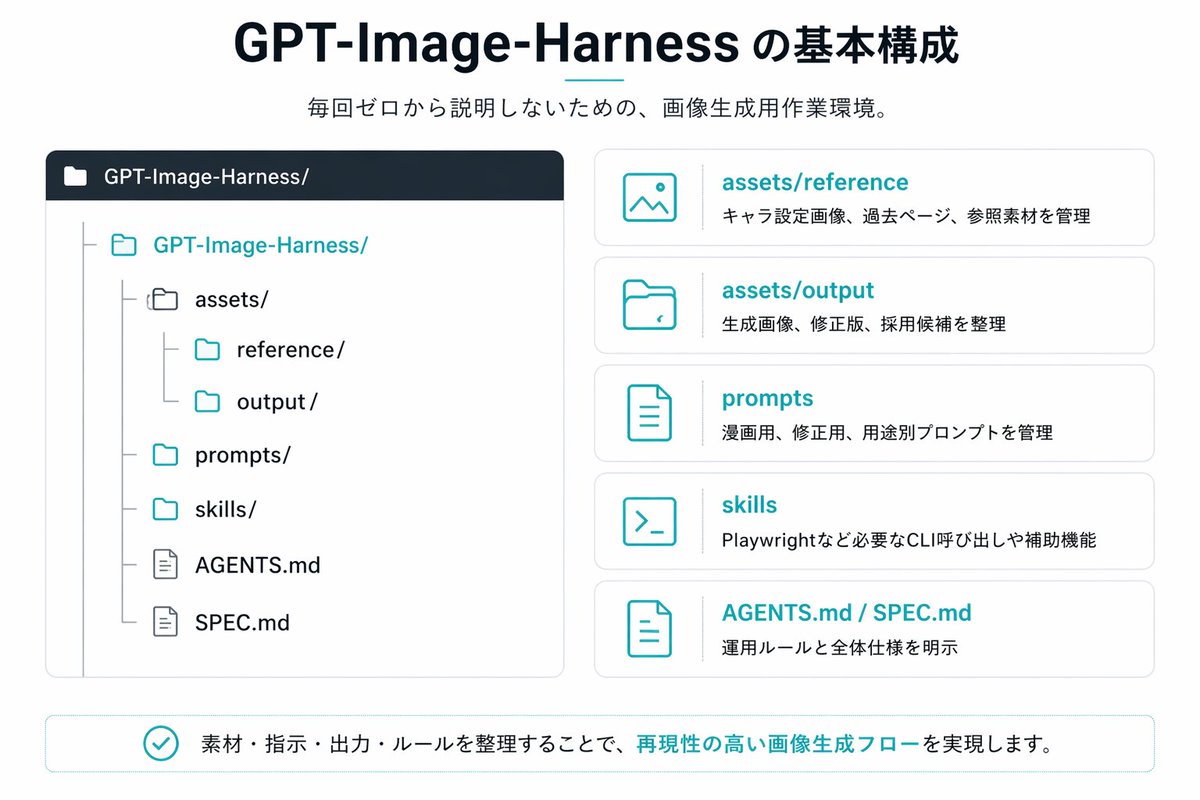
일본 GPT 이미지 하네스 인포그래픽
깔끔한 일본식 프레젠테이션 스타일의 인포그래픽으로, 저장소 구조와 5개의 설명 카드를 보여주며, AI 이미지 생성 워크플로 또는 프로젝트 폴더 시스템을 문서화하는 데 이상적입니다.
이것은 그래픽 및 포스터 에 대한 GPT Image 2 프롬프트 사례입니다. 아래의 복사 가능한 프롬프트를 사용하여 유사한 시각 자료를 생성하고, 재사용하기 전에 Awesome GPT Image 2 Prompts 의 저작자 표시 및 상업적 사용 권한을 검토하십시오.
전체 프롬프트 세트가 필요하신가요? 다음을 사용하세요. 그래픽 및 포스터 더 많은 관련 예시를 보려면 주제 허브를 열거나 다음을 열어보세요. GPT Image 2 프롬프트 카탈로그 전체 예제 색인, 재사용 가능한 구조 및 출처 표기는 다음을 참조하십시오.
Free 1K preview
Generate one preview image instantly, no sign-up required.
3201/4000
프롬프트
복사 준비 프롬프트
{
  "type": "Japanese infographic slide",
  "style": "clean flat vector presentation graphic, minimal corporate design, white background, dark navy and teal accent colors, subtle light gray borders, crisp typography, balanced spacing",
  "canvas": {
    "aspect_ratio": "16:9"
  },
  "title_block": {
    "headline": "{argument name=\"headline text\" default=\"GPT-Image-Harness の基本構成\"}",
    "subheadline": "{argument name=\"subheadline text\" default=\"毎回ゼロから説明しないための、画像生成用作業環境。\"}",
    "headline_alignment": "center top",
    "headline_style": "bold sans-serif, very large, dark navy",
    "accent": "short horizontal teal line under headline"
  },
  "layout": {
    "sections": [
      {
        "title": "repository tree",
        "position": "left large panel",
        "count": 1,
        "panel_style": "rounded rectangle with light gray outline and dark navy header bar",
        "header_label": "GPT-Image-Harness/",
        "content": {
          "type": "folder tree",
          "root": "GPT-Image-Harness/",
          "items_count": 8,
          "items": [
            "assets/",
            "reference/",
            "output/",
            "prompts/",
            "skills/",
            "AGENTS.md",
            "SPEC.md"
          ],
          "hierarchy": "assets contains reference and output; root also contains prompts, skills, AGENTS.md, and SPEC.md",
          "icon_style": "outline folder and document icons, teal for active folders, gray for nested guides"
        }
      },
      {
        "title": "feature cards",
        "position": "right stacked column",
        "count": 5,
        "panel_style": "five separate rounded white cards with light gray outline, evenly spaced vertically",
        "labels": [
          "assets/reference",
          "assets/output",
          "prompts",
          "skills",
          "AGENTS.md / SPEC.md"
        ],
        "descriptions": [
          "キャラ設定画像、過去ページ、参照素材を管理",
          "生成画像、修正版、採用候補を整理",
          "漫画用、修正版、用途別プロンプトを管理",
          "Playwrightなど必要なCLI呼び出しや補助機能",
          "運用ルールと全体仕様を明示"
        ],
        "icons": [
          "image icon",
          "folder icon",
          "document icon",
          "terminal icon",
          "document icon"
        ],
        "title_color": "teal",
        "body_color": "dark gray"
      },
      {
        "title": "bottom message",
        "position": "bottom full width banner",
        "count": 1,
        "panel_style": "rounded rectangle with light teal outline",
        "content": {
          "icon": "teal circled checkmark",
          "text": "{argument name=\"footer message\" default=\"素材・指示・出力・ルールを整理することで、再現性の高い画像生成フローを実現します。\"}",
          "emphasis": "the phrase 再現性の高い画像生成フロー is teal and bold"
        }
      }
    ],
    "composition": "title and subtitle centered at top, large repository diagram on left, five explanatory cards on right, summary banner across bottom"
  },
  "text_language": "Japanese",
  "visual_details": {
    "left_panel_header_gradient": "dark navy to slightly lighter navy",
    "folder_tree_line_color": "light gray",
    "teal_hex_approx": "#22B8C7",
    "navy_hex_approx": "#0F2236",
    "background": "very light gray-white"
  }
}
프롬프트 변수
프롬프트에 있는 편집 가능한 인수 자리 표시자와 해당 기본값입니다.
변하기 쉬운
headline text
기본
GPT-Image-Harness の基本構成
변하기 쉬운
subheadline text
기본
毎回ゼロから説明しないための、画像生成用作業環境。
변하기 쉬운
footer message
기본
素材・指示・出力・ルールを整理することで、再現性の高い画像生成フローを実現します。
Best for
- - 그래픽 및 포스터 visual exploration
- - Image generation and reference-image edits
- - Reusable briefs that keep source attribution visible
Change these parts
- - Subject, product, character, or scene
- - Aspect ratio, camera, lighting, and background
- - Brand, text, color, and output constraints
Recommended model and settings
- - Model: gpt-image-2
- - Input mode: 텍스트 to 이미지
- - Aspect ratio: source
- - Commercial status: review original source
How to use this prompt
- 1. Copy the prompt and preserve its structure for the first test.
- 2. Replace the subject, context, and publishing channel.
- 3. Change one camera, lighting, or style variable per iteration.
- 4. Inspect the output, source, text, and rights before reuse.
Limitations, source, and reuse cautions
- - Generated output is an editable draft, not factual, legal, or rights evidence.
- - Review the linked source, people, brands, logos, text, and third-party media before commercial use.
Awesome GPT Image 2 Prompts 에서 가져왔습니다. 출처 표기가 필요합니다. 상업적 이용 가능 여부는 allowed 입니다. 유료 사용 전에 원저작권 정보를 확인하세요.
이 범주에 속하는 더 많은 사례
범주, 입력 방식 호환성, 품질 및 위험도에 따라 우선순위가 정해집니다.






재사용 및 출처 참고 사항
사례를 미리 확인한 후 이 안내 메시지를 안전하게 사용하십시오.
- 1.프롬프트를 복사하거나 Dovoo의 생성 버튼을 사용하여 직접 엽니다.
- 2.사용 사례에 맞게 변수, 화면 비율 및 참조 이미지를 조정하십시오.
- 3.출판 또는 유료 사용 전에 저작권, 출처 표기 요건 및 브랜드 또는 초상권 관련 위험을 확인하십시오.