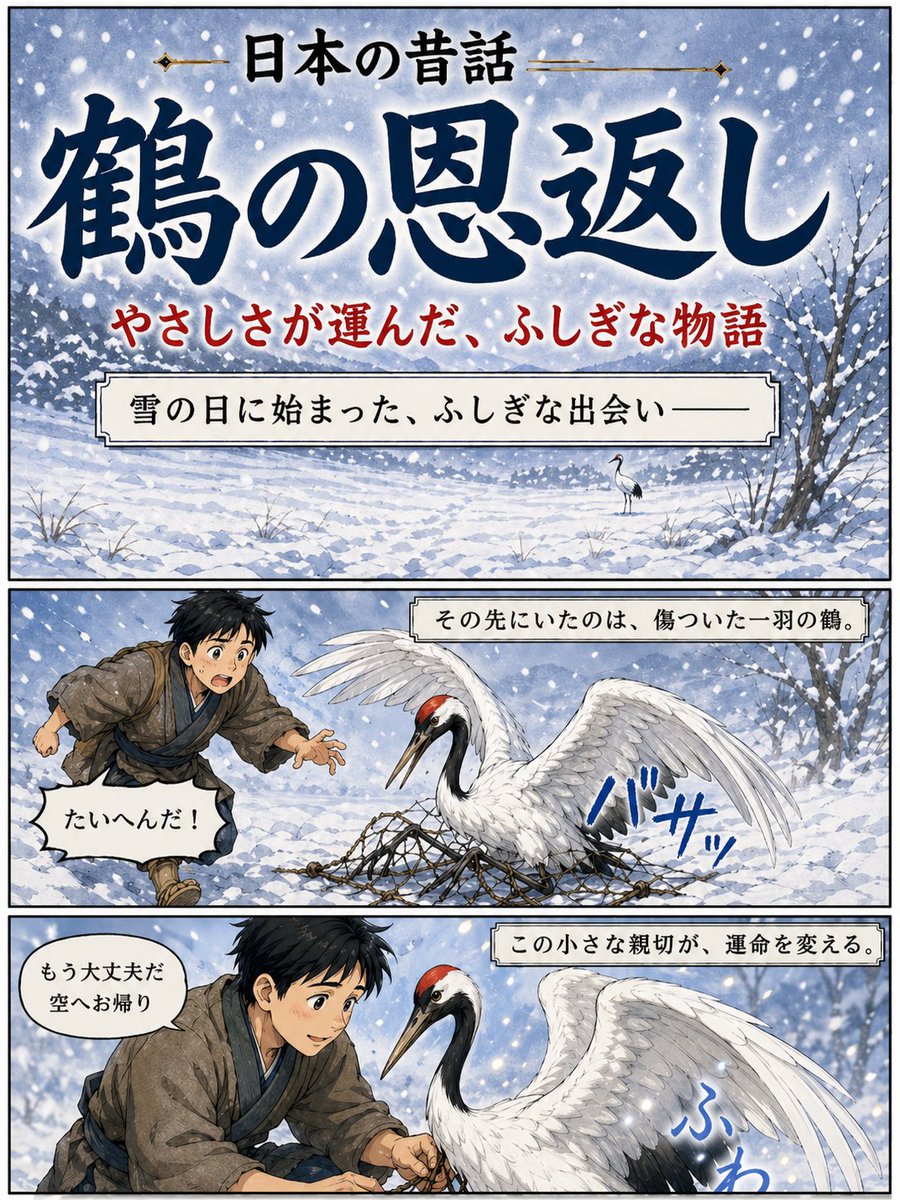
일본 학 설화 포스터
눈 덮인 배경의 만화책 형식으로 표현된 일본 전래 동화 '은혜로운 학'을 그린 3컷 일러스트 포스터입니다. 스토리텔링 표지나 문화 관련 스토리 비주얼로 활용하기에 적합합니다.
이것은 일러스트레이션 및 미술 에 대한 GPT Image 2 프롬프트 사례입니다. 아래의 복사 가능한 프롬프트를 사용하여 유사한 시각 자료를 생성하고, 재사용하기 전에 Awesome GPT Image 2 Prompts 의 저작자 표시 및 상업적 사용 권한을 검토하십시오.
전체 프롬프트 세트가 필요하신가요? 다음을 사용하세요. 일러스트레이션 및 미술 더 많은 관련 예시를 보려면 주제 허브를 열거나 다음을 열어보세요. GPT Image 2 프롬프트 카탈로그 전체 예제 색인, 재사용 가능한 구조 및 출처 표기는 다음을 참조하십시오.
Free 1K preview
Generate one preview image instantly, no sign-up required.
3419/4000
프롬프트
복사 준비 프롬프트
{
  "type": "Japanese folktale manga-style poster",
  "style": "dramatic watercolor anime illustration with inked outlines, vintage storybook poster design, soft snowy atmosphere, vertical three-panel layout with black panel borders",
  "theme": "kindness, winter, folklore, gratitude",
  "text": {
    "topHeader": "日本の昔話",
    "mainTitle": "{argument name=\"title text\" default=\"鶴の恩返し\"}",
    "subtitle": "やさしさが運んだ、ふしぎな物語"
  },
  "layout": {
    "orientation": "portrait",
    "sections": [
      {
        "title": "cover panel",
        "position": "top",
        "count": 1,
        "labels": [
          "title area",
          "subtitle line",
          "narration box"
        ]
      },
      {
        "title": "story panel 1",
        "position": "middle",
        "count": 1,
        "labels": [
          "boy running in snow",
          "injured crane in net",
          "sound effect",
          "speech bubble",
          "caption box"
        ]
      },
      {
        "title": "story panel 2",
        "position": "bottom",
        "count": 1,
        "labels": [
          "boy helping crane",
          "crane close-up",
          "sound effect",
          "speech bubble",
          "caption box"
        ]
      }
    ],
    "panelCount": 3
  },
  "scene": {
    "season": "winter",
    "weather": "heavy falling snow with large visible flakes",
    "background": "snow-covered field with distant tree line, pale blue-gray sky, bare winter trees at the right edge, uneven snowdrifts and sparse grasses poking through snow"
  },
  "topPanel": {
    "composition": "large title-dominant cover image over a snowy landscape",
    "narrationBox": "雪の日に始まった、ふしぎな出会い——",
    "backgroundDetail": "a single small crane standing in the snowy distance near the center-right"
  },
  "middlePanel": {
    "caption": "その先にいたのは、傷ついた一羽の鶴。",
    "characters": [
      {
        "role": "boy",
        "count": 1,
        "appearance": "young Japanese boy in rustic old-fashioned village clothing, messy short black hair, brown kimono-style outer robe, blue inner layer and sash, running urgently from the left with one hand reaching forward"
      },
      {
        "role": "crane",
        "count": 1,
        "appearance": "red-crowned crane with white body, black neck and tail accents, one wing raised, trapped in a rope net spread across the snow"
      }
    ],
    "speechBubble": "たいへんだ!",
    "soundEffect": "バサッ"
  },
  "bottomPanel": {
    "caption": "この小さな親切が、運命を変える。",
    "characters": [
      {
        "role": "boy",
        "count": 1,
        "appearance": "the same boy kneeling and carefully loosening the net with both hands, leaning close to the bird"
      },
      {
        "role": "crane",
        "count": 1,
        "appearance": "large red-crowned crane facing left, calmer now, wings partially lifted, feathers detailed and luminous against the snow"
      }
    ],
    "speechBubble": "もう大丈夫だ 空へお帰り",
    "soundEffect": "ふわ"
  },
  "colorPalette": {
    "primary": [
      "indigo blue",
      "snow white",
      "soft gray",
      "muted brown"
    ],
    "accents": [
      "crane crown red",
      "subtitle red",
      "sound effect blue"
    ]
  },
  "rendering": "highly polished illustration, elegant Japanese calligraphy for the main title, readable printed Japanese text in captions and speech balloons, cinematic contrast between white snow and deep blue lettering"
}
프롬프트 변수
프롬프트에 있는 편집 가능한 인수 자리 표시자와 해당 기본값입니다.
변하기 쉬운
title text
기본
鶴の恩返し
Best for
- - 일러스트레이션 및 미술 visual exploration
- - Image generation and reference-image edits
- - Reusable briefs that keep source attribution visible
Change these parts
- - Subject, product, character, or scene
- - Aspect ratio, camera, lighting, and background
- - Brand, text, color, and output constraints
Recommended model and settings
- - Model: gpt-image-2
- - Input mode: 텍스트 to 이미지
- - Aspect ratio: source
- - Commercial status: review original source
How to use this prompt
- 1. Copy the prompt and preserve its structure for the first test.
- 2. Replace the subject, context, and publishing channel.
- 3. Change one camera, lighting, or style variable per iteration.
- 4. Inspect the output, source, text, and rights before reuse.
Limitations, source, and reuse cautions
- - Generated output is an editable draft, not factual, legal, or rights evidence.
- - Review the linked source, people, brands, logos, text, and third-party media before commercial use.
Awesome GPT Image 2 Prompts 에서 가져왔습니다. 출처 표기가 필요합니다. 상업적 이용 가능 여부는 allowed 입니다. 유료 사용 전에 원저작권 정보를 확인하세요.
이 범주에 속하는 더 많은 사례
범주, 입력 방식 호환성, 품질 및 위험도에 따라 우선순위가 정해집니다.






재사용 및 출처 참고 사항
사례를 미리 확인한 후 이 안내 메시지를 안전하게 사용하십시오.
- 1.프롬프트를 복사하거나 Dovoo의 생성 버튼을 사용하여 직접 엽니다.
- 2.사용 사례에 맞게 변수, 화면 비율 및 참조 이미지를 조정하십시오.
- 3.출판 또는 유료 사용 전에 저작권, 출처 표기 요건 및 브랜드 또는 초상권 관련 위험을 확인하십시오.