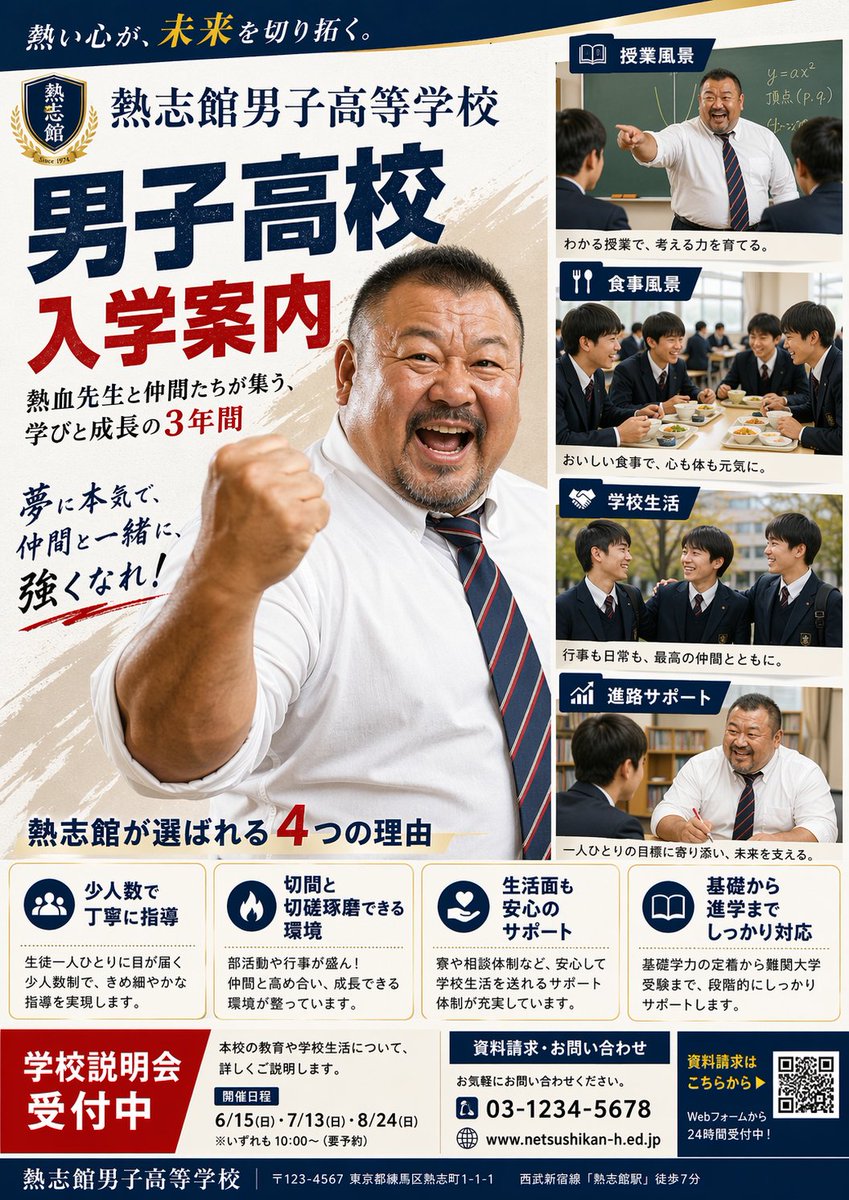
일본 남자 고등학교 입학 안내 포스터
일본 고등학교의 입학 홍보 자료로 활용할 수 있는, 동기 부여를 해주는 교사의 모습, 학생 생활 사진, 그리고 상세한 입학 정보가 담긴 사실적인 학교 소개 포스터입니다.
이것은 그래픽 및 포스터 에 대한 GPT Image 2 프롬프트 사례입니다. 아래의 복사 가능한 프롬프트를 사용하여 유사한 시각 자료를 생성하고, 재사용하기 전에 Awesome GPT Image 2 Prompts 의 저작자 표시 및 상업적 사용 권한을 검토하십시오.
전체 프롬프트 세트가 필요하신가요? 다음을 사용하세요. 그래픽 및 포스터 더 많은 관련 예시를 보려면 주제 허브를 열거나 다음을 열어보세요. GPT Image 2 프롬프트 카탈로그 전체 예제 색인, 재사용 가능한 구조 및 출처 표기는 다음을 참조하십시오.
Free 1K preview
Generate one preview image instantly, no sign-up required.
4000/4000
프롬프트
복사 준비 프롬프트
{
  "type": "Japanese high school admissions poster",
  "style": "formal school promotional flyer, clean editorial layout, realistic photography collage, bold Japanese typography, navy blue and red color scheme with gold accents, portrait-oriented A4 poster design",
  "subject": {
    "institution": "{argument name=\"school name\" default=\"Retsushikan Boys' High School\"}",
    "theme": "boys high school entrance guide",
    "slogan_top": "熱い心が、未来を切り拓く。",
    "main_headline_1": "Boys' High School",
    "main_headline_2": "Admission Guide",
    "subheadline": "熱血先生と仲間たちが集う、学びと成長の3年間",
    "calligraphy_copy": "夢に本気で、仲間と一緒に、強くなれ!",
    "hero": "a large, muscular, passionate male teacher in a white dress shirt with rolled sleeves and a navy-and-red striped tie, standing in the center-left foreground, raising one clenched fist toward the camera in an encouraging pose, cropped from mid torso upward, energetic and motivational expression",
    "crest": {
      "position": "top left",
      "shape": "shield emblem with laurel wreath",
      "text": "Ketsushikan",
      "detail": "Since 1974"
    }
  },
  "layout": {
    "background": "off-white paper texture with diagonal beige brush-stroke accents",
    "sections": [
      {
        "title": "Classroom Scenery",
        "position": "top right",
        "count": 1,
        "labels": [
          "teacher pointing in front of a chalkboard with equations while two male students listen"
        ]
      },
      {
        "title": "Dining Scenery",
        "position": "upper mid-right",
        "count": 1,
        "labels": [
          "five male students in school uniforms eating lunch together in a cafeteria"
        ]
      },
      {
        "title": "Campus Life",
        "position": "lower mid-right",
        "count": 1,
        "labels": [
          "three male students in uniforms talking outdoors on campus"
        ]
      },
      {
        "title": "進路サポート",
        "position": "bottom right",
        "count": 1,
        "labels": [
          "one-on-one counseling between a teacher and a male student at a desk"
        ]
      },
      {
        "title": "熱志館が選ばれる4つの理由",
        "position": "bottom center",
        "count": 4,
        "labels": [
          "少人数で丁寧に指導",
          "切磋と切磋琢磨できる環境",
          "生活面も安心のサポート",
          "基礎から進学までしっかり対応"
        ]
      },
      {
        "title": "School Information Session Registration Open",
        "position": "bottom left",
        "count": 1,
        "labels": [
          "large red registration block"
        ]
      },
      {
        "title": "Event Date",
        "position": "bottom lower-left center",
        "count": 3,
        "labels": [
          "6/15 (Sun)",
          "7/13 (Sun)",
          "8/24 (Sun)"
        ]
      },
      {
        "title": "資料請求・お問い合わせ",
        "position": "bottom center-right",
        "count": 3,
        "labels": [
          "03-1234-5678",
          "www.netsushikan-h.ed.jp",
          "お気軽にお問い合わせください。"
        ]
      },
      {
        "title": "資料請求はこちらから",
        "position": "bottom right",
        "count": 2,
        "labels": [
          "QR code",
          "Webフォームから24時間受付中!"
        ]
      }
    ],
    "composition": "very large main headline on the left half, dominant hero teacher overlapping the center, four stacked rectangular photo panels on the right with blue title tabs and white icons, four rounded feature boxes in a horizontal row near the bottom, footer bar spanning the width"
  },
  "details": {
    "feature_boxes": [
      {
        "icon": "group of people",
        "heading": "少人数で丁寧に指導",
        "body": "生徒一人ひとりに目が届く少人数制で、きめ細やかな指導を実現します。"
      },
      {
        "icon": "flame",
        "heading": "切磋と切磋琢磨できる環境",
        "body": "部活動や行事が盛ん!仲間と高め合い、成長できる環境が整っています。"
      },
      {
        "icon": "heart in hand",
        "heading": "生活面も安心のサポート",
        "body": "寮や相談体制など、安心して学校生活を送れるサポート体制が充実しています。"
      },
      {
        "icon": "open book",
        "heading": "基礎から進学までしっかり対応",
        "body": "基礎学力の定着から難関大学受験まで、段階的にしっかりサポートします。"
      }
    ],
    "footer_text": [
      "Retsushikan Boys' High School",
      "〒123-4567 Nerima-ku, Tokyo 1-1-1 Atsushi-cho",
      "7-minute walk from Seibu Shinjuku Line \"Atsushi-kan Station\""
    ],
    "photo_style": "realistic Japanese school brochure photography, adult teacher and male high school students in dark navy uniforms with white shirts and striped ties, warm natural lighting",
    "graphic_elements": "blue ribbon-like section headers with white pictogram icons, bold serif Japanese display text for the main title, red emphasis numerals, neat grid alignment, brochure-like professionalism"
  },
  "customization": {
    "headline": "{argument name=\"headline text\" default=\"Admission Guide\"}",
    "phone": "{argument name=\"phone number\" default=\"03-1234-5678\"}",
    "website": "{argument name=\"website\" default=\"www.netsushikan-h.ed.jp\"}",
    "event_banner": "{argument name=\"event banner text\" default=\"School Information Session Registration Open\"}"
  }
}
프롬프트 변수
프롬프트에 있는 편집 가능한 인수 자리 표시자와 해당 기본값입니다.
변하기 쉬운
school name
기본
Retsushikan Boys' High School
변하기 쉬운
headline text
기본
Admission Guide
변하기 쉬운
phone number
기본
03-1234-5678
변하기 쉬운
website
기본
www.netsushikan-h.ed.jp
변하기 쉬운
event banner text
기본
School Information Session Registration Open
Best for
- - 그래픽 및 포스터 visual exploration
- - Image generation and reference-image edits
- - Reusable briefs that keep source attribution visible
Change these parts
- - Subject, product, character, or scene
- - Aspect ratio, camera, lighting, and background
- - Brand, text, color, and output constraints
Recommended model and settings
- - Model: gpt-image-2
- - Input mode: 텍스트 to 이미지
- - Aspect ratio: source
- - Commercial status: review original source
How to use this prompt
- 1. Copy the prompt and preserve its structure for the first test.
- 2. Replace the subject, context, and publishing channel.
- 3. Change one camera, lighting, or style variable per iteration.
- 4. Inspect the output, source, text, and rights before reuse.
Limitations, source, and reuse cautions
- - Generated output is an editable draft, not factual, legal, or rights evidence.
- - Review the linked source, people, brands, logos, text, and third-party media before commercial use.
Awesome GPT Image 2 Prompts 에서 가져왔습니다. 출처 표기가 필요합니다. 상업적 이용 가능 여부는 allowed 입니다. 유료 사용 전에 원저작권 정보를 확인하세요.
이 범주에 속하는 더 많은 사례
범주, 입력 방식 호환성, 품질 및 위험도에 따라 우선순위가 정해집니다.






재사용 및 출처 참고 사항
사례를 미리 확인한 후 이 안내 메시지를 안전하게 사용하십시오.
- 1.프롬프트를 복사하거나 Dovoo의 생성 버튼을 사용하여 직접 엽니다.
- 2.사용 사례에 맞게 변수, 화면 비율 및 참조 이미지를 조정하십시오.
- 3.출판 또는 유료 사용 전에 저작권, 출처 표기 요건 및 브랜드 또는 초상권 관련 위험을 확인하십시오.