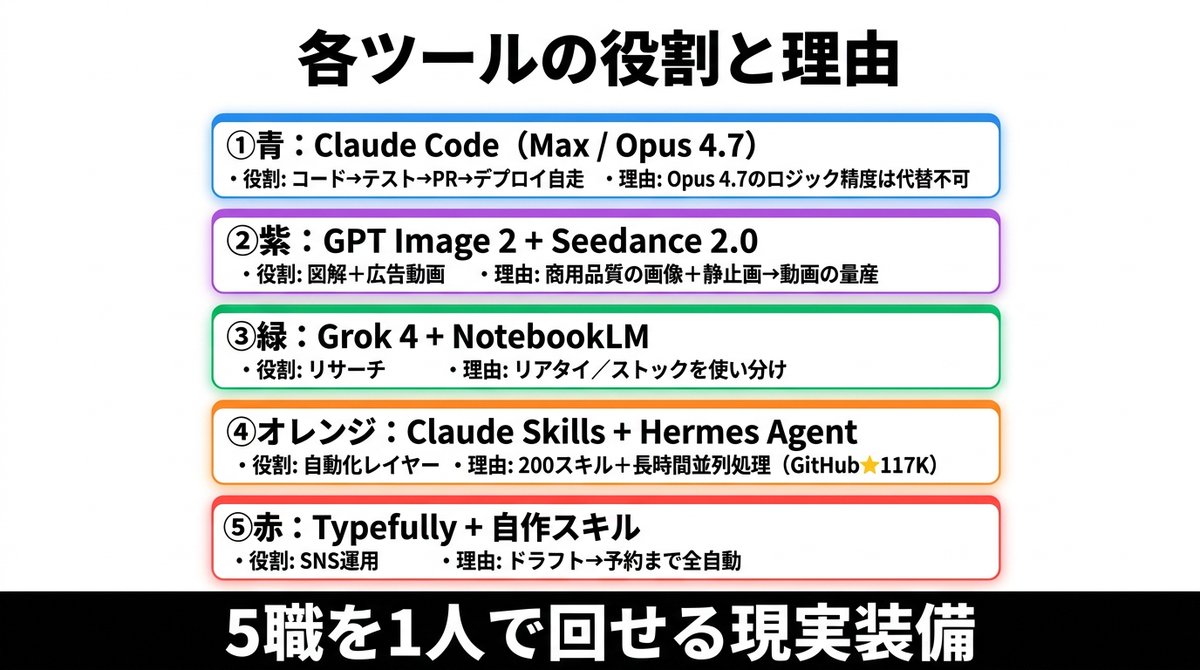
일본 AI 도구의 역할 인포그래픽
다섯 가지 색상으로 구분된 AI 도구 스택과 각 도구의 역할 및 이유를 보여주는 깔끔한 일본어 인포그래픽 슬라이드입니다. 소셜 미디어 게시물, 프레젠테이션 및 비즈니스 논평에 적합합니다.
이것은 그래픽 및 포스터 에 대한 GPT Image 2 프롬프트 사례입니다. 아래의 복사 가능한 프롬프트를 사용하여 유사한 시각 자료를 생성하고, 재사용하기 전에 Awesome GPT Image 2 Prompts 의 저작자 표시 및 상업적 사용 권한을 검토하십시오.
전체 프롬프트 세트가 필요하신가요? 다음을 사용하세요. 그래픽 및 포스터 더 많은 관련 예시를 보려면 주제 허브를 열거나 다음을 열어보세요. GPT Image 2 프롬프트 카탈로그 전체 예제 색인, 재사용 가능한 구조 및 출처 표기는 다음을 참조하십시오.
Free 1K preview
Generate one preview image instantly, no sign-up required.
3407/4000
프롬프트
복사 준비 프롬프트
{
  "type": "Japanese infographic poster",
  "style": "clean business presentation slide, minimalist flat design, crisp vector-like typography, white background with subtle light gray tone, centered composition, high contrast, social-media-friendly landscape layout",
  "canvas": {
    "aspect_ratio": "2:1",
    "size": "wide horizontal"
  },
  "headline": {
    "text": "{argument name=\"headline text\" default=\"各ツールの役割と理由\"}",
    "position": "top center",
    "font": "bold Japanese sans-serif",
    "color": "black",
    "size": "very large"
  },
  "layout": {
    "sections": [
      {
        "title": "① Blue: Claude Code (Max / Opus 4.7)",
        "position": "upper middle",
        "count": 2,
        "labels": [
          "・役割: コード→テスト→PR→デプロイ自走",
          "・理由: Opus 4.7のロジック精度は代替不可"
        ],
        "container": "rounded white rectangle with blue outline, faint blue glow, soft drop shadow"
      },
      {
        "title": "② Purple: GPT Image 2 + Seedance 2.0",
        "position": "upper mid-lower",
        "count": 2,
        "labels": [
          "・役割: 図解+広告動画",
          "・理由: 商用品質の画像+静止画→動画の量産"
        ],
        "container": "rounded white rectangle with purple outline, faint purple glow, soft drop shadow"
      },
      {
        "title": "③ Green: Grok 4 + NotebookLM",
        "position": "center",
        "count": 2,
        "labels": [
          "・役割: リサーチ",
          "・理由: リアタイ/ストックを使い分け"
        ],
        "container": "rounded white rectangle with green outline, faint green glow, soft drop shadow"
      },
      {
        "title": "④オレンジ:Claude Skills + Hermes Agent",
        "position": "lower mid-upper",
        "count": 2,
        "labels": [
          "・役割: 自動化レイヤー",
          "・理由: 200スキル+長時間並列処理(GitHub★117K)"
        ],
        "container": "rounded white rectangle with orange outline, faint orange glow, soft drop shadow"
      },
      {
        "title": "⑤赤:Typefully + 自作スキル",
        "position": "lower middle",
        "count": 2,
        "labels": [
          "・役割: SNS運用",
          "・理由: ドラフト→予約まで全自動"
        ],
        "container": "rounded white rectangle with red outline, faint red glow, soft drop shadow"
      }
    ],
    "section_count": 5,
    "arrangement": "five evenly spaced horizontal cards stacked vertically in the center, all same width, each with rounded corners and colored border matching the numbered color name"
  },
  "footer": {
    "text": "{argument name=\"footer text\" default=\"5職を1人で回せる現実装備\"}",
    "position": "bottom full width",
    "background": "solid black bar",
    "font": "extra bold Japanese sans-serif",
    "color": "white",
    "size": "very large"
  },
  "typography": {
    "body_font": "bold Japanese sans-serif",
    "body_color": "black",
    "emphasis": "tool names in heavier bold, compact spacing, left-aligned inside each card"
  },
  "colors": {
    "card_borders": [
      "blue",
      "purple",
      "green",
      "orange",
      "red"
    ],
    "background": "white to very light gray",
    "text": "black",
    "footer_bg": "black",
    "footer_text": "white"
  },
  "customization": {
    "item_1_tool": "{argument name=\"first tool line\" default=\"Claude Code(Max / Opus 4.7)\"}",
    "item_2_tool": "{argument name=\"second tool line\" default=\"GPT Image 2 + Seedance 2.0\"}",
    "item_3_tool": "{argument name=\"third tool line\" default=\"Grok 4 + NotebookLM\"}"
  }
}
프롬프트 변수
프롬프트에 있는 편집 가능한 인수 자리 표시자와 해당 기본값입니다.
변하기 쉬운
headline text
기본
各ツールの役割と理由
변하기 쉬운
footer text
기본
5職を1人で回せる現実装備
변하기 쉬운
first tool line
기본
Claude Code(Max / Opus 4.7)
변하기 쉬운
second tool line
기본
GPT Image 2 + Seedance 2.0
변하기 쉬운
third tool line
기본
Grok 4 + NotebookLM
Best for
- - 그래픽 및 포스터 visual exploration
- - Image generation and reference-image edits
- - Reusable briefs that keep source attribution visible
Change these parts
- - Subject, product, character, or scene
- - Aspect ratio, camera, lighting, and background
- - Brand, text, color, and output constraints
Recommended model and settings
- - Model: gpt-image-2
- - Input mode: 텍스트 to 이미지
- - Aspect ratio: source
- - Commercial status: review original source
How to use this prompt
- 1. Copy the prompt and preserve its structure for the first test.
- 2. Replace the subject, context, and publishing channel.
- 3. Change one camera, lighting, or style variable per iteration.
- 4. Inspect the output, source, text, and rights before reuse.
Limitations, source, and reuse cautions
- - Generated output is an editable draft, not factual, legal, or rights evidence.
- - Review the linked source, people, brands, logos, text, and third-party media before commercial use.
Awesome GPT Image 2 Prompts 에서 가져왔습니다. 출처 표기가 필요합니다. 상업적 이용 가능 여부는 allowed 입니다. 유료 사용 전에 원저작권 정보를 확인하세요.
이 범주에 속하는 더 많은 사례
범주, 입력 방식 호환성, 품질 및 위험도에 따라 우선순위가 정해집니다.






재사용 및 출처 참고 사항
사례를 미리 확인한 후 이 안내 메시지를 안전하게 사용하십시오.
- 1.프롬프트를 복사하거나 Dovoo의 생성 버튼을 사용하여 직접 엽니다.
- 2.사용 사례에 맞게 변수, 화면 비율 및 참조 이미지를 조정하십시오.
- 3.출판 또는 유료 사용 전에 저작권, 출처 표기 요건 및 브랜드 또는 초상권 관련 위험을 확인하십시오.