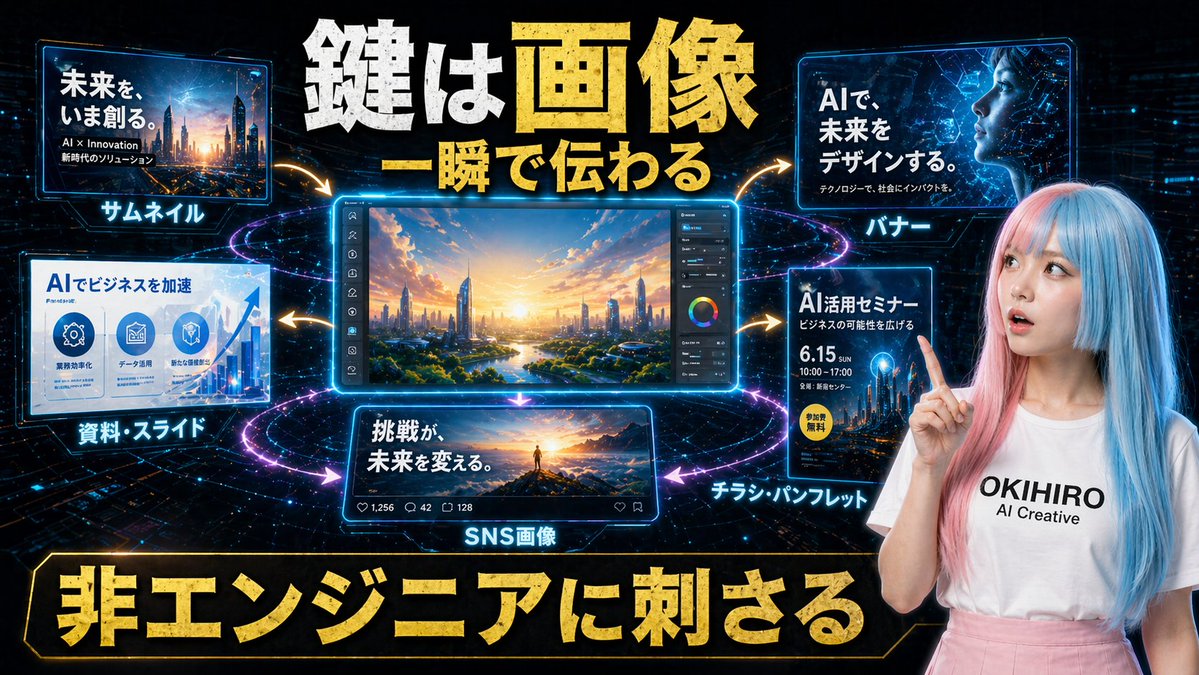
일본 AI 크리에이티브 홍보 슬라이드
미래지향적인 일본 마케팅 그래픽으로, 기업 홍보를 위해 썸네일, 배너, 슬라이드, 소셜 미디어 게시물, 전단지 등 다양한 매체에 AI 생성 이미지를 활용하는 사례를 보여줍니다.
이것은 그래픽 및 포스터 에 대한 GPT Image 2 프롬프트 사례입니다. 아래의 복사 가능한 프롬프트를 사용하여 유사한 시각 자료를 생성하고, 재사용하기 전에 Awesome GPT Image 2 Prompts 의 저작자 표시 및 상업적 사용 권한을 검토하십시오.
전체 프롬프트 세트가 필요하신가요? 다음을 사용하세요. 그래픽 및 포스터 더 많은 관련 예시를 보려면 주제 허브를 열거나 다음을 열어보세요. GPT Image 2 프롬프트 카탈로그 전체 예제 색인, 재사용 가능한 구조 및 출처 표기는 다음을 참조하십시오.
Free 1K preview
Generate one preview image instantly, no sign-up required.
Free text preview doesn’t preserve reference-image consistency.
3080/4000
프롬프트
복사 준비 프롬프트
Create a futuristic Japanese promotional hero graphic for an AI creative service, designed like a high-impact social media ad or presentation slide. Use a dark black-and-deep-blue cyber background with glowing circuit patterns, star-like particles, and neon light trails forming circular rings around a central editing screen. The composition is a single wide landscape layout with 6 distinct visual panels plus 1 human presenter on the right. At the top center, place a huge bold Japanese headline in distressed metallic gold and white text reading "鍵は画像" on the first line and "一瞬で伝わる" below it, with dramatic 3D depth, rough texture, and strong glow. In the center, place the largest panel: a luminous blue-framed desktop editing interface showing a vivid futuristic cityscape at sunrise, viewed from above with a river, greenery, sleek skyscrapers, warm orange sunlight, and a right-side vertical toolbar including sliders and a color wheel. Surround this centerpiece with 5 smaller glowing panels connected by curved gold arrows pointing outward from the center. Top left panel: a thumbnail example with a futuristic city image and Japanese text reading "未来を、いま創る。", smaller subtext "AI × Innovation" and "時代のソリューション", and a bright cyan label below the panel reading "サムネイル". Top right panel: a banner example with an abstract blue digital globe or network image and Japanese text reading "AIで、未来をデザインする。" with smaller subtext "テクノロジーで、社会にインパクトを。", and a cyan label below reading "バナー". Bottom left panel: a slide/document example with a business infographic style, title text "AIでビジネスを加速", three circular icon areas, an upward graph on the right, and a cyan label below reading "資料・スライド". Bottom center panel: an SNS post example showing a person standing on a mountain peak at sunrise with bold Japanese text "挑戦が、未来を変える。", small social media engagement icons and counts along the bottom bar, and a cyan label below reading "SNS画像". Bottom right panel: a flyer example with a dark blue event poster layout, title text "AI活用セミナー", smaller line "ビジネスの可能性を広げる", large date "6.15", time "10:00–17:00", a yellow circular badge reading "参加費無料", and a cyan label below reading "チラシ・パンフレット". On the right side of the overall composition, place a young woman presenter from waist up, facing forward, lightly smiling, raising her right index finger near her face as if making a key point. She has long straight split-dyed hair, pastel pink on one side and pastel blue on the other, fair skin, and wears a white T-shirt with black text reading "{argument name="brand text" default="OKIHIRO AI Creative"}" and a high-waisted soft pink skirt. Her face is intentionally simplified or obscured in a clean ad-like way. At the very bottom, add an enormous gold Japanese slogan inside a black-and-gold framed banner reading "非エンジニアに刺さる". Use intense contrast, neon cyan edge lighting, gold accent typography, glossy UI frames, energetic motion arrows, and a polished tech-marketing aesthetic that feels optimized for convincing non-technical business users about AI-powered image generation.프롬프트 변수
프롬프트에 있는 편집 가능한 인수 자리 표시자와 해당 기본값입니다.
변하기 쉬운
brand text
기본
OKIHIRO AI Creative
Best for
- - 그래픽 및 포스터 visual exploration
- - Image generation and reference-image edits
- - Reusable briefs that keep source attribution visible
Change these parts
- - Subject, product, character, or scene
- - Aspect ratio, camera, lighting, and background
- - Brand, text, color, and output constraints
Recommended model and settings
- - Model: gpt-image-2
- - Input mode: 이미지 to 이미지
- - Aspect ratio: source
- - Commercial status: review original source
How to use this prompt
- 1. Copy the prompt and preserve its structure for the first test.
- 2. Replace the subject, context, and publishing channel.
- 3. Change one camera, lighting, or style variable per iteration.
- 4. Inspect the output, source, text, and rights before reuse.
Limitations, source, and reuse cautions
- - Generated output is an editable draft, not factual, legal, or rights evidence.
- - Review the linked source, people, brands, logos, text, and third-party media before commercial use.
Awesome GPT Image 2 Prompts 에서 가져왔습니다. 출처 표기가 필요합니다. 상업적 이용 가능 여부는 allowed 입니다. 유료 사용 전에 원저작권 정보를 확인하세요.
이 범주에 속하는 더 많은 사례
범주, 입력 방식 호환성, 품질 및 위험도에 따라 우선순위가 정해집니다.






재사용 및 출처 참고 사항
사례를 미리 확인한 후 이 안내 메시지를 안전하게 사용하십시오.
- 1.프롬프트를 복사하거나 Dovoo의 생성 버튼을 사용하여 직접 엽니다.
- 2.사용 사례에 맞게 변수, 화면 비율 및 참조 이미지를 조정하십시오.
- 3.출판 또는 유료 사용 전에 저작권, 출처 표기 요건 및 브랜드 또는 초상권 관련 위험을 확인하십시오.