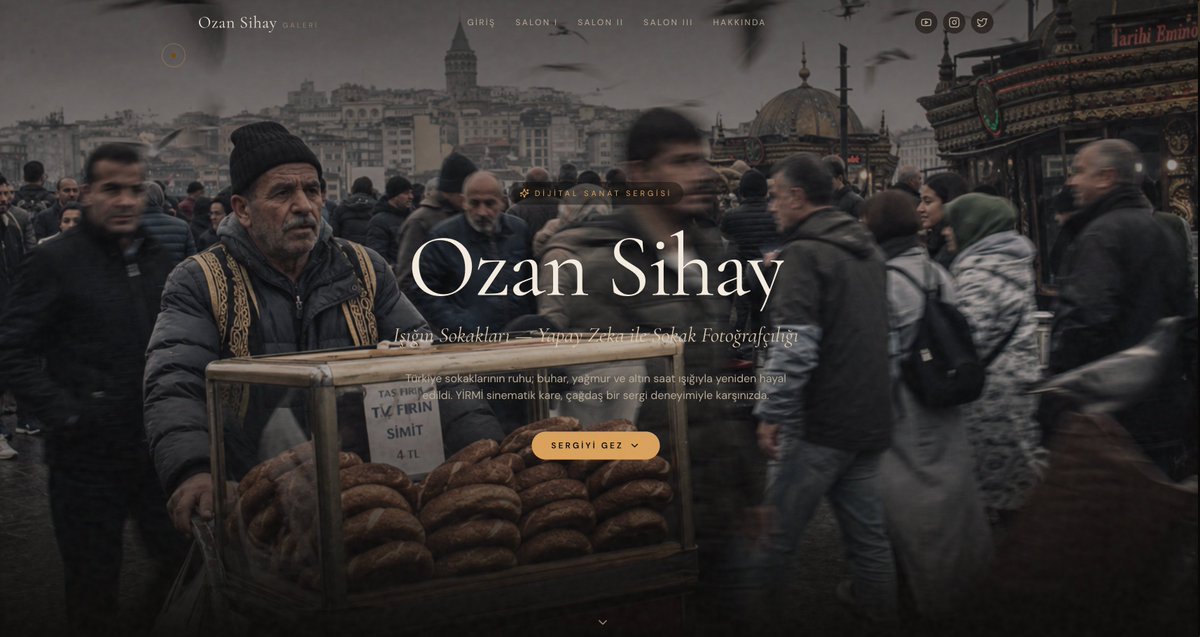
Cinematic Istanbul Gallery Website Hero
Generates a moody full-screen art gallery landing page hero for an Istanbul street photography portfolio.
이것은 그래픽 및 포스터 에 대한 GPT Image 2 프롬프트 사례입니다. 아래의 복사 가능한 프롬프트를 사용하여 유사한 시각 자료를 생성하고, 재사용하기 전에 Awesome GPT Image 2 Prompts 의 저작자 표시 및 상업적 사용 권한을 검토하십시오.
전체 프롬프트 세트가 필요하신가요? 다음을 사용하세요. 그래픽 및 포스터 더 많은 관련 예시를 보려면 주제 허브를 열거나 다음을 열어보세요. GPT Image 2 프롬프트 카탈로그 전체 예제 색인, 재사용 가능한 구조 및 출처 표기는 다음을 참조하십시오.
Free 1K preview
Generate one preview image instantly, no sign-up required.
2817/4000
프롬프트
복사 준비 프롬프트
Goal: Create a cinematic full-width website hero section for a modern digital art gallery portfolio featuring AI-generated Istanbul street photography, with a refined museum/gallery aesthetic.

Canvas: Ultra-wide desktop webpage screenshot, 1200x627 px, dark moody color grading, edge-to-edge background image with subtle black vignette and translucent overlay.

Background scene: A realistic street-photography image of a crowded Istanbul public square in rainy winter weather. Foreground left shows an older male simit street vendor wearing a black knit cap, dark puffer jacket, and patterned vest, standing behind a glass cart filled with stacks of sesame simit rings. A small paper sign on the cart reads “TAS FIRIN”, “TV FIRIN”, “SIMIT”, and “4 TL”. The crowd around him is motion-blurred, with pedestrians passing in both directions. In the distance are Istanbul landmarks resembling Galata Tower and domed mosque architecture, plus seagulls in the cloudy sky. The right side includes an ornate red-and-gold storefront sign. Overall palette: charcoal gray, muted brown, faded cream, warm amber accents.

Layout: Minimal top navigation over the image. At top left, a small circular amber-outline cursor/accent dot. Near the upper left-center place the brand text “Ozan Sihay” in elegant serif type, followed by small spaced text “GALERI”. Centered across the top place exactly 5 navigation links: “GIRIS”, “SALON I”, “SALON II”, “SALON III”, “HAKKINDA”. At the top right place exactly 3 small circular social icons: YouTube/play, Instagram/camera, and Twitter/bird.

Hero typography: Center the main content slightly right of center. Add a small pill label above the title with a sparkle icon and the text “DIJITAL SANAT SERGISI”. Main headline is very large elegant high-contrast serif text: {argument name="artist name" default="Ozan Sihay"}. Under it, add an italic serif subtitle line reading {argument name="subtitle text" default="İstanbul Sokakları — Yapay Zeka ile Sokak Fotoğrafçılığı"}. Below that, add a small muted paragraph: {argument name="description text" default="Türkiye sokaklarının ruhu; buhar, yağmur ve altın saat ışığıyla yeniden hayal edildi. YİRMİ sinematik kare, çağdaş bir sergi deneyimiyle karşınızda。"}

Call to action: Beneath the paragraph, place one rounded amber button with spaced uppercase text {argument name="button text" default="SERGIYI GEZ"} and a small downward chevron icon inside the button. At bottom center, add one tiny downward chevron scroll indicator.

Visual style: 2026 luxury web design, modern art museum landing page, minimal, cinematic, editorial, immersive, soft glassy overlays, refined serif typography, wide letter spacing for navigation, warm amber accent color, shallow haze, realistic motion blur, no visible browser chrome, no extra panels or cards.
프롬프트 변수
프롬프트에 있는 편집 가능한 인수 자리 표시자와 해당 기본값입니다.
변하기 쉬운
artist name
기본
Ozan Sihay
변하기 쉬운
subtitle text
기본
İstanbul Sokakları — Yapay Zeka ile Sokak Fotoğrafçılığı
변하기 쉬운
description text
기본
Türkiye sokaklarının ruhu; buhar, yağmur ve altın saat ışığıyla yeniden hayal edildi. YİRMİ sinematik kare, çağdaş bir sergi deneyimiyle karşınızda。
변하기 쉬운
button text
기본
SERGIYI GEZ
Best for
- - 그래픽 및 포스터 visual exploration
- - Image generation and reference-image edits
- - Reusable briefs that keep source attribution visible
Change these parts
- - Subject, product, character, or scene
- - Aspect ratio, camera, lighting, and background
- - Brand, text, color, and output constraints
Recommended model and settings
- - Model: gpt-image-2
- - Input mode: 텍스트 to 이미지
- - Aspect ratio: source
- - Commercial status: review original source
How to use this prompt
- 1. Copy the prompt and preserve its structure for the first test.
- 2. Replace the subject, context, and publishing channel.
- 3. Change one camera, lighting, or style variable per iteration.
- 4. Inspect the output, source, text, and rights before reuse.
Limitations, source, and reuse cautions
- - Generated output is an editable draft, not factual, legal, or rights evidence.
- - Review the linked source, people, brands, logos, text, and third-party media before commercial use.
Awesome GPT Image 2 Prompts 에서 가져왔습니다. 출처 표기가 필요합니다. 상업적 이용 가능 여부는 allowed 입니다. 유료 사용 전에 원저작권 정보를 확인하세요.
이 범주에 속하는 더 많은 사례
범주, 입력 방식 호환성, 품질 및 위험도에 따라 우선순위가 정해집니다.






재사용 및 출처 참고 사항
사례를 미리 확인한 후 이 안내 메시지를 안전하게 사용하십시오.
- 1.프롬프트를 복사하거나 Dovoo의 생성 버튼을 사용하여 직접 엽니다.
- 2.사용 사례에 맞게 변수, 화면 비율 및 참조 이미지를 조정하십시오.
- 3.출판 또는 유료 사용 전에 저작권, 출처 표기 요건 및 브랜드 또는 초상권 관련 위험을 확인하십시오.