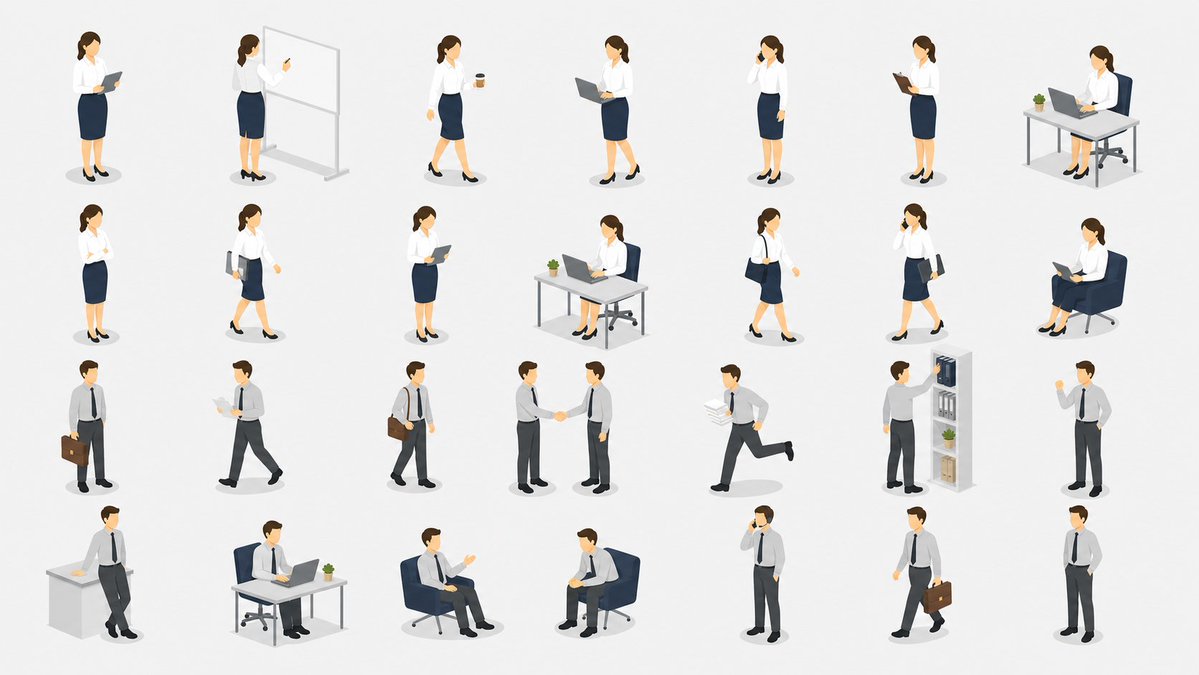
아이소메트릭 사무직 직원 자산 시트
학술 논문, 프레젠테이션 및 비즈니스 다이어그램에 적합한 깔끔한 28가지 포즈의 등각 투영 사무직 직원 일러스트레이션 시트를 생성합니다.
이것은 일러스트레이션 및 미술 에 대한 GPT Image 2 프롬프트 사례입니다. 아래의 복사 가능한 프롬프트를 사용하여 유사한 시각 자료를 생성하고, 재사용하기 전에 Awesome GPT Image 2 Prompts 의 저작자 표시 및 상업적 사용 권한을 검토하십시오.
전체 프롬프트 세트가 필요하신가요? 다음을 사용하세요. 일러스트레이션 및 미술 더 많은 관련 예시를 보려면 주제 허브를 열거나 다음을 열어보세요. GPT Image 2 프롬프트 카탈로그 전체 예제 색인, 재사용 가능한 구조 및 출처 표기는 다음을 참조하십시오.
Free 1K preview
Generate one preview image instantly, no sign-up required.
3931/4000
프롬프트
복사 준비 프롬프트
{
  "type": "isometric vector illustration asset sheet",
  "subject": "a clean collection of office worker character cutouts for academic papers, presentations, and business diagrams",
  "style": "minimal flat 3D isometric vector style, soft shadows, simple facial features, white background, muted corporate colors, consistent scale, no text labels, no borders, no watermark",
  "characters": {
    "count": 28,
    "gender mix": "14 female office worker poses and 14 male office worker poses",
    "female outfit": "{argument name=\"female outfit\" default=\"white blouse, navy pencil skirt, black heels\"}",
    "male outfit": "{argument name=\"male outfit\" default=\"light gray dress shirt, navy tie, dark trousers, black shoes\"}",
    "hair color": "{argument name=\"hair color\" default=\"brown\"}",
    "skin tone": "{argument name=\"skin tone\" default=\"light skin tone\"}"
  },
  "layout": {
    "canvas": "wide 16:9 horizontal sheet on a plain white background",
    "arrangement": "four neat rows and seven columns with generous spacing, each character or small office vignette isolated with a subtle gray oval shadow",
    "total discrete elements": 28,
    "row 1": {
      "count": 7,
      "items": [
        "female standing and reading from a clipboard or tablet",
        "female presenting at a freestanding whiteboard with a pointer",
        "female walking while holding a takeaway coffee cup",
        "female standing with an open laptop",
        "female standing and talking on a phone",
        "female standing and reading a clipboard",
        "female seated at a desk using a laptop with a small potted plant"
      ]
    },
    "row 2": {
      "count": 7,
      "items": [
        "female standing with one hand near her face in a thinking pose",
        "female walking while holding documents or a folder",
        "female standing and holding a tablet against her chest",
        "female seated at an office desk using a laptop with a plant",
        "female walking with a shoulder bag",
        "female walking while talking on a phone and carrying documents",
        "female seated in a lounge chair reading from an open laptop"
      ]
    },
    "row 3": {
      "count": 7,
      "items": [
        "male standing with a briefcase",
        "male walking while reading papers",
        "male walking with a shoulder bag",
        "two male workers shaking hands as one combined vignette",
        "male running while carrying a stack of documents",
        "male reaching toward a tall office shelf with binders, boxes, and a plant",
        "male standing and pointing or giving a presentation gesture"
      ]
    },
    "row 4": {
      "count": 7,
      "items": [
        "male leaning against a desk with papers on top",
        "male seated at a desk using a laptop with a small potted plant",
        "male seated in a lounge chair gesturing during conversation",
        "male seated in a lounge chair holding a clipboard or tablet",
        "male standing and talking on a phone",
        "male walking with a briefcase",
        "male standing casually with one hand in pocket"
      ]
    }
  },
  "props": {
    "count": 13,
    "items": [
      "clipboard or tablet",
      "whiteboard",
      "coffee cup",
      "laptop",
      "phone",
      "desk",
      "office chair",
      "potted plant",
      "shoulder bag",
      "briefcase",
      "stack of papers",
      "lounge chair",
      "office shelf with binders and boxes"
    ]
  },
  "rendering instructions": "Create a polished stock-illustration asset set, with all figures separated and usable as individual paper or presentation illustrations. Keep proportions consistent, use soft ambient lighting and tiny gray ground shadows, and avoid any text, logos, captions, or background scenery. Use {argument name=\"accent color palette\" default=\"navy blue, white, gray, black, and small green plant accents\"}."
}
프롬프트 변수
프롬프트에 있는 편집 가능한 인수 자리 표시자와 해당 기본값입니다.
변하기 쉬운
female outfit
기본
white blouse, navy pencil skirt, black heels
변하기 쉬운
male outfit
기본
light gray dress shirt, navy tie, dark trousers, black shoes
변하기 쉬운
hair color
기본
brown
변하기 쉬운
skin tone
기본
light skin tone
변하기 쉬운
accent color palette
기본
navy blue, white, gray, black, and small green plant accents
Best for
- - 일러스트레이션 및 미술 visual exploration
- - Image generation and reference-image edits
- - Reusable briefs that keep source attribution visible
Change these parts
- - Subject, product, character, or scene
- - Aspect ratio, camera, lighting, and background
- - Brand, text, color, and output constraints
Recommended model and settings
- - Model: gpt-image-2
- - Input mode: 텍스트 to 이미지
- - Aspect ratio: source
- - Commercial status: review original source
How to use this prompt
- 1. Copy the prompt and preserve its structure for the first test.
- 2. Replace the subject, context, and publishing channel.
- 3. Change one camera, lighting, or style variable per iteration.
- 4. Inspect the output, source, text, and rights before reuse.
Limitations, source, and reuse cautions
- - Generated output is an editable draft, not factual, legal, or rights evidence.
- - Review the linked source, people, brands, logos, text, and third-party media before commercial use.
Awesome GPT Image 2 Prompts 에서 가져왔습니다. 출처 표기가 필요합니다. 상업적 이용 가능 여부는 allowed 입니다. 유료 사용 전에 원저작권 정보를 확인하세요.
이 범주에 속하는 더 많은 사례
범주, 입력 방식 호환성, 품질 및 위험도에 따라 우선순위가 정해집니다.






재사용 및 출처 참고 사항
사례를 미리 확인한 후 이 안내 메시지를 안전하게 사용하십시오.
- 1.프롬프트를 복사하거나 Dovoo의 생성 버튼을 사용하여 직접 엽니다.
- 2.사용 사례에 맞게 변수, 화면 비율 및 참조 이미지를 조정하십시오.
- 3.출판 또는 유료 사용 전에 저작권, 출처 표기 요건 및 브랜드 또는 초상권 관련 위험을 확인하십시오.