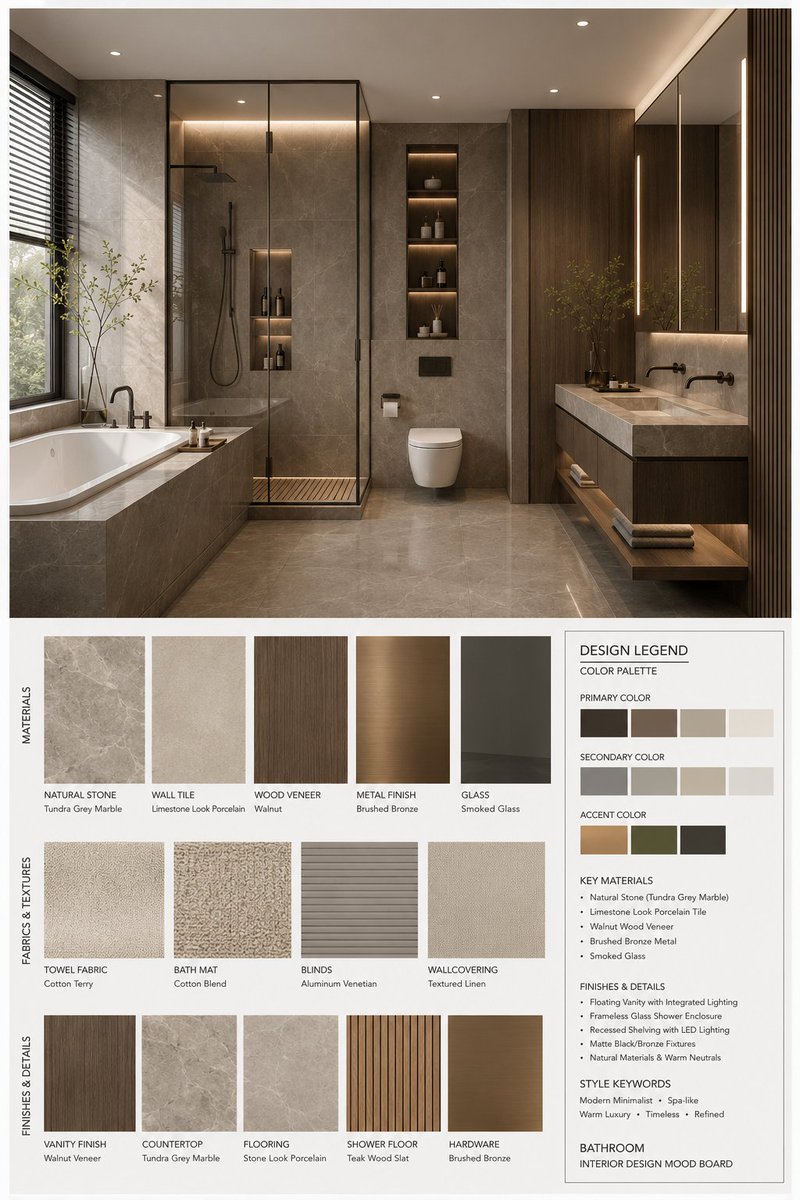
인테리어 디자인 무드보드 생성기
전문적인 인테리어 디자인 무드보드를 제작하기 위한 종합적인 가이드입니다. 고해상도 3D 공간 렌더링 이미지와 함께 어울리는 소재 샘플, 패브릭 질감, 그리고 색상 팔레트 및 소재 사양을 포함한 상세한 디자인 범례를 제공하는 구조화된 레이아웃을 생성합니다.
이것은 인테리어 및 건축 에 대한 GPT Image 2 프롬프트 사례입니다. 아래의 복사 가능한 프롬프트를 사용하여 유사한 시각 자료를 생성하고, 재사용하기 전에 Awesome GPT Image 2 Prompts 의 저작자 표시 및 상업적 사용 권한을 검토하십시오.
전체 프롬프트 세트가 필요하신가요? 다음을 사용하세요. 인테리어 및 건축 더 많은 관련 예시를 보려면 주제 허브를 열거나 다음을 열어보세요. GPT Image 2 프롬프트 카탈로그 전체 예제 색인, 재사용 가능한 구조 및 출처 표기는 다음을 참조하십시오.
Free 1K preview
Generate one preview image instantly, no sign-up required.
Free text preview doesn’t preserve reference-image consistency.
1849/4000
프롬프트
복사 준비 프롬프트
You are a professional interior design Mood Board creator. Based on the provided {argument name="space type" default="bedroom"} design photo, generate a high-end vertical 3:4 mood board. The overall visual should reference professional design proposals, showing {argument name="style name" default="Modern Mid-century"} aesthetic features, possessing a [Mood Keywords] atmosphere, and conforming to [Branding Tone] design expression.
Space Type: {argument name="space type" default="bedroom"}
Layout Requirements:
Upper section: A high-resolution, photorealistic {argument name="space type" default="bedroom"} interior rendering. It must be consistent with the user's photo in structure, furniture, materials, colors, and lighting, but refined for a professional proposal. Focus on: [Key Furniture Elements], [Material Keywords], [Color Palette], [Lighting Style].
Lower section: Display material and furnishing samples strictly corresponding to the upper design, including: Material samples, fabric samples, color swatches, finish samples, and related wood/stone/metal/glass/leather samples. All must reflect the core material and color logic of the plan.
Bottom right: A Design Legend / Color Palette info box showing: Primary color, secondary color, accent color, core materials, finish descriptions, and style keywords.
Style and Output:
Professional firm-level layout; minimalist, clean, restrained, and orderly; clear visual hierarchy and white space control; material/color labels clear and modern; overall vibe matching {argument name="style name" default="Modern Mid-century"}; Render Quality: 4K Ultra HD, hyper-detailed, photorealistic rendering. Vertical 3:4 composition.
Label Requirements:
Each sample must have a clear label organized by [Label Language] material/color/finish names in a concise, professional, and well-aligned style.
프롬프트 변수
프롬프트에 있는 편집 가능한 인수 자리 표시자와 해당 기본값입니다.
변하기 쉬운
space type
기본
bedroom
변하기 쉬운
style name
기본
Modern Mid-century
Best for
- - 인테리어 및 건축 visual exploration
- - Image generation and reference-image edits
- - Reusable briefs that keep source attribution visible
Change these parts
- - Subject, product, character, or scene
- - Aspect ratio, camera, lighting, and background
- - Brand, text, color, and output constraints
Recommended model and settings
- - Model: gpt-image-2
- - Input mode: 이미지 to 이미지
- - Aspect ratio: source
- - Commercial status: review original source
How to use this prompt
- 1. Copy the prompt and preserve its structure for the first test.
- 2. Replace the subject, context, and publishing channel.
- 3. Change one camera, lighting, or style variable per iteration.
- 4. Inspect the output, source, text, and rights before reuse.
Limitations, source, and reuse cautions
- - Generated output is an editable draft, not factual, legal, or rights evidence.
- - Review the linked source, people, brands, logos, text, and third-party media before commercial use.
Awesome GPT Image 2 Prompts 에서 가져왔습니다. 출처 표기가 필요합니다. 상업적 이용 가능 여부는 allowed 입니다. 유료 사용 전에 원저작권 정보를 확인하세요.
이 범주에 속하는 더 많은 사례
범주, 입력 방식 호환성, 품질 및 위험도에 따라 우선순위가 정해집니다.






재사용 및 출처 참고 사항
사례를 미리 확인한 후 이 안내 메시지를 안전하게 사용하십시오.
- 1.프롬프트를 복사하거나 Dovoo의 생성 버튼을 사용하여 직접 엽니다.
- 2.사용 사례에 맞게 변수, 화면 비율 및 참조 이미지를 조정하십시오.
- 3.출판 또는 유료 사용 전에 저작권, 출처 표기 요건 및 브랜드 또는 초상권 관련 위험을 확인하십시오.