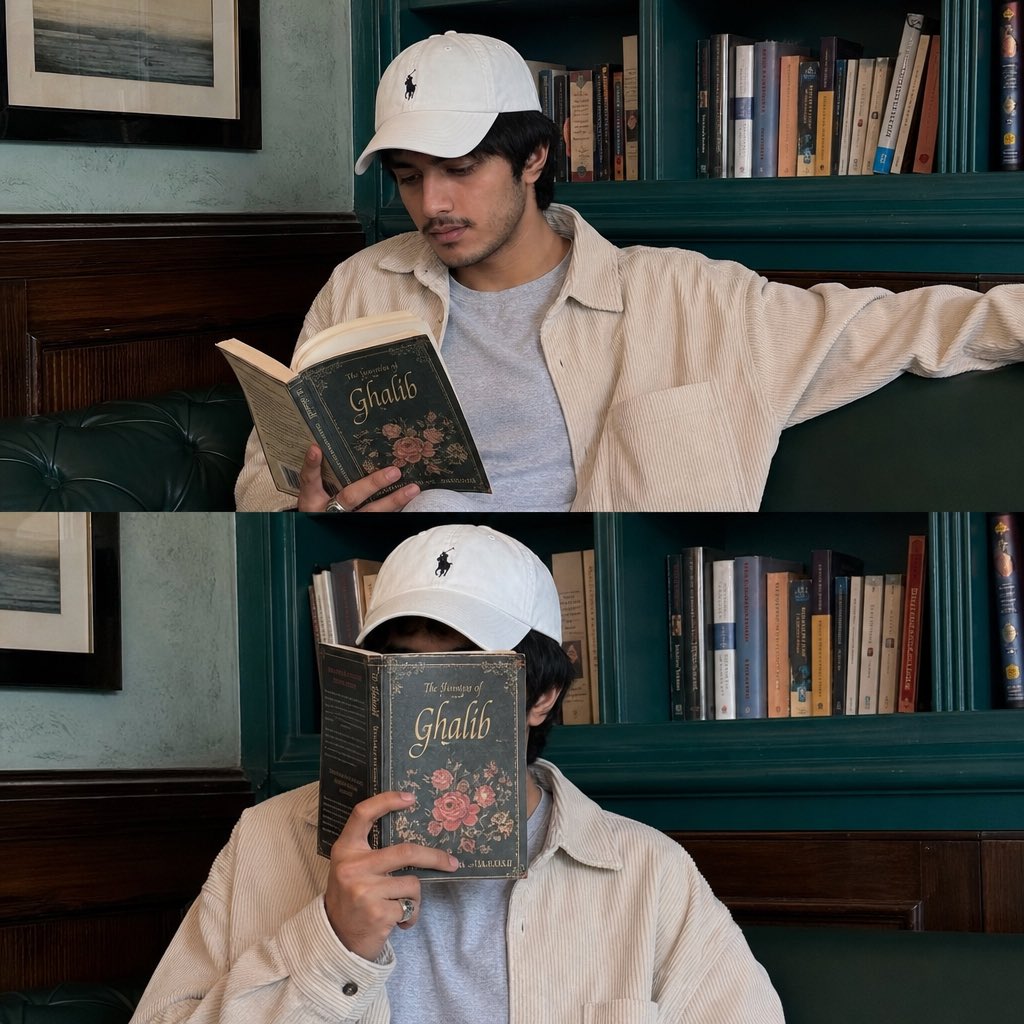
Instagram Lifestyle Collage Prompt
A prompt for an aesthetic Instagram-style collage of a man in a cafe, featuring natural daylight and moody grading.
이것은 인물과 캐릭터 에 대한 GPT Image 2 프롬프트 사례입니다. 아래의 복사 가능한 프롬프트를 사용하여 유사한 시각 자료를 생성하고, 재사용하기 전에 Awesome GPT Image 2 Prompts 의 저작자 표시 및 상업적 사용 권한을 검토하십시오.
전체 프롬프트 세트가 필요하신가요? 다음을 사용하세요. 인물과 캐릭터 더 많은 관련 예시를 보려면 주제 허브를 열거나 다음을 열어보세요. GPT Image 2 프롬프트 카탈로그 전체 예제 색인, 재사용 가능한 구조 및 출처 표기는 다음을 참조하십시오.
Free 1K preview
Generate one preview image instantly, no sign-up required.
2235/4000
프롬프트
복사 준비 프롬프트
Create Ultra-realistic cinematic Instagram lifestyle collage of a {argument name="subject" default="young South Asian man"} relaxing inside a cozy aesthetic {argument name="location" default="cafe/ library corner"} with teal-green interiors and vintage wooden paneling. Natural candid smartphone photography aesthetic with soft daylight, realistic skin texture, calm intellectual vibe, and minimal moody color grading. Vertical 2-frame collage composition inspired by modern Instagram story/ reel screenshots. Subject Appearance: Young South Asian man with slim face structure, medium-fair warm skin tone, soft jawline, light mustache and faint beard, natural black hair partially hidden under a white baseball cap with black embroidered logo. Calm thoughtful expression with relaxed body language. Natural candid masculine aesthetic. Outfit: Oversized cream/beige corduroy overshirt with loose relaxed fit and large sleeves, light grey inner t-shirt, minimal casual styling. White baseball cap with black logo embroidery. Silver ring on finger. Scene & Environment: Indoor cafe/lounge with aesthetic teal-green bookshelves in background filled with scattered books. Dark polished wooden wall paneling below shelves. Green cushioned leather seating sofa. Textured vintage-style walls with framed black-and-white artwork partially visible. Cozy intellectual cafe atmosphere with calm reading aesthetic. Frame 1: The young man is sitting casually in a relaxed sideways pose on the green sofa. Left arm stretched naturally across the backrest while reading an open poetry book carefully in his hands. Head slightly tilted downward toward the book. Natural candid reading moment. Soft daylight entering from side creating smooth shadows and realistic highlights. Calm poetic mood. Frame 2 (Bottom Frame): The young man sits facing the camera while hiding his face completely behind the same poetry book. Book cover visible with vintage floral design and "Ghalib" title aesthetic. One hand holding the book vertically in front of face. Relaxed minimalist pose with artistic introvert vibe. Photography Style: Ultra-realistic DSLR + smartphone hybrid photography, Instagram aesthetic, natural ambient lighting, realistic proportions, shallow프롬프트 변수
프롬프트에 있는 편집 가능한 인수 자리 표시자와 해당 기본값입니다.
변하기 쉬운
subject
기본
young South Asian man
변하기 쉬운
location
기본
cafe/ library corner
Best for
- - 인물과 캐릭터 visual exploration
- - Image generation and reference-image edits
- - Reusable briefs that keep source attribution visible
Change these parts
- - Subject, product, character, or scene
- - Aspect ratio, camera, lighting, and background
- - Brand, text, color, and output constraints
Recommended model and settings
- - Model: gpt-image-2
- - Input mode: 텍스트 to 이미지
- - Aspect ratio: source
- - Commercial status: review original source
How to use this prompt
- 1. Copy the prompt and preserve its structure for the first test.
- 2. Replace the subject, context, and publishing channel.
- 3. Change one camera, lighting, or style variable per iteration.
- 4. Inspect the output, source, text, and rights before reuse.
Limitations, source, and reuse cautions
- - Generated output is an editable draft, not factual, legal, or rights evidence.
- - Review the linked source, people, brands, logos, text, and third-party media before commercial use.
Awesome GPT Image 2 Prompts 에서 가져왔습니다. 출처 표기가 필요합니다. 상업적 이용 가능 여부는 allowed 입니다. 유료 사용 전에 원저작권 정보를 확인하세요.
이 범주에 속하는 더 많은 사례
범주, 입력 방식 호환성, 품질 및 위험도에 따라 우선순위가 정해집니다.






재사용 및 출처 참고 사항
사례를 미리 확인한 후 이 안내 메시지를 안전하게 사용하십시오.
- 1.프롬프트를 복사하거나 Dovoo의 생성 버튼을 사용하여 직접 엽니다.
- 2.사용 사례에 맞게 변수, 화면 비율 및 참조 이미지를 조정하십시오.
- 3.출판 또는 유료 사용 전에 저작권, 출처 표기 요건 및 브랜드 또는 초상권 관련 위험을 확인하십시오.