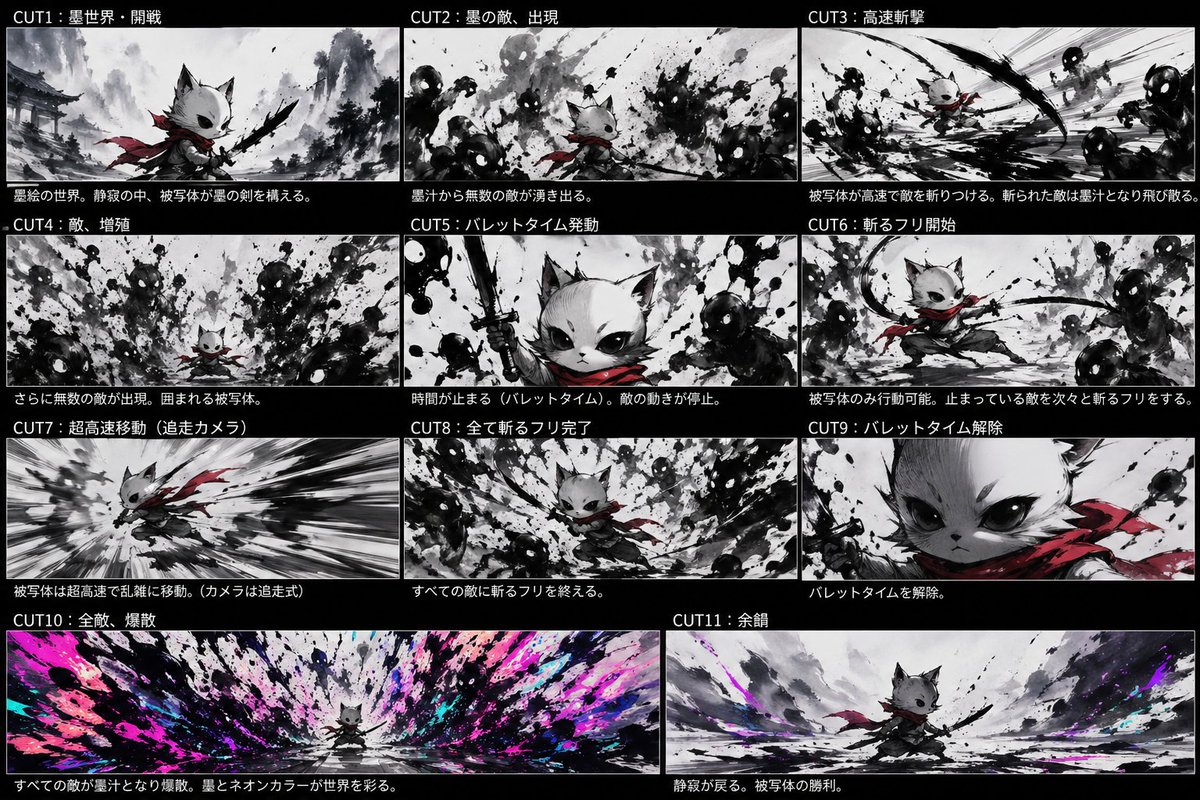
잉크 네온 캣 사무라이 스토리보드
네온 폭발이 펼쳐지는 수묵화 세계를 배경으로 흰 고양이 사무라이가 먹물 괴물과 싸우는 11컷짜리 시네마틱 스토리보드입니다. 컨셉 아트나 애니메이션 기획에 이상적입니다.
이것은 애니메이션 & 게임 에 대한 GPT Image 2 프롬프트 사례입니다. 아래의 복사 가능한 프롬프트를 사용하여 유사한 시각 자료를 생성하고, 재사용하기 전에 Awesome GPT Image 2 Prompts 의 저작자 표시 및 상업적 사용 권한을 검토하십시오.
전체 프롬프트 세트가 필요하신가요? 다음을 사용하세요. 애니메이션 & 게임 더 많은 관련 예시를 보려면 주제 허브를 열거나 다음을 열어보세요. GPT Image 2 프롬프트 카탈로그 전체 예제 색인, 재사용 가능한 구조 및 출처 표기는 다음을 참조하십시오.
Free 1K preview
Generate one preview image instantly, no sign-up required.
4000/4000
프롬프트
복사 준비 프롬프트
{
  "type": "anime storyboard sheet",
  "style": "dynamic sumi-e ink painting fused with neon accents, cinematic concept board, monochrome black-and-white base with selective crimson and electric magenta/cyan highlights, rough brush splatter textures, high contrast, dramatic speed lines, manga action composition",
  "subject": {
    "main character": "small anthropomorphic cat warrior with white fur, oversized dark eyes, pointed ears, a short muzzle, and a determined expression",
    "outfit": [
      "flowing {argument name=\"scarf color\" default=\"crimson red\"} scarf",
      "dark loose samurai-style clothing",
      "black ink sword held in one paw"
    ],
    "scale": "tiny hero against overwhelming waves of ink enemies"
  },
  "layout": {
    "background": "solid black page with 11 storyboard panels separated by thin white borders",
    "sections": [
      {
        "title": "CUT1:墨世界・開戦",
        "position": "upper left",
        "count": 1,
        "labels": [
          "opening battle in the ink world"
        ]
      },
      {
        "title": "CUT2:墨の敵、出現",
        "position": "top-center",
        "count": 1,
        "labels": [
          "ink enemies appear from splashes"
        ]
      },
      {
        "title": "CUT3: High-Speed Slash",
        "position": "upper right",
        "count": 1,
        "labels": [
          "high-speed slash attack"
        ]
      },
      {
        "title": "CUT4: Enemy, Proliferation",
        "position": "middle-left",
        "count": 1,
        "labels": [
          "enemies multiply and surround the hero"
        ]
      },
      {
        "title": "CUT5:バレットタイム発動",
        "position": "middle-center",
        "count": 1,
        "labels": [
          "bullet time activated"
        ]
      },
      {
        "title": "CUT6:斬るフリ開始",
        "position": "middle-right",
        "count": 1,
        "labels": [
          "begin fake slashing while time is stopped"
        ]
      },
      {
        "title": "CUT7:超高速移動(追走カメラ)",
        "position": "lower-left",
        "count": 1,
        "labels": [
          "ultra-fast movement with chase camera"
        ]
      },
      {
        "title": "CUT8:全て斬るフリ完了",
        "position": "lower-center",
        "count": 1,
        "labels": [
          "all fake slashes completed"
        ]
      },
      {
        "title": "CUT9:バレットタイム解除",
        "position": "lower-right",
        "count": 1,
        "labels": [
          "bullet time released"
        ]
      },
      {
        "title": "CUT10: All enemies, Scatter",
        "position": "bottom-left wide",
        "count": 1,
        "labels": [
          "all enemies explode into ink and neon color"
        ]
      },
      {
        "title": "CUT11: Afterglow",
        "position": "bottom-right wide",
        "count": 1,
        "labels": [
          "quiet aftermath and victory pose"
        ]
      }
    ],
    "count": 11
  },
  "panels": [
    {
      "title": "CUT1:墨世界・開戦",
      "scene": "A misty ink-wash battlefield with distant traditional Japanese temple architecture and mountains. The cat warrior stands in the foreground in a low ready stance, scarf trailing, raising a black brushlike sword. The world is mostly grayscale with subtle red on the scarf.",
      "camera": "medium-wide low angle"
    },
    {
      "title": "CUT2:墨の敵、出現",
      "scene": "Dozens of amorphous shadow enemies with glowing white eyes emerge from violent black ink splashes around the small cat. Chaotic splatter fills the frame.",
      "camera": "wide shot"
    },
    {
      "title": "CUT3: High-Speed Slash",
      "scene": "The hero launches into a rapid diagonal slash through clustered ink monsters. Strong motion streaks and curved black slash arcs dominate the composition.",
      "camera": "dynamic action perspective"
    },
    {
      "title": "CUT4: Enemy, Proliferation",
      "scene": "The enemies increase in number, surrounding the cat from all directions. Dense abstract silhouettes and splashes close in menacingly.",
      "camera": "wide encirclement shot"
    },
    {
      "title": "CUT5:バレットタイム発動",
      "scene": "Close-up hero shot. The cat lifts the sword vertically with fierce confidence as nearby ink enemies freeze in place. Splatter textures remain suspended midair.",
      "camera": "tight close-up"
    },
    {
      "title": "CUT6:斬るフリ開始",
      "scene": "In frozen time, only the cat moves, stepping through a poised slashing gesture among immobilized shadow enemies. The scarf draws elegant red curves through the grayscale scene.",
      "camera": "medium action shot"
    },
    {
      "title": "CUT7:超高速移動(追走カメラ)",
      "scene": "A speed-tunnel composition with the cat sprinting or dashing at extreme velocity, body leaning forward, scarf whipping behind, background stretched into black-and-white radial blur.",
      "camera": "tracking chase shot"
    },
    {
      "title": "CUT8:全て斬るフリ完了",
      "scene": "The hero returns to the center after finishing all staged slash poses around every enemy. Ink masses form a circular vortex around the calm cat.",
      "camera": "wide centered shot"
    },
    {
      "title": "CUT9:バレットタイム解除",
      "scene": "Extreme close-up of the cat's face and shoulder, intense eyes looking forward, red scarf prominent, signaling the end of bullet time.",
      "camera": "extreme close-up"
    },
    {
      "title": "CUT10: All enemies, Scatter",
      "scene": "A massive panoramic detonation as every frozen enemy bursts at once into black ink, bright {argument name=\"neon accent colors\" default=\"magenta, cyan, and violet\"} paint, and explosive splashes radiating outward from the tiny centered hero.",
      "camera": "ultra-wide panoramic shot"
    },
    {
      "title": "CUT11: Afterglow",
      "scene": "After the explosion, the battlefield becomes quiet again. The cat stands victorious in a broad ink-wash landscape with residual neon color streaks fading into the mist.",
      "camera": "wide heroic epilogue shot"
    }
  ],
  "text": {
    "header language": "Japanese",
    "captions": "each panel has white Japanese title text on black bars and a short explanatory sentence below the image area"
  },
  "rendering": {
    "aspect ratio": "16:9 overall sheet",
    "finish": "polished storyboard illustration, concept-art quality, expressive ink splashes, seamless visual continuity between panels"
  }
}
프롬프트 변수
프롬프트에 있는 편집 가능한 인수 자리 표시자와 해당 기본값입니다.
변하기 쉬운
scarf color
기본
crimson red
변하기 쉬운
neon accent colors
기본
magenta, cyan, and violet
Best for
- - 애니메이션 & 게임 visual exploration
- - Image generation and reference-image edits
- - Reusable briefs that keep source attribution visible
Change these parts
- - Subject, product, character, or scene
- - Aspect ratio, camera, lighting, and background
- - Brand, text, color, and output constraints
Recommended model and settings
- - Model: gpt-image-2
- - Input mode: 텍스트 to 이미지
- - Aspect ratio: source
- - Commercial status: review original source
How to use this prompt
- 1. Copy the prompt and preserve its structure for the first test.
- 2. Replace the subject, context, and publishing channel.
- 3. Change one camera, lighting, or style variable per iteration.
- 4. Inspect the output, source, text, and rights before reuse.
Limitations, source, and reuse cautions
- - Generated output is an editable draft, not factual, legal, or rights evidence.
- - Review the linked source, people, brands, logos, text, and third-party media before commercial use.
Awesome GPT Image 2 Prompts 에서 가져왔습니다. 출처 표기가 필요합니다. 상업적 이용 가능 여부는 allowed 입니다. 유료 사용 전에 원저작권 정보를 확인하세요.
이 범주에 속하는 더 많은 사례
범주, 입력 방식 호환성, 품질 및 위험도에 따라 우선순위가 정해집니다.






재사용 및 출처 참고 사항
사례를 미리 확인한 후 이 안내 메시지를 안전하게 사용하십시오.
- 1.프롬프트를 복사하거나 Dovoo의 생성 버튼을 사용하여 직접 엽니다.
- 2.사용 사례에 맞게 변수, 화면 비율 및 참조 이미지를 조정하십시오.
- 3.출판 또는 유료 사용 전에 저작권, 출처 표기 요건 및 브랜드 또는 초상권 관련 위험을 확인하십시오.