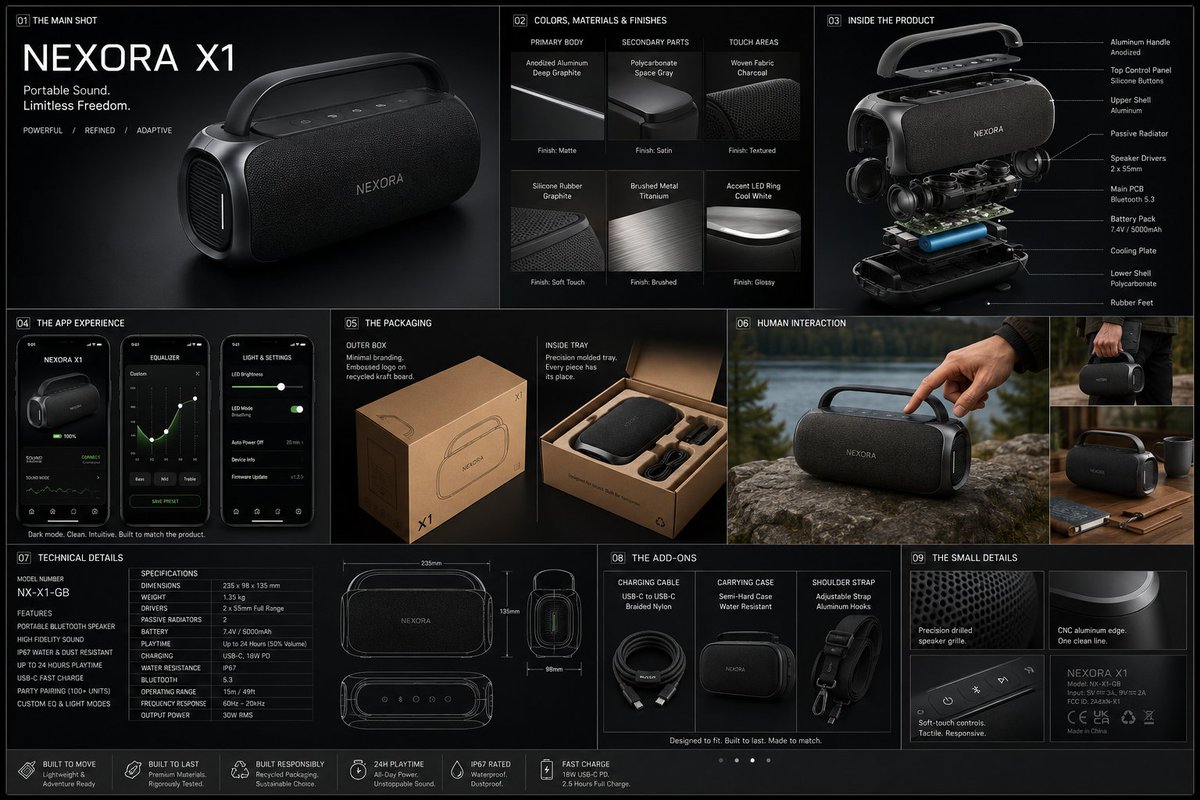
전문 물리적 제품 디자인 보드
분해도, 재료, 디지털 화면 레이아웃 등을 포함하여 전문적인 제품 디자인 포스터 제작을 위한 체계적인 기술 지침입니다.
이것은 제품 및 상업 에 대한 GPT Image 2 프롬프트 사례입니다. 아래의 복사 가능한 프롬프트를 사용하여 유사한 시각 자료를 생성하고, 재사용하기 전에 Awesome GPT Image 2 Prompts 의 저작자 표시 및 상업적 사용 권한을 검토하십시오.
전체 프롬프트 세트가 필요하신가요? 다음을 사용하세요. 제품 및 상업 더 많은 관련 예시를 보려면 주제 허브를 열거나 다음을 열어보세요. GPT Image 2 프롬프트 카탈로그 전체 예제 색인, 재사용 가능한 구조 및 출처 표기는 다음을 참조하십시오.
Free 1K preview
Generate one preview image instantly, no sign-up required.
3106/4000
프롬프트
복사 준비 프롬프트
{
 "prompt": {
"title": "High-End Physical Product Design Board",     "trigger": "Upload a simple sketch or outline of a product. Use it to build a full, professional product design poster—the kind that wins over investors and gets featured on top design websites.",          "prime_directive": {
"rule": "Every shape, material, screen, and accessory must come directly from the lines and style of the uploaded sketch.",
"enforcement": "Do not use standard templates. Look closely at the shape. Build a complete physical and digital world from its basic design."
 },

"format": {
"orientation": "Horizontal",
"aspect_ratio": "16:9",
"layout": "Clean technical grid",
"composition": "Neat, spacious, and purposeful—balancing big, beautiful images with clear technical details"
},
"sections": {
"01_product_header": {
"label": "The Main Shot",
"elements": [
"{argument name="product name" default="Product name"} in strong, clean text",
"Short product goal—5 words max, sharp and clear",
"Three main feeling words (e.g., {argument name="style keywords" default="Smooth / Tough / Smart"})"
]
},
"02_materials_system": {
"label": "Colors, Materials, and Finishes",
"palettes": {
"primary_body": "Main materials (e.g., {argument name="primary materials" default="dark metal, smooth plastic"})",
"secondary_parts": "Materials for buttons, ports, or edges",
"touch_areas": "Materials you feel (e.g., soft rubber, textured fabric)"
},
"per_material_display": [
"Close-up picture of the material",
"Material name",
"Finish type (matte, shiny, or rough)"
]
},

"03_exploded_view": {
"label": "Inside the Product",
"components": [
"Outer shell floating above the inside parts",
"Visible battery, main circuit board, or switches",
"Connecting wires and cooling parts"
],
"requirement": "Must look like it can actually be built in real life, with clear guide lines."
},
"04_digital_screen": {
"label": "The App or Screen",
"define": [
"The main device screen or a mobile app that controls it",
"The screen design must match the physical product's shape"
],
"visual_tiles": {
"count": "2–3 key screens",
"style": "Dark mode with high contrast and simple buttons"
}
},
"05_unboxing_experience": {
"label": "The Packaging",
"rule": "The box must look premium, sturdy, and environmentally friendly.",
"mockups": [
{
"type": "Outer Box",
"detail": "Clean logo pressed into thick, high-quality cardboard"
},
{
"type": "Inside Tray",
"detail": "Perfectly cut spaces to hold the product and wires safely"
}
]
},
"06_real_world_use": {
"label": "Human Interaction",
"scenarios": [
"Product sitting naturally on a desk or outdoors",
"A person's hand pressing the main button or holding the handle",
"Realistic lighting and shadows that match the background"
],
"requirement": "Must look like a real photograph to show the actual size of the item."
},
"07_text_and_specs": {
"label": "Technical Details",
"tiers": {
"model_number": "Clear, typewriter-style text for small numbers"
}
}
}
}
프롬프트 변수
프롬프트에 있는 편집 가능한 인수 자리 표시자와 해당 기본값입니다.
변하기 쉬운
product name
기본
Product name
변하기 쉬운
style keywords
기본
Smooth / Tough / Smart
변하기 쉬운
primary materials
기본
dark metal, smooth plastic
Best for
- - 제품 및 상업 visual exploration
- - Image generation and reference-image edits
- - Reusable briefs that keep source attribution visible
Change these parts
- - Subject, product, character, or scene
- - Aspect ratio, camera, lighting, and background
- - Brand, text, color, and output constraints
Recommended model and settings
- - Model: gpt-image-2
- - Input mode: 텍스트 to 이미지
- - Aspect ratio: source
- - Commercial status: review original source
How to use this prompt
- 1. Copy the prompt and preserve its structure for the first test.
- 2. Replace the subject, context, and publishing channel.
- 3. Change one camera, lighting, or style variable per iteration.
- 4. Inspect the output, source, text, and rights before reuse.
Limitations, source, and reuse cautions
- - Generated output is an editable draft, not factual, legal, or rights evidence.
- - Review the linked source, people, brands, logos, text, and third-party media before commercial use.
Awesome GPT Image 2 Prompts 에서 가져왔습니다. 출처 표기가 필요합니다. 상업적 이용 가능 여부는 allowed 입니다. 유료 사용 전에 원저작권 정보를 확인하세요.
이 범주에 속하는 더 많은 사례
범주, 입력 방식 호환성, 품질 및 위험도에 따라 우선순위가 정해집니다.






재사용 및 출처 참고 사항
사례를 미리 확인한 후 이 안내 메시지를 안전하게 사용하십시오.
- 1.프롬프트를 복사하거나 Dovoo의 생성 버튼을 사용하여 직접 엽니다.
- 2.사용 사례에 맞게 변수, 화면 비율 및 참조 이미지를 조정하십시오.
- 3.출판 또는 유료 사용 전에 저작권, 출처 표기 요건 및 브랜드 또는 초상권 관련 위험을 확인하십시오.