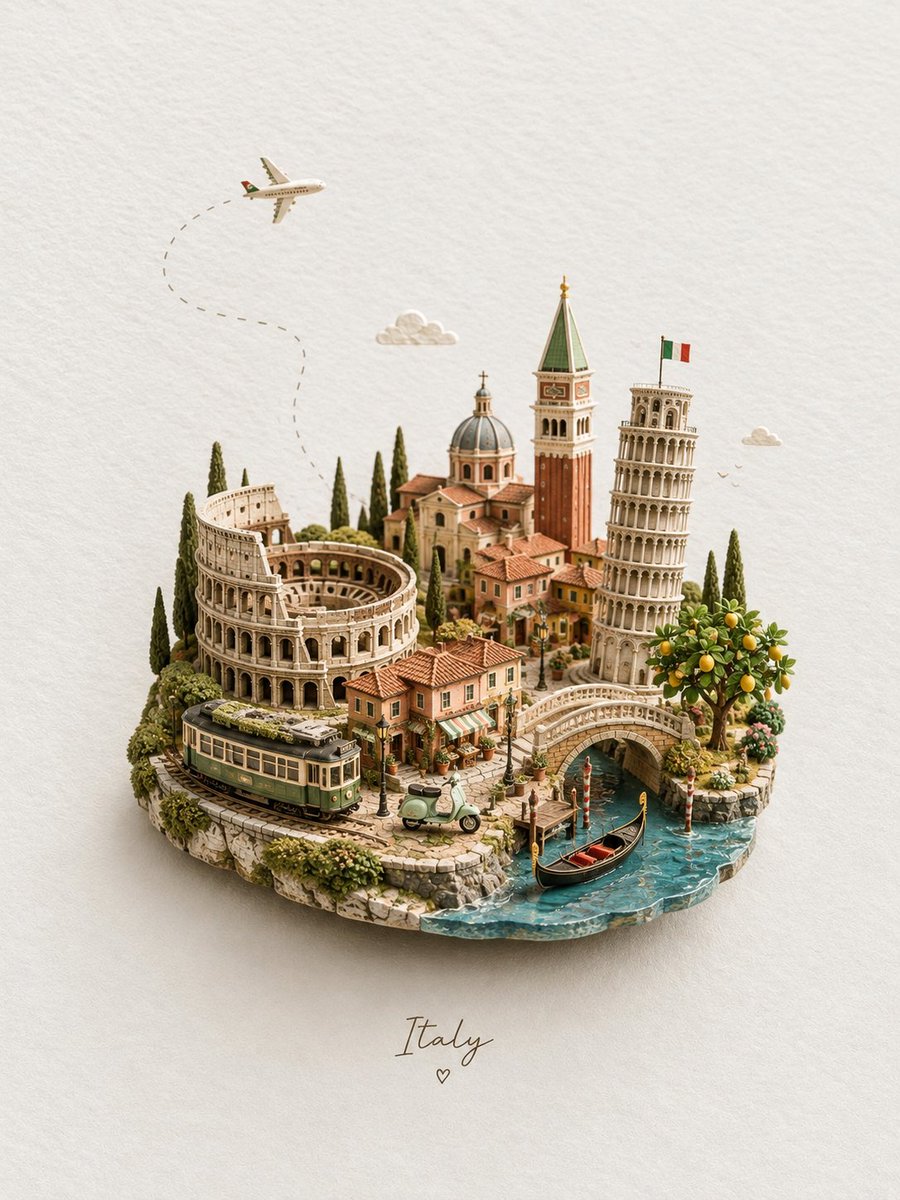
Handcrafted Miniature Diorama Landscape
Creates a detailed miniature diorama of a travel destination, styled as a handcrafted resin and ceramic model on a textured paper background.
이것은 제품 및 상업 에 대한 GPT Image 2 프롬프트 사례입니다. 아래의 복사 가능한 프롬프트를 사용하여 유사한 시각 자료를 생성하고, 재사용하기 전에 Awesome GPT Image 2 Prompts 의 저작자 표시 및 상업적 사용 권한을 검토하십시오.
전체 프롬프트 세트가 필요하신가요? 다음을 사용하세요. 제품 및 상업 더 많은 관련 예시를 보려면 주제 허브를 열거나 다음을 열어보세요. GPT Image 2 프롬프트 카탈로그 전체 예제 색인, 재사용 가능한 구조 및 출처 표기는 다음을 참조하십시오.
Free 1K preview
Generate one preview image instantly, no sign-up required.
2197/4000
프롬프트
복사 준비 프롬프트
A premium handcrafted miniature diorama of {argument name="country" default="Italy"} arranged as a tiny floating travel island on a warm ivory textured paper background, viewed from a slightly elevated three-quarter perspective.

Create a richly detailed {argument name="country" default="Italy"} landscape featuring the {argument name="landmark 1" default="Colosseum"}, the {argument name="landmark 2" default="Leaning Tower of Pisa"}, a Venetian bell tower, a beautiful Renaissance-style domed church, charming terracotta-roofed village houses, narrow cobblestone streets, tall Mediterranean cypress trees, olive greenery, flowering plants, and a vibrant lemon tree filled with ripe yellow lemons.

In the foreground, include a vintage green-and-cream Italian tram following miniature railway tracks around the island, a pastel green Vespa parked beside a tiny café, and a graceful stone bridge crossing a turquoise Venetian canal. A classic black gondola with subtle red interior details glides through the water beside traditional striped mooring poles.

Above the miniature landscape, a small passenger airplane flies across the open background with a delicate curved dotted flight path trailing behind it. Add a few tiny soft clouds and distant birds for a whimsical travel atmosphere.

Use warm Mediterranean colors: terracotta orange, aged limestone beige, olive green, soft cream, muted brick red, pastel peach, and clear turquoise-blue water. Every structure should feel handcrafted from painted resin, wood, ceramic, sculpted foliage, and fine architectural model materials.

Soft diffused studio lighting from the upper left, realistic contact shadows beneath the island and buildings, subtle depth of field, crisp micro-detail, realistic miniature photography, collectible architectural model aesthetic, elegant composition, peaceful nostalgic mood, sophisticated travel-poster quality, ultra-detailed photorealism, 8K.

Keep generous clean negative space around the miniature island. Center the word “{argument name="country name" default="Italy"}” beneath the island in delicate handwritten calligraphy with a tiny minimalist heart below it.

Portrait composition, 3:4 aspect ratio.
프롬프트 변수
프롬프트에 있는 편집 가능한 인수 자리 표시자와 해당 기본값입니다.
변하기 쉬운
country
기본
Italy
변하기 쉬운
landmark 1
기본
Colosseum
변하기 쉬운
landmark 2
기본
Leaning Tower of Pisa
변하기 쉬운
country name
기본
Italy
Best for
- - 제품 및 상업 visual exploration
- - Image generation and reference-image edits
- - Reusable briefs that keep source attribution visible
Change these parts
- - Subject, product, character, or scene
- - Aspect ratio, camera, lighting, and background
- - Brand, text, color, and output constraints
Recommended model and settings
- - Model: gpt-image-2
- - Input mode: 텍스트 to 이미지
- - Aspect ratio: source
- - Commercial status: review original source
How to use this prompt
- 1. Copy the prompt and preserve its structure for the first test.
- 2. Replace the subject, context, and publishing channel.
- 3. Change one camera, lighting, or style variable per iteration.
- 4. Inspect the output, source, text, and rights before reuse.
Limitations, source, and reuse cautions
- - Generated output is an editable draft, not factual, legal, or rights evidence.
- - Review the linked source, people, brands, logos, text, and third-party media before commercial use.
Awesome GPT Image 2 Prompts 에서 가져왔습니다. 출처 표기가 필요합니다. 상업적 이용 가능 여부는 allowed 입니다. 유료 사용 전에 원저작권 정보를 확인하세요.
이 범주에 속하는 더 많은 사례
범주, 입력 방식 호환성, 품질 및 위험도에 따라 우선순위가 정해집니다.




재사용 및 출처 참고 사항
사례를 미리 확인한 후 이 안내 메시지를 안전하게 사용하십시오.
- 1.프롬프트를 복사하거나 Dovoo의 생성 버튼을 사용하여 직접 엽니다.
- 2.사용 사례에 맞게 변수, 화면 비율 및 참조 이미지를 조정하십시오.
- 3.출판 또는 유료 사용 전에 저작권, 출처 표기 요건 및 브랜드 또는 초상권 관련 위험을 확인하십시오.