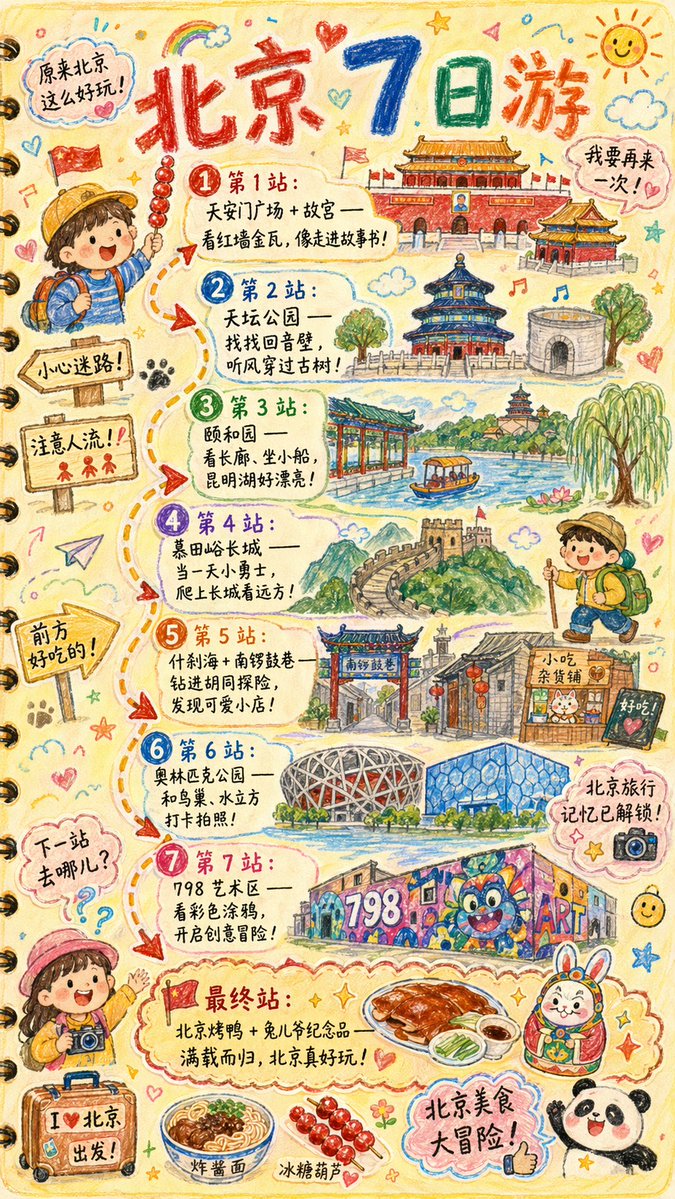
손으로 그린 여행 일기 삽화
도시 이름, 랜드마크, 경로를 자유롭게 설정할 수 있는, 어린아이 감성이 담긴 손으로 그린 여행 일기 일러스트를 제작하기 위한 자세한 지침입니다.
이것은 그래픽 및 포스터 에 대한 GPT Image 2 프롬프트 사례입니다. 아래의 복사 가능한 프롬프트를 사용하여 유사한 시각 자료를 생성하고, 재사용하기 전에 Awesome GPT Image 2 Prompts 의 저작자 표시 및 상업적 사용 권한을 검토하십시오.
전체 프롬프트 세트가 필요하신가요? 다음을 사용하세요. 그래픽 및 포스터 더 많은 관련 예시를 보려면 주제 허브를 열거나 다음을 열어보세요. GPT Image 2 프롬프트 카탈로그 전체 예제 색인, 재사용 가능한 구조 및 출처 표기는 다음을 참조하십시오.
Free 1K preview
Generate one preview image instantly, no sign-up required.
2430/4000
프롬프트
복사 준비 프롬프트
Please draw a brightly colored, vertical (9:16) hand-drawn style "{argument name="city name" default="Beijing"} Travel Journal Illustration." The style should look as if it were created with crayons by a curious child. Use a soft and warm light-colored background (such as light yellow), paired with bright tones like red, blue, and green, to create a cozy, child-like, and travel-inspired atmosphere.

I. Main Image: Journal-style Travel Route

Draw a "winding travel route" in the center of the illustration, connecting multiple locations with arrows and dashed lines. Recommended attractions will be automatically generated based on a {argument name="number of days" default="1"}-day itinerary:

Example format (automatically replaced with {argument name="city name" default="Beijing"} related content):

- "Stop 1: {Attraction 1 recommendation + short fun description}"
- "Stop 2: {Attraction 2 recommendation + short fun description}"
- "Stop 3: {Attraction 3 recommendation + short fun description}"
- ...
- "Final Stop: {Local signature food/souvenir + warm closing statement}"

> The number of travel stops is automatically generated based on the number of days. If no days are input, a 1-day/highlights route will be generated by default.

II. Fun Surrounding Elements (Automatically replaced based on the city)

Add plenty of child-like elements around the route, such as:

- Cute travel characters: "A child holding local snacks," "An adventurous kid wearing a backpack," etc.
- Child-like Q-version hand-drawings of local landmarks: such as "{landmark 1}," "{landmark 2}," "{landmark 3}."
- Fun signboards: "Watch out for getting lost!", "Mind the crowds!", "Good food ahead!" (Adjusted according to city context).
- Sticker-style slogans: "{argument name="city name" default="Beijing"} Travel Memories Unlocked!", "{argument name="city name" default="Beijing"} Food Adventure!", "Where to next?"
- Cute small icons of local delicacies: such as "{food 1}," "{food 2}," "{food 3}."
- Exclamations (maintaining a child-like tone): "{argument name="city name" default="Beijing"} is so much fun!", "I want to go again!"

III. Overall Style Requirements

- Hand-drawn crayon style / children's travel log style
- Bright colors, full but warm composition
- Emphasis on the joy and exploration of travel
- All text uses cute handwritten fonts
- Make the entire image look like a travel journal page full of child-like wonder.
프롬프트 변수
프롬프트에 있는 편집 가능한 인수 자리 표시자와 해당 기본값입니다.
변하기 쉬운
city name
기본
Beijing
변하기 쉬운
number of days
기본
1
Best for
- - 그래픽 및 포스터 visual exploration
- - Image generation and reference-image edits
- - Reusable briefs that keep source attribution visible
Change these parts
- - Subject, product, character, or scene
- - Aspect ratio, camera, lighting, and background
- - Brand, text, color, and output constraints
Recommended model and settings
- - Model: gpt-image-2
- - Input mode: 텍스트 to 이미지
- - Aspect ratio: source
- - Commercial status: review original source
How to use this prompt
- 1. Copy the prompt and preserve its structure for the first test.
- 2. Replace the subject, context, and publishing channel.
- 3. Change one camera, lighting, or style variable per iteration.
- 4. Inspect the output, source, text, and rights before reuse.
Limitations, source, and reuse cautions
- - Generated output is an editable draft, not factual, legal, or rights evidence.
- - Review the linked source, people, brands, logos, text, and third-party media before commercial use.
Awesome GPT Image 2 Prompts 에서 가져왔습니다. 출처 표기가 필요합니다. 상업적 이용 가능 여부는 allowed 입니다. 유료 사용 전에 원저작권 정보를 확인하세요.
이 범주에 속하는 더 많은 사례
범주, 입력 방식 호환성, 품질 및 위험도에 따라 우선순위가 정해집니다.






재사용 및 출처 참고 사항
사례를 미리 확인한 후 이 안내 메시지를 안전하게 사용하십시오.
- 1.프롬프트를 복사하거나 Dovoo의 생성 버튼을 사용하여 직접 엽니다.
- 2.사용 사례에 맞게 변수, 화면 비율 및 참조 이미지를 조정하십시오.
- 3.출판 또는 유료 사용 전에 저작권, 출처 표기 요건 및 브랜드 또는 초상권 관련 위험을 확인하십시오.