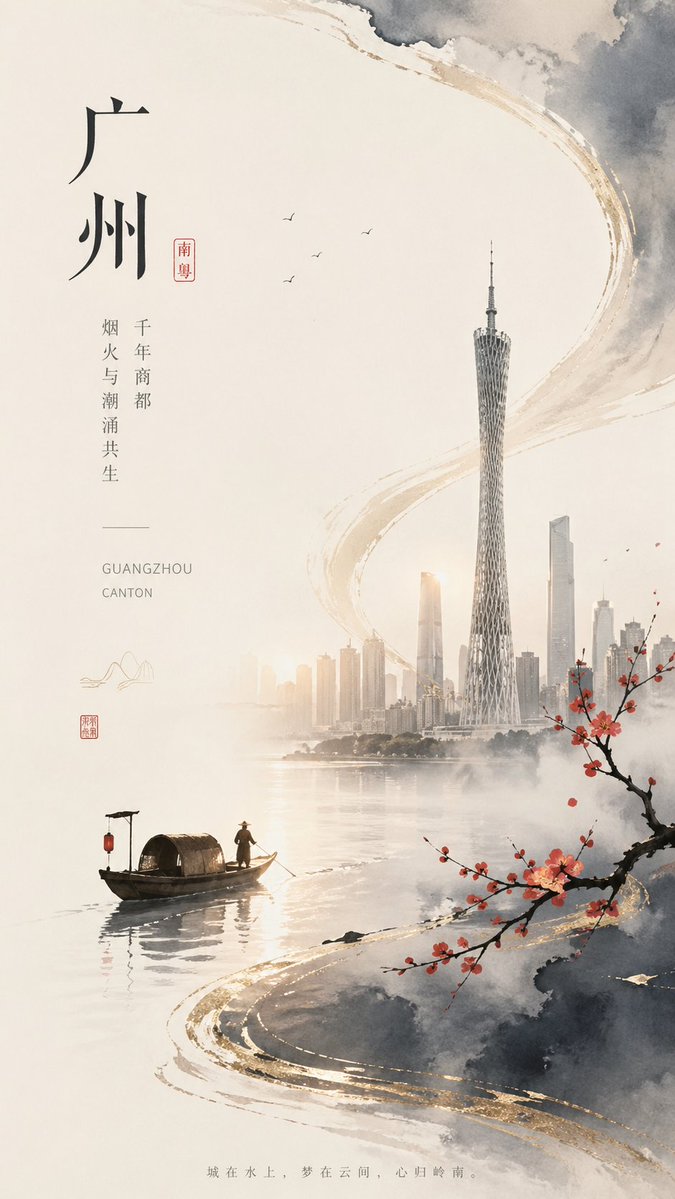
광저우 수묵화 도시 포스터
이 프롬프트는 광저우의 현대적인 스카이라인과 전통 수묵화 요소를 결합한 새로운 중국 미학을 담은 세로형 포스터를 생성하여 문화 브랜딩이나 잡지 표지 디자인에 활용할 수 있도록 합니다.
이것은 그래픽 및 포스터 에 대한 GPT Image 2 프롬프트 사례입니다. 아래의 복사 가능한 프롬프트를 사용하여 유사한 시각 자료를 생성하고, 재사용하기 전에 Awesome GPT Image 2 Prompts 의 저작자 표시 및 상업적 사용 권한을 검토하십시오.
전체 프롬프트 세트가 필요하신가요? 다음을 사용하세요. 그래픽 및 포스터 더 많은 관련 예시를 보려면 주제 허브를 열거나 다음을 열어보세요. GPT Image 2 프롬프트 카탈로그 전체 예제 색인, 재사용 가능한 구조 및 출처 표기는 다음을 참조하십시오.
Free 1K preview
Generate one preview image instantly, no sign-up required.
2201/4000
프롬프트
복사 준비 프롬프트
A delicate vertical modern Chinese ink-wash style poster, the design style is like the cover of a cultural city brand, themed as {argument name="headline text" default="Guangzhou"}. Use soft warm ivory paper as the background, leaving a large area of blank space, supplemented by delicate gray watercolor clouds and semi-abstract brushstroke arcs with matte metallic gold edges. The composition integrates traditional Jiangnan ink painting with modern skylines: on the right-center, depicts the Guangzhou skyline appearing in the mist above calm water, with the Canton Tower as the most prominent tallest building, with delicate and detailed lines, surrounded by several light gray-beige modern skyscrapers. On the water in the lower left corner, place 1 traditional small wooden awning boat, with 1 boatman wearing a bamboo hat, presented in dark ink silhouettes with subtle reflections. In the lower right foreground, add 1 branch of plum blossom leaning inward, with strong branches and dotted with a few bright red plum blossoms. In the upper-middle blank space, add 4 flying birds. Keep the water surface smooth, reflective and full of mist, and the city landscape softly blends into the atmosphere. On the left side, adopt a minimalist poster layout to design elegant vertical text: a large Chinese main title {argument name="headline text" default="Guangzhou"}, a small red seal-style label with {argument name="region tag" default="Lingnan"} written on it, two columns of slender vertical text “Millennium Trading City” and “Coexistence of Fireworks and Tides”, a thin dividing line, and the lowercase English letters “GUANGZHOU” and “CANTON” at the bottom. Add 2 small red seals and 1 minimalist mountain line icon near the text area in the lower left corner. Place a faint Chinese short sentence {argument name="bottom quote" default="The city is on the water, the dream is in the clouds, the heart returns to Lingnan."} in the center at the bottom. Overall atmosphere: quiet, elegant, poetic, high-end poster style, balanced asymmetrical composition, light mist, restrained tones, including ivory white, charcoal gray, warm beige, ink black, cinnabar red and wire-drawn gold embellishments.프롬프트 변수
프롬프트에 있는 편집 가능한 인수 자리 표시자와 해당 기본값입니다.
변하기 쉬운
headline text
기본
Guangzhou
변하기 쉬운
region tag
기본
Lingnan
변하기 쉬운
bottom quote
기본
The city is on the water, the dream is in the clouds, the heart returns to Lingnan.
Best for
- - 그래픽 및 포스터 visual exploration
- - Image generation and reference-image edits
- - Reusable briefs that keep source attribution visible
Change these parts
- - Subject, product, character, or scene
- - Aspect ratio, camera, lighting, and background
- - Brand, text, color, and output constraints
Recommended model and settings
- - Model: gpt-image-2
- - Input mode: 텍스트 to 이미지
- - Aspect ratio: source
- - Commercial status: review original source
How to use this prompt
- 1. Copy the prompt and preserve its structure for the first test.
- 2. Replace the subject, context, and publishing channel.
- 3. Change one camera, lighting, or style variable per iteration.
- 4. Inspect the output, source, text, and rights before reuse.
Limitations, source, and reuse cautions
- - Generated output is an editable draft, not factual, legal, or rights evidence.
- - Review the linked source, people, brands, logos, text, and third-party media before commercial use.
Awesome GPT Image 2 Prompts 에서 가져왔습니다. 출처 표기가 필요합니다. 상업적 이용 가능 여부는 allowed 입니다. 유료 사용 전에 원저작권 정보를 확인하세요.
이 범주에 속하는 더 많은 사례
범주, 입력 방식 호환성, 품질 및 위험도에 따라 우선순위가 정해집니다.






재사용 및 출처 참고 사항
사례를 미리 확인한 후 이 안내 메시지를 안전하게 사용하십시오.
- 1.프롬프트를 복사하거나 Dovoo의 생성 버튼을 사용하여 직접 엽니다.
- 2.사용 사례에 맞게 변수, 화면 비율 및 참조 이미지를 조정하십시오.
- 3.출판 또는 유료 사용 전에 저작권, 출처 표기 요건 및 브랜드 또는 초상권 관련 위험을 확인하십시오.