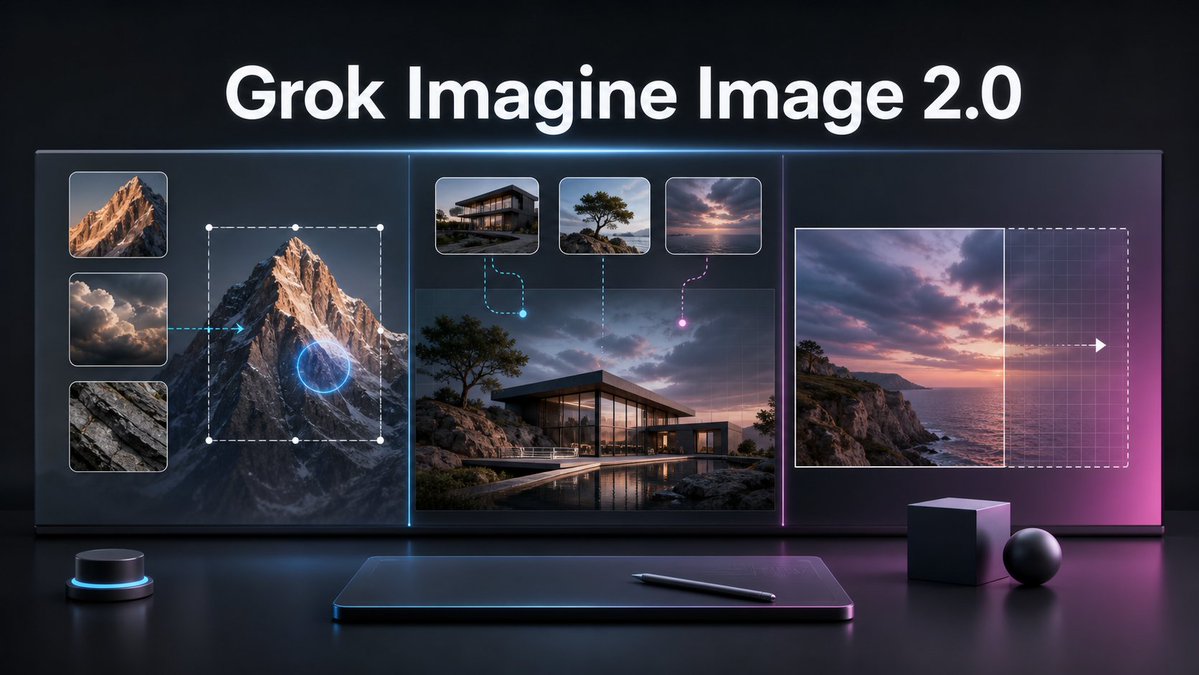
Grok Imagine Image 2.0 Launch Banner
A cinematic tech promo banner visualizing AI image editing, multi-reference generation, and smart resizing for a product launch.
이것은 제품 및 상업 에 대한 GPT Image 2 프롬프트 사례입니다. 아래의 복사 가능한 프롬프트를 사용하여 유사한 시각 자료를 생성하고, 재사용하기 전에 Awesome GPT Image 2 Prompts 의 저작자 표시 및 상업적 사용 권한을 검토하십시오.
전체 프롬프트 세트가 필요하신가요? 다음을 사용하세요. 제품 및 상업 더 많은 관련 예시를 보려면 주제 허브를 열거나 다음을 열어보세요. GPT Image 2 프롬프트 카탈로그 전체 예제 색인, 재사용 가능한 구조 및 출처 표기는 다음을 참조하십시오.
Free 1K preview
Generate one preview image instantly, no sign-up required.
Free text preview doesn’t preserve reference-image consistency.
2997/4000
프롬프트
복사 준비 프롬프트
Goal: Create a cinematic dark tech launch banner for {argument name="product name" default="Grok Imagine Image 2.0"}, showing an advanced AI image editing workflow on a large futuristic display.

Canvas: Wide 16:9 horizontal composition, glossy black studio environment, high contrast, premium product-announcement style. Use a deep charcoal background with subtle blue and magenta rim lighting, reflections on a polished desk surface, and a soft neon glow around interface elements.

Layout: Place a large bold white headline centered at the top reading “{argument name="product name" default="Grok Imagine Image 2.0"}”. Below it, create one continuous widescreen glass UI display divided into exactly 3 vertical sections by thin glowing separators: cyan separator between the left and center sections, magenta separator between the center and right sections.

Left section: Show local image editing. Include exactly 3 stacked reference thumbnails on the far left: 1) sunlit mountain peak, 2) dramatic clouds, 3) gray rock texture. To the right of these thumbnails, show a large mountain image with a dashed rectangular selection box, white corner/edge handles, and a glowing blue circular edit target over the mountain. Add a cyan arrow pointing from the cloud thumbnail area toward the mountain, implying guided editing.

Center section: Show multi-image reference generation. Use a large realistic image of a modern glass house on a rocky coastal landscape at dusk, with a pool reflection in the foreground. Above it, include exactly 3 small rounded reference cards: 1) modern house exterior, 2) lone windswept tree on rocks, 3) pink-purple sunset sky over water. Connect the first card with a cyan dashed curved line ending in a glowing cyan dot, connect the second card with a vertical dotted line, and connect the third card with a magenta dashed curved line ending in a glowing magenta dot.

Right section: Show intelligent resizing or outpainting. Include a sunset seascape image on the left side of the panel, a vertical boundary line at its right edge, and a larger dashed rectangular extension area to the right with a faint grid overlay. Add a white arrow pointing right across the extension area to indicate expansion. The right side should fade into a magenta glow.

Foreground objects: On the desk below the display, include exactly 4 objects: 1) a small black cylindrical control puck with a cyan light ring on the left, 2) a slim dark drawing tablet centered with a soft blue rim glow, 3) a black stylus lying diagonally on the tablet, 4) two matte geometric props on the right consisting of one cube and one sphere.

Visual style: Ultra-polished 3D render mixed with realistic UI mockup, dramatic cinematic lighting, glass panels, crisp rounded thumbnails, subtle grid textures, neon cyan and magenta accents, shallow reflections, high-resolution product keynote aesthetic. Keep the typography clean, bold, and sans-serif. No extra logos, watermarks, people, or additional text.
프롬프트 변수
프롬프트에 있는 편집 가능한 인수 자리 표시자와 해당 기본값입니다.
변하기 쉬운
product name
기본
Grok Imagine Image 2.0
Best for
- - 제품 및 상업 visual exploration
- - Image generation and reference-image edits
- - Reusable briefs that keep source attribution visible
Change these parts
- - Subject, product, character, or scene
- - Aspect ratio, camera, lighting, and background
- - Brand, text, color, and output constraints
Recommended model and settings
- - Model: gpt-image-2
- - Input mode: 이미지 to 이미지
- - Aspect ratio: source
- - Commercial status: review original source
How to use this prompt
- 1. Copy the prompt and preserve its structure for the first test.
- 2. Replace the subject, context, and publishing channel.
- 3. Change one camera, lighting, or style variable per iteration.
- 4. Inspect the output, source, text, and rights before reuse.
Limitations, source, and reuse cautions
- - Generated output is an editable draft, not factual, legal, or rights evidence.
- - Review the linked source, people, brands, logos, text, and third-party media before commercial use.
Awesome GPT Image 2 Prompts 에서 가져왔습니다. 출처 표기가 필요합니다. 상업적 이용 가능 여부는 allowed 입니다. 유료 사용 전에 원저작권 정보를 확인하세요.
이 범주에 속하는 더 많은 사례
범주, 입력 방식 호환성, 품질 및 위험도에 따라 우선순위가 정해집니다.






재사용 및 출처 참고 사항
사례를 미리 확인한 후 이 안내 메시지를 안전하게 사용하십시오.
- 1.프롬프트를 복사하거나 Dovoo의 생성 버튼을 사용하여 직접 엽니다.
- 2.사용 사례에 맞게 변수, 화면 비율 및 참조 이미지를 조정하십시오.
- 3.출판 또는 유료 사용 전에 저작권, 출처 표기 요건 및 브랜드 또는 초상권 관련 위험을 확인하십시오.