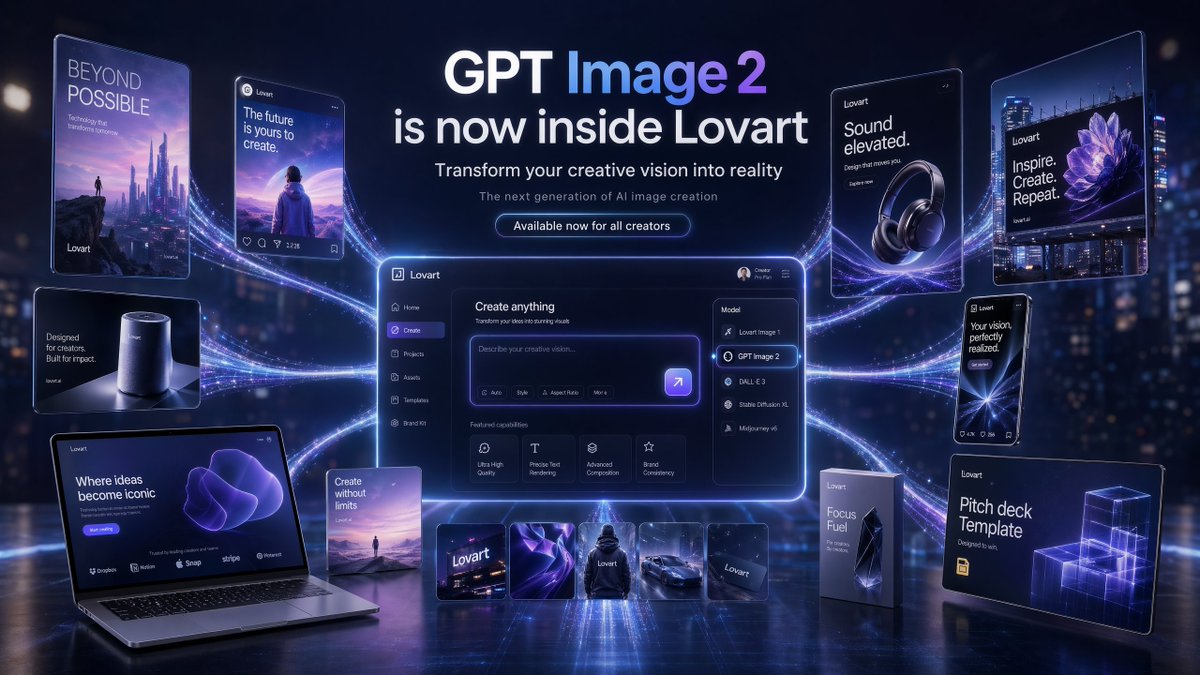
미래지향적인 GPT 이미지 2 출시 배너
제품 출시 마케팅을 위한 고급 캠페인 스타일의 히어로 이미지로, Lovart 내부에 GPT Image 2가 표시되고, 중앙 UI 대시보드, 연결된 여러 프로모션 목업, 세련되고 미래지향적인 브랜딩이 포함되어 있습니다.
이것은 제품 및 상업 에 대한 GPT Image 2 프롬프트 사례입니다. 아래의 복사 가능한 프롬프트를 사용하여 유사한 시각 자료를 생성하고, 재사용하기 전에 Awesome GPT Image 2 Prompts 의 저작자 표시 및 상업적 사용 권한을 검토하십시오.
전체 프롬프트 세트가 필요하신가요? 다음을 사용하세요. 제품 및 상업 더 많은 관련 예시를 보려면 주제 허브를 열거나 다음을 열어보세요. GPT Image 2 프롬프트 카탈로그 전체 예제 색인, 재사용 가능한 구조 및 출처 표기는 다음을 참조하십시오.
이 프롬프트는 여러 개의 참조 이미지를 사용하도록 설계되었습니다. Dovoo를 열고 프롬프트와 미리보기 이미지를 표시한 다음, Dovoo에서 나머지 참조 이미지를 추가한 후 생성하겠습니다.
Free 1K preview
Generate one preview image instantly, no sign-up required.
Free text preview doesn’t preserve reference-image consistency.
4000/4000
프롬프트
복사 준비 프롬프트
{
  "type": "futuristic AI product launch campaign hero banner",
  "style": "high-end 3D advertising composite with cinematic neon lighting, polished UI mockups, floating product cards, and glossy tech presentation aesthetics",
  "theme": {
    "primary colors": [
      "deep navy",
      "electric violet",
      "indigo",
      "white"
    ],
    "mood": "innovative, premium, futuristic, campaign-ready",
    "lighting": "dramatic blue-violet glow, rim lighting, luminous particle trails, soft bloom, reflective floor"
  },
  "canvas": {
    "aspect_ratio": "16:9",
    "background": "dark futuristic city-at-night bokeh with subtle skyscraper lights and atmospheric haze"
  },
  "headline_block": {
    "position": "top center",
    "count": 4,
    "lines": [
      "GPT Image 2",
      "is now inside Lovart",
      "Transform your creative vision into reality",
      "The next generation of AI image creation"
    ],
    "cta": "Available now for all creators",
    "typography": "clean modern sans-serif, bold white headline, smaller white and pale gray subtext, glowing rounded button"
  },
  "layout": {
    "centerpiece": "large glowing desktop app interface floating in the center with purple edge lighting and curved energy trails connecting all surrounding assets",
    "sections": [
      {
        "title": "left floating posters and devices",
        "position": "left side",
        "count": 5,
        "labels": [
          "BEYOND POSSIBLE vertical sci-fi poster with futuristic skyline and tiny figure",
          "social-style card reading 'The future is yours to create.' with a person facing a surreal landscape",
          "small smart speaker product card reading 'Designed for creators. Built for impact.'",
          "open laptop mockup reading 'Where ideas become iconic' with a purple abstract form on screen",
          "small vertical card reading 'Create without limits' with a tiny landscape scene"
        ]
      },
      {
        "title": "center application UI",
        "position": "middle",
        "count": 1,
        "labels": [
          "Lovart create interface with prompt box and model dropdown opened"
        ]
      },
      {
        "title": "model menu items",
        "position": "center-right inside UI",
        "count": 5,
        "labels": [
          "Lovart Image 1",
          "GPT Image 2",
          "DALL·E 3",
          "Stable Diffusion XL",
          "Midjourney v6"
        ]
      },
      {
        "title": "featured capability cards",
        "position": "lower middle inside UI",
        "count": 4,
        "labels": [
          "Ultra High Quality",
          "Precise Text Rendering",
          "Advanced Composition",
          "Brand Consistency"
        ]
      },
      {
        "title": "bottom asset strip",
        "position": "bottom center",
        "count": 5,
        "labels": [
          "Lovart logo card",
          "abstract purple fabric-like visual",
          "black hoodie mockup",
          "sports car render",
          "dark Lovart card"
        ]
      },
      {
        "title": "right floating posters and packages",
        "position": "right side",
        "count": 5,
        "labels": [
          "headphone ad reading 'Sound elevated.'",
          "large billboard-style poster reading 'Inspire. Create. Repeat.' with a purple flower image",
          "phone-style card reading 'Your vision, perfectly realized.'",
          "tall product box reading 'Focus Fuel'",
          "presentation board reading 'Pitch deck Template' with glowing wireframe cubes"
        ]
      }
    ]
  },
  "ui_details": {
    "app_brand": "Lovart",
    "main_panel_title": "Create anything",
    "prompt_placeholder": "Describe your creative vision...",
    "left_sidebar_count": 6,
    "left_sidebar_labels": [
      "Lovart",
      "Home",
      "Create",
      "Projects",
      "Assets",
      "Templates"
    ],
    "top_right_user_label": "Creator Pro Plan"
  },
  "composition": "symmetrical campaign composition, central software dashboard larger than all other elements, connected to surrounding posters and product mockups by multiple flowing luminous ribbons, reflective ground plane beneath all objects, crisp readable text, premium launch announcement aesthetic",
  "quality": "ultra-detailed, sharp typography, realistic reflections, clean interface design, commercial-grade product visualization"
}
Best for
- - 제품 및 상업 visual exploration
- - Image generation and reference-image edits
- - Reusable briefs that keep source attribution visible
Change these parts
- - Subject, product, character, or scene
- - Aspect ratio, camera, lighting, and background
- - Brand, text, color, and output constraints
Recommended model and settings
- - Model: gpt-image-2
- - Input mode: 다중 이미지 대 이미지
- - Aspect ratio: source
- - Commercial status: review original source
How to use this prompt
- 1. Copy the prompt and preserve its structure for the first test.
- 2. Replace the subject, context, and publishing channel.
- 3. Change one camera, lighting, or style variable per iteration.
- 4. Inspect the output, source, text, and rights before reuse.
Limitations, source, and reuse cautions
- - Generated output is an editable draft, not factual, legal, or rights evidence.
- - Review the linked source, people, brands, logos, text, and third-party media before commercial use.
Awesome GPT Image 2 Prompts 에서 가져왔습니다. 출처 표기가 필요합니다. 상업적 이용 가능 여부는 allowed 입니다. 유료 사용 전에 원저작권 정보를 확인하세요.
이 범주에 속하는 더 많은 사례
범주, 입력 방식 호환성, 품질 및 위험도에 따라 우선순위가 정해집니다.






재사용 및 출처 참고 사항
사례를 미리 확인한 후 이 안내 메시지를 안전하게 사용하십시오.
- 1.프롬프트를 복사하거나 Dovoo의 생성 버튼을 사용하여 직접 엽니다.
- 2.사용 사례에 맞게 변수, 화면 비율 및 참조 이미지를 조정하십시오.
- 3.출판 또는 유료 사용 전에 저작권, 출처 표기 요건 및 브랜드 또는 초상권 관련 위험을 확인하십시오.