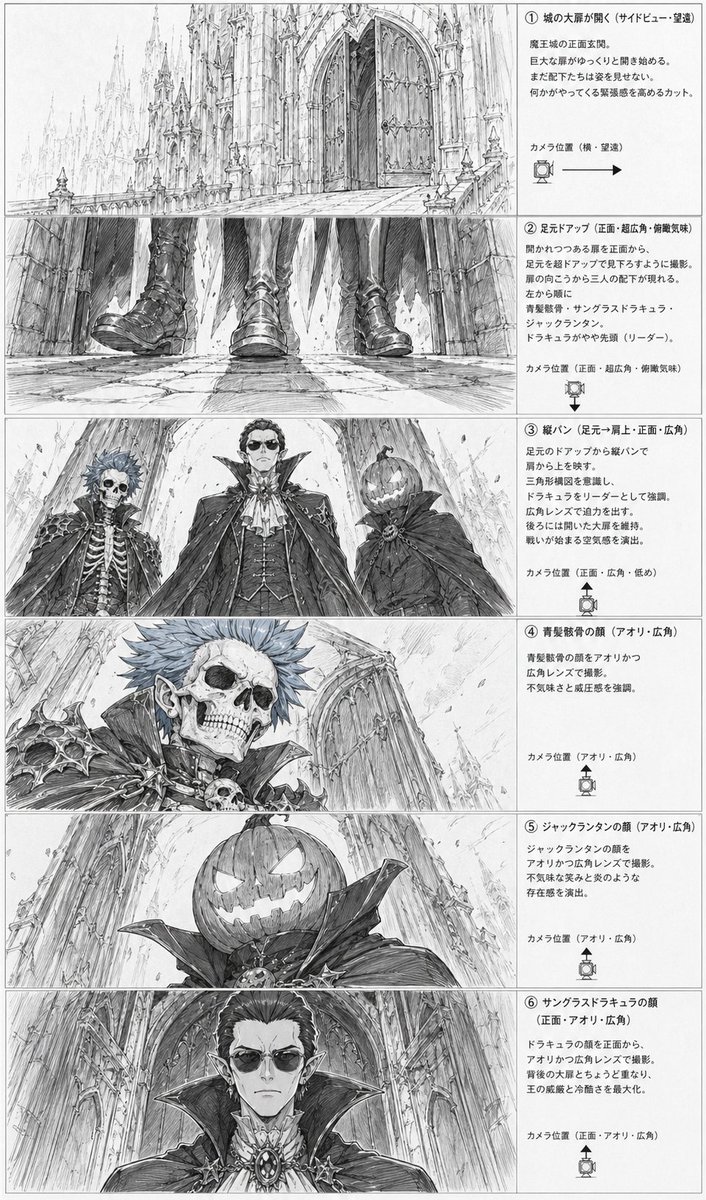
고딕 악당 스토리보드 시트
이 기능은 고딕풍 악당들이 성 입구에 서 있는 모습을 담은 흑백 애니메이션 스타일의 스토리보드 페이지 6장을 생성하며, 사전 제작 레이아웃 및 장면 계획에 유용합니다.
이것은 애니메이션 & 게임 에 대한 GPT Image 2 프롬프트 사례입니다. 아래의 복사 가능한 프롬프트를 사용하여 유사한 시각 자료를 생성하고, 재사용하기 전에 Awesome GPT Image 2 Prompts 의 저작자 표시 및 상업적 사용 권한을 검토하십시오.
전체 프롬프트 세트가 필요하신가요? 다음을 사용하세요. 애니메이션 & 게임 더 많은 관련 예시를 보려면 주제 허브를 열거나 다음을 열어보세요. GPT Image 2 프롬프트 카탈로그 전체 예제 색인, 재사용 가능한 구조 및 출처 표기는 다음을 참조하십시오.
Free 1K preview
Generate one preview image instantly, no sign-up required.
4000/4000
프롬프트
복사 준비 프롬프트
{
  "type": "anime storyboard layout sheet",
  "style": "monochrome pencil sketch, detailed line art, grayscale concept art, dramatic gothic fantasy atmosphere, manga storyboard presentation",
  "subject": {
    "setting": "the front entrance of a massive gothic demon castle with towering cathedral-like spires, pointed arches, carved stone, huge double doors, long stone approach, and a cavernous sense of scale",
    "theme": "ominous villain introduction before a battle",
    "characters": [
      {
        "id": "character 1",
        "description": "undead noble with a skeletal face, spiky short hair, pointed ears, ornate dark armor with bone and skull motifs, high collar, aristocratic vampire-like styling"
      },
      {
        "id": "character 2",
        "description": "tall central vampire lord in an elaborate formal outfit with layered cape, high standing collar, cravat, vest, jewelry and medallion, regal and intimidating presence"
      },
      {
        "id": "character 3",
        "description": "jack-o'-lantern headed figure wearing a dark cloak with a huge collar, carved glowing-smile pumpkin face, eerie and theatrical"
      }
    ],
    "faces partially censored with soft gray rectangular blurs on 3 close-up panels": "true"
  },
  "layout": {
    "orientation": "vertical page",
    "columns": "2",
    "left column": "6 storyboard image panels stacked vertically",
    "right column": "6 explanatory text boxes stacked vertically",
    "sections": [
      {
        "title": "① 城の大扉が開く(サイドビュー・望遠)",
        "position": "top row",
        "count": 1,
        "labels": [
          "opening castle gate wide shot"
        ],
        "image": "a long telephoto side view of the gigantic castle entrance, with the monumental front doors beginning to open and the architecture dwarfing everything around it"
      },
      {
        "title": "② 足元アップ(正面・超広角・俯瞰気味)",
        "position": "second row",
        "count": 1,
        "labels": [
          "feet close-up"
        ],
        "image": "an ultra-wide low frontal close-up of 3 pairs of boots and the hems of capes as the villains approach over cracked stone pavement, emphasizing footsteps and menace"
      },
      {
        "title": "③ 縦パン(足元→肩上・正面・広角)",
        "position": "third row",
        "count": 3,
        "labels": [
          "skeleton noble",
          "vampire lord",
          "jack-o'-lantern figure"
        ],
        "image": "a dramatic low-angle three-character lineup framed from below, showing the 3 antagonists towering above the viewer against the cathedral facade"
      },
      {
        "title": "④ 青髪骸骨の顔(アオリ・広角)",
        "position": "fourth row",
        "count": 1,
        "labels": [
          "skeletal face close-up"
        ],
        "image": "close-up low-angle portrait of the skeletal blue-haired noble, with sharp shoulder armor, skull ornament, and the castle wall receding behind"
      },
      {
        "title": "⑤ ジャックランタンの顔(アオリ・広角)",
        "position": "fifth row",
        "count": 1,
        "labels": [
          "pumpkin head close-up"
        ],
        "image": "close-up low-angle portrait of the jack-o'-lantern headed figure, showing the carved sinister grin and oversized collar against the towering architecture"
      },
      {
        "title": "⑥ サングラスドラキュラの顔(正面・アオリ・広角)",
        "position": "bottom row",
        "count": 1,
        "labels": [
          "vampire lord face close-up"
        ],
        "image": "frontal low-angle close-up of the central vampire lord with elegant hair, pointed ears, ornate brooch, and enormous collar filling the frame"
      }
    ],
    "ui components": {
      "count": 6,
      "items": [
        "6 numbered section headers",
        "6 camera position notes",
        "6 camera direction icons with arrows or angle markers",
        "6 bordered explanatory text areas",
        "6 storyboard image frames",
        "1 full page border"
      ]
    }
  },
  "composition": "clean production sheet layout with thin panel borders, dense Japanese annotations on the right, each illustration on the left corresponding to one text explanation, highly readable storyboard design",
  "text": "all annotation text is in Japanese, printed in neat storyboard document formatting",
  "quality": "highly detailed architectural draftsmanship, expressive perspective exaggeration, cinematic villain reveal, professional anime pre-production board"
}
Best for
- - 애니메이션 & 게임 visual exploration
- - Image generation and reference-image edits
- - Reusable briefs that keep source attribution visible
Change these parts
- - Subject, product, character, or scene
- - Aspect ratio, camera, lighting, and background
- - Brand, text, color, and output constraints
Recommended model and settings
- - Model: gpt-image-2
- - Input mode: 텍스트 to 이미지
- - Aspect ratio: source
- - Commercial status: review original source
How to use this prompt
- 1. Copy the prompt and preserve its structure for the first test.
- 2. Replace the subject, context, and publishing channel.
- 3. Change one camera, lighting, or style variable per iteration.
- 4. Inspect the output, source, text, and rights before reuse.
Limitations, source, and reuse cautions
- - Generated output is an editable draft, not factual, legal, or rights evidence.
- - Review the linked source, people, brands, logos, text, and third-party media before commercial use.
Awesome GPT Image 2 Prompts 에서 가져왔습니다. 출처 표기가 필요합니다. 상업적 이용 가능 여부는 allowed 입니다. 유료 사용 전에 원저작권 정보를 확인하세요.
이 범주에 속하는 더 많은 사례
범주, 입력 방식 호환성, 품질 및 위험도에 따라 우선순위가 정해집니다.






재사용 및 출처 참고 사항
사례를 미리 확인한 후 이 안내 메시지를 안전하게 사용하십시오.
- 1.프롬프트를 복사하거나 Dovoo의 생성 버튼을 사용하여 직접 엽니다.
- 2.사용 사례에 맞게 변수, 화면 비율 및 참조 이미지를 조정하십시오.
- 3.출판 또는 유료 사용 전에 저작권, 출처 표기 요건 및 브랜드 또는 초상권 관련 위험을 확인하십시오.