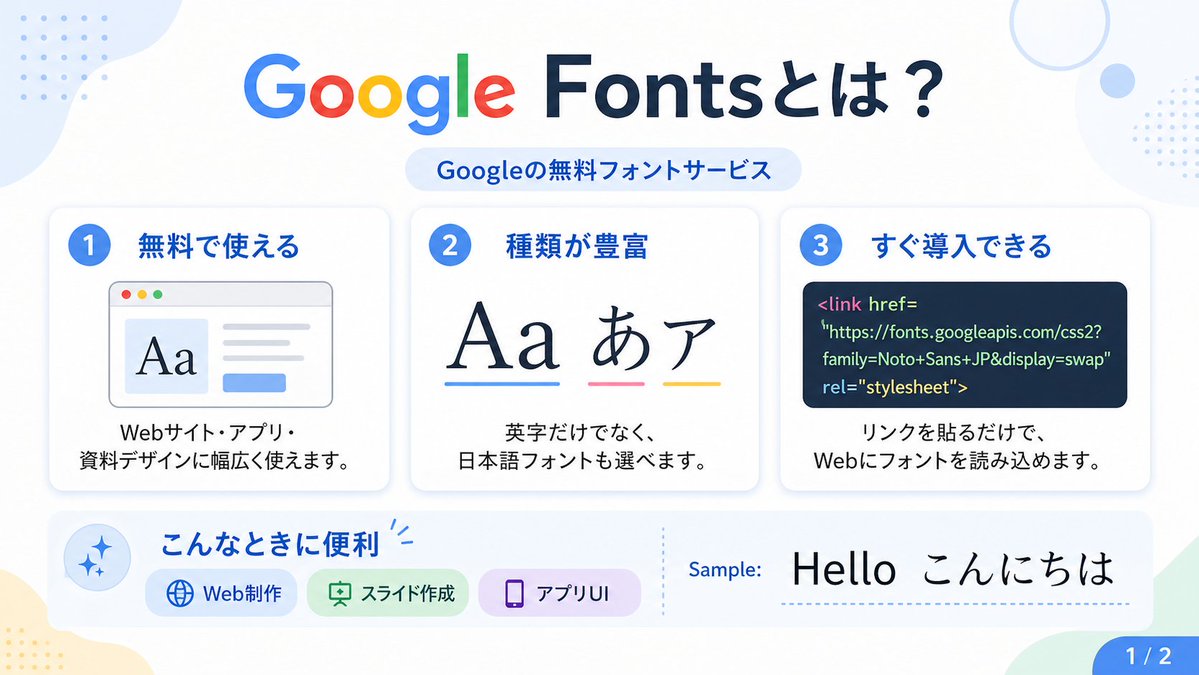
구글 폰트 일본어 인포그래픽
구글 폰트를 설명하는 깔끔한 일본식 프레젠테이션 스타일의 인포그래픽입니다. 소셜 미디어 게시물, 슬라이드 또는 교육용 디자인 콘텐츠에 적합합니다.
이것은 그래픽 및 포스터 에 대한 GPT Image 2 프롬프트 사례입니다. 아래의 복사 가능한 프롬프트를 사용하여 유사한 시각 자료를 생성하고, 재사용하기 전에 Awesome GPT Image 2 Prompts 의 저작자 표시 및 상업적 사용 권한을 검토하십시오.
전체 프롬프트 세트가 필요하신가요? 다음을 사용하세요. 그래픽 및 포스터 더 많은 관련 예시를 보려면 주제 허브를 열거나 다음을 열어보세요. GPT Image 2 프롬프트 카탈로그 전체 예제 색인, 재사용 가능한 구조 및 출처 표기는 다음을 참조하십시오.
Free 1K preview
Generate one preview image instantly, no sign-up required.
4000/4000
프롬프트
복사 준비 프롬프트
{
  "type": "Japanese infographic poster",
  "topic": "Google Fonts introduction",
  "style": {
    "look": "clean flat modern presentation slide",
    "palette": "white background with soft pastel blue, green, yellow, and lavender accents",
    "aspect_ratio": "16:9",
    "lighting": "bright even digital graphic lighting",
    "finish": "crisp vector-like infographic with subtle shadows and rounded cards"
  },
  "text": {
    "headline": "{argument name=\"headline text\" default=\"Google Fontsとは?\"}",
    "subheadline": "Googleの無料フォントサービス",
    "sample_label": "Sample:",
    "sample_text": "{argument name=\"sample text\" default=\"Hello こんにちは\"}",
    "page_indicator": "1 / 2"
  },
  "layout": {
    "sections": [
      {
        "title": "top header",
        "position": "top center",
        "count": 2,
        "labels": [
          "Google Fontsとは?",
          "Googleの無料フォントサービス"
        ]
      },
      {
        "title": "feature cards",
        "position": "middle row",
        "count": 3,
        "labels": [
          "1 無料で使える",
          "2 種類が豊富",
          "3 すぐ導入できる"
        ]
      },
      {
        "title": "use cases bar",
        "position": "bottom left to center",
        "count": 4,
        "labels": [
          "こんなときに便利",
          "Web Production",
          "スライド作成",
          "アプリUI"
        ]
      },
      {
        "title": "sample area",
        "position": "bottom right",
        "count": 2,
        "labels": [
          "Sample:",
          "Hello こんにちは"
        ]
      },
      {
        "title": "page marker",
        "position": "bottom right corner",
        "count": 1,
        "labels": [
          "1 / 2"
        ]
      }
    ],
    "background_decorations": {
      "count": 7,
      "items": [
        "pale blue organic blob in top left",
        "small blue dotted grid in top left",
        "thin pale blue ring in top right",
        "small pale blue circle near top right",
        "small blue dotted grid at upper right edge",
        "pale yellow organic blob in bottom left",
        "pale green angular shape in bottom right"
      ]
    }
  },
  "cards": [
    {
      "number": "1",
      "title": "無料で使える",
      "description": "Webサイト・アプリ・資料デザインに幅広く使えます。",
      "visual": "rounded white card with light shadow, blue number badge, browser window illustration showing large serif Aa on the left, gray text lines on the right, and a small blue button below"
    },
    {
      "number": "2",
      "title": "種類が豊富",
      "description": "英字だけでなく、日本語フォントも選べます。",
      "visual": "rounded white card with light shadow, blue number badge, large typography samples reading Aa あ ア, each with colored underline in blue, pink, and yellow"
    },
    {
      "number": "3",
      "title": "すぐ導入できる",
      "description": "リンクを貼るだけで、Webにフォントを読み込めます。",
      "visual": "rounded white card with light shadow, blue number badge, dark navy code panel containing HTML link tag for Google Fonts"
    }
  ],
  "lower_band": {
    "left_icon": "blue sparkle icon inside pale blue circle",
    "title": "こんなときに便利",
    "chips": {
      "count": 3,
      "items": [
        {
          "label": "Web Production",
          "color": "light blue",
          "icon": "globe"
        },
        {
          "label": "スライド作成",
          "color": "light green",
          "icon": "presentation board"
        },
        {
          "label": "アプリUI",
          "color": "light purple",
          "icon": "smartphone"
        }
      ]
    },
    "divider": "vertical dotted line",
    "sample_preview": "large black typography sample on white background"
  },
  "typography": {
    "headline_font": "{argument name=\"headline font\" default=\"Google Sans-like rounded sans serif\"}",
    "body_font": "{argument name=\"body font\" default=\"clean Japanese sans serif\"}",
    "notes": "The word Google in the headline uses the official multicolor Google logo style: blue G, red o, yellow o, blue g, green l, red e; the rest of the headline is dark navy."
  }
}
프롬프트 변수
프롬프트에 있는 편집 가능한 인수 자리 표시자와 해당 기본값입니다.
변하기 쉬운
headline text
기본
Google Fontsとは?
변하기 쉬운
sample text
기본
Hello こんにちは
변하기 쉬운
headline font
기본
Google Sans-like rounded sans serif
변하기 쉬운
body font
기본
clean Japanese sans serif
Best for
- - 그래픽 및 포스터 visual exploration
- - Image generation and reference-image edits
- - Reusable briefs that keep source attribution visible
Change these parts
- - Subject, product, character, or scene
- - Aspect ratio, camera, lighting, and background
- - Brand, text, color, and output constraints
Recommended model and settings
- - Model: gpt-image-2
- - Input mode: 텍스트 to 이미지
- - Aspect ratio: source
- - Commercial status: review original source
How to use this prompt
- 1. Copy the prompt and preserve its structure for the first test.
- 2. Replace the subject, context, and publishing channel.
- 3. Change one camera, lighting, or style variable per iteration.
- 4. Inspect the output, source, text, and rights before reuse.
Limitations, source, and reuse cautions
- - Generated output is an editable draft, not factual, legal, or rights evidence.
- - Review the linked source, people, brands, logos, text, and third-party media before commercial use.
Awesome GPT Image 2 Prompts 에서 가져왔습니다. 출처 표기가 필요합니다. 상업적 이용 가능 여부는 allowed 입니다. 유료 사용 전에 원저작권 정보를 확인하세요.
이 범주에 속하는 더 많은 사례
범주, 입력 방식 호환성, 품질 및 위험도에 따라 우선순위가 정해집니다.






재사용 및 출처 참고 사항
사례를 미리 확인한 후 이 안내 메시지를 안전하게 사용하십시오.
- 1.프롬프트를 복사하거나 Dovoo의 생성 버튼을 사용하여 직접 엽니다.
- 2.사용 사례에 맞게 변수, 화면 비율 및 참조 이미지를 조정하십시오.
- 3.출판 또는 유료 사용 전에 저작권, 출처 표기 요건 및 브랜드 또는 초상권 관련 위험을 확인하십시오.