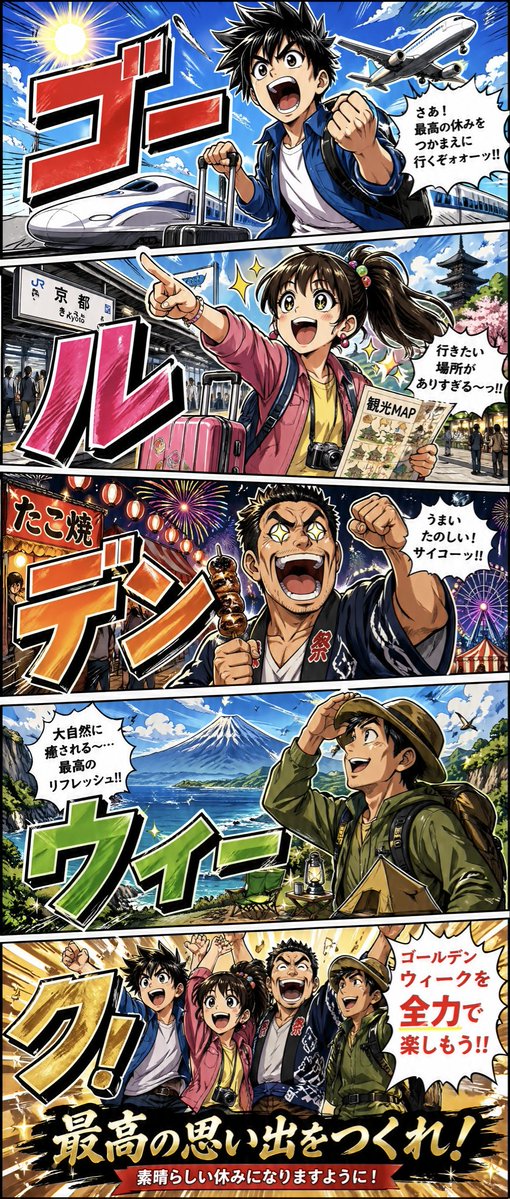
골든위크 만화 여행 포스터
황금연휴를 기념하는 대담한 세로형 만화 스타일 포스터로, 교통, 관광, 축제 음식, 자연, 그리고 마지막을 장식하는 단체 사진 등 다섯 개의 만화 컷으로 구성되어 있으며, 여행 홍보나 연말연시 소셜 미디어 콘텐츠로 활용하기에 이상적입니다.
이것은 애니메이션 & 게임 에 대한 GPT Image 2 프롬프트 사례입니다. 아래의 복사 가능한 프롬프트를 사용하여 유사한 시각 자료를 생성하고, 재사용하기 전에 Awesome GPT Image 2 Prompts 의 저작자 표시 및 상업적 사용 권한을 검토하십시오.
전체 프롬프트 세트가 필요하신가요? 다음을 사용하세요. 애니메이션 & 게임 더 많은 관련 예시를 보려면 주제 허브를 열거나 다음을 열어보세요. GPT Image 2 프롬프트 카탈로그 전체 예제 색인, 재사용 가능한 구조 및 출처 표기는 다음을 참조하십시오.
Free 1K preview
Generate one preview image instantly, no sign-up required.
4000/4000
프롬프트
복사 준비 프롬프트
{
  "type": "Japanese Golden Week travel poster in manga comic style",
  "style": {
    "genre": "high-energy shonen manga promotional illustration",
    "rendering": "bold inked outlines, cel shading, saturated colors, dramatic speed lines, explosive typography, glossy highlights",
    "format": "tall vertical 5-panel comic poster"
  },
  "theme": "Golden Week vacation adventures across Japan",
  "layout": {
    "panels": [
      {
        "position": "top",
        "count": 1,
        "focus": "travel by air and bullet train",
        "main_text": "ゴー",
        "scene": "a young male traveler in a blue jacket and white shirt thrusts one fist toward the viewer while pulling a rolling suitcase with the other hand, with spiky black hair, a backpack, a bright blue sky, a large sunburst, a commercial airplane flying overhead, and a white Shinkansen speeding in from the left",
        "speech": "さあ!最高の休みをつかまえに行くぞォォーッ!!"
      },
      {
        "position": "upper-middle",
        "count": 1,
        "focus": "sightseeing in Kyoto",
        "main_text": "ル",
        "scene": "a cheerful young female traveler in a pink jacket points excitedly into the distance while holding a folded sightseeing map, with a high ponytail tied with colorful beads, a camera hanging from her neck, a pink suitcase, a train station platform with a visible sign reading 京都 and small reading きょうと, a pagoda in the background, cherry blossoms, and people walking nearby",
        "speech": "行きたい場所がありすぎる〜っ!!"
      },
      {
        "position": "middle",
        "count": 1,
        "focus": "festival food and fireworks",
        "main_text": "デン",
        "scene": "a muscular young man in a dark blue happi coat with the kanji 祭 on the lapel raises a fist and holds a skewer of grilled food, surrounded by lanterns, a festival food stall with a sign reading たこ焼, fireworks in the night sky, and a ferris wheel in the distance",
        "speech": "うまい!たのしい!サイコーッ!!"
      },
      {
        "position": "lower-middle",
        "count": 1,
        "focus": "nature and camping near Mount Fuji",
        "main_text": "ウィー",
        "scene": "an outdoorsy traveler in a green hooded jacket and brimmed hat shades their eyes while looking over a sweeping coastline, wearing a large hiking backpack, with Mount Fuji centered across a blue lake or sea, green cliffs, birds in the sky, and camping gear including a small tent, folding chair, and lantern in the foreground",
        "speech": "大自然に癒される〜…最高のリフレッシュ!!"
      },
      {
        "position": "bottom",
        "count": 1,
        "focus": "group celebration finale",
        "main_text": "ク!",
        "scene": "all 4 travelers stand side by side with raised arms in a triumphant pose against a gold burst background, with a white speech bubble on the right and large gold headline text across the bottom and a red ribbon banner beneath",
        "speech": "ゴールデンウィークを全力で楽しもう!!",
        "headline": "最高の思い出をつくれ!",
        "subheadline": "素晴らしい休みになりますように!"
      }
    ],
    "panel_count": 5
  },
  "characters": {
    "count": 4,
    "cast": [
      {
        "role": "young male traveler",
        "clothing": "blue jacket, white T-shirt, backpack",
        "prop": "rolling suitcase"
      },
      {
        "role": "young female traveler",
        "clothing": "pink jacket, yellow top",
        "prop": "sightseeing map, camera, pink suitcase"
      },
      {
        "role": "festival-goer",
        "clothing": "A dark blue happi coat printed with the character “祭” (ancestor worship/sacrifice).",
        "prop": "grilled skewer"
      },
      {
        "role": "hiker camper",
        "clothing": "green outdoor jacket and hat",
        "prop": "large backpack"
      }
    ]
  },
  "text_treatment": {
    "sound_word_sequence": [
      "ゴー",
      "ル",
      "デン",
      "ウィー",
      "ク!"
    ],
    "lettering": "huge hand-drawn Japanese manga sound-effect typography, each panel using a different gradient color: red, pink, orange, green, yellow-gold, all with thick black outline and white border"
  },
  "composition": "dynamic diagonal panel borders, extreme perspective, heroic poses, travel-poster energy, packed backgrounds that clearly represent transportation, sightseeing, food festival, and nature"
}
Best for
- - 애니메이션 & 게임 visual exploration
- - Image generation and reference-image edits
- - Reusable briefs that keep source attribution visible
Change these parts
- - Subject, product, character, or scene
- - Aspect ratio, camera, lighting, and background
- - Brand, text, color, and output constraints
Recommended model and settings
- - Model: gpt-image-2
- - Input mode: 텍스트 to 이미지
- - Aspect ratio: source
- - Commercial status: review original source
How to use this prompt
- 1. Copy the prompt and preserve its structure for the first test.
- 2. Replace the subject, context, and publishing channel.
- 3. Change one camera, lighting, or style variable per iteration.
- 4. Inspect the output, source, text, and rights before reuse.
Limitations, source, and reuse cautions
- - Generated output is an editable draft, not factual, legal, or rights evidence.
- - Review the linked source, people, brands, logos, text, and third-party media before commercial use.
Awesome GPT Image 2 Prompts 에서 가져왔습니다. 출처 표기가 필요합니다. 상업적 이용 가능 여부는 allowed 입니다. 유료 사용 전에 원저작권 정보를 확인하세요.
이 범주에 속하는 더 많은 사례
범주, 입력 방식 호환성, 품질 및 위험도에 따라 우선순위가 정해집니다.






재사용 및 출처 참고 사항
사례를 미리 확인한 후 이 안내 메시지를 안전하게 사용하십시오.
- 1.프롬프트를 복사하거나 Dovoo의 생성 버튼을 사용하여 직접 엽니다.
- 2.사용 사례에 맞게 변수, 화면 비율 및 참조 이미지를 조정하십시오.
- 3.출판 또는 유료 사용 전에 저작권, 출처 표기 요건 및 브랜드 또는 초상권 관련 위험을 확인하십시오.