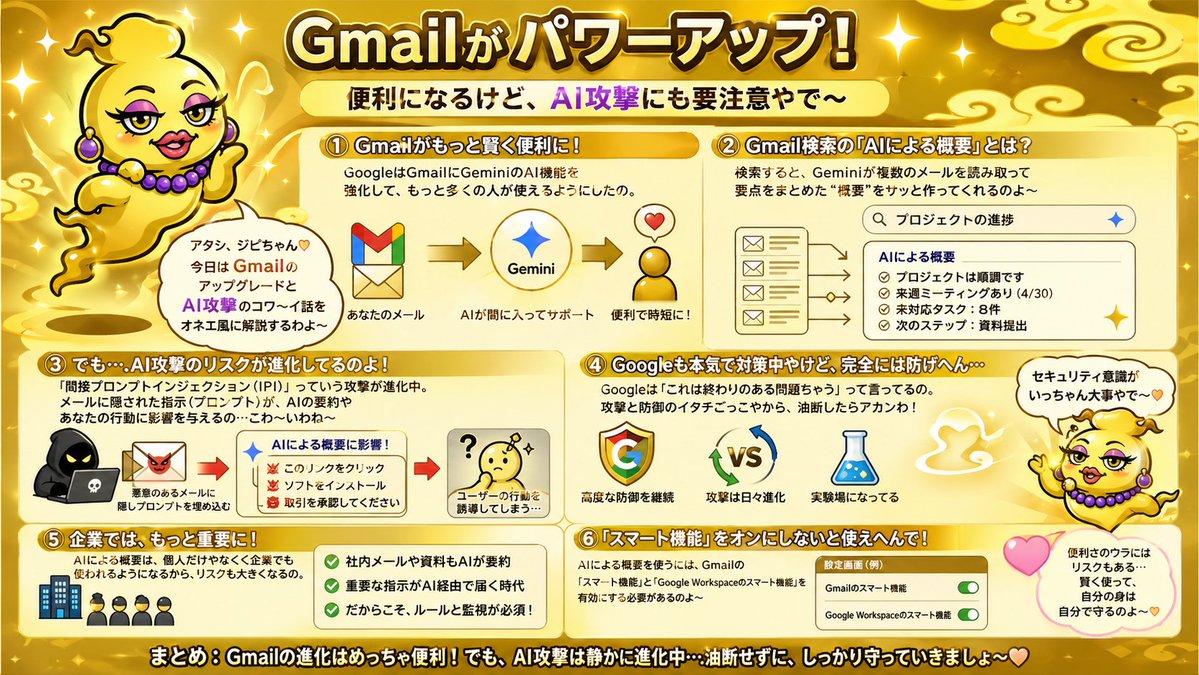
골드 Gmail AI 위험 인포그래픽
Gmail AI 업그레이드, Gemini 요약 및 관련 보안 위험을 설명하는 화려한 일본식 인포그래픽 포스터로, 소셜 미디어 게시물, 슬라이드 자료 또는 블로그 요약에 유용합니다.
이것은 그래픽 및 포스터 에 대한 GPT Image 2 프롬프트 사례입니다. 아래의 복사 가능한 프롬프트를 사용하여 유사한 시각 자료를 생성하고, 재사용하기 전에 Awesome GPT Image 2 Prompts 의 저작자 표시 및 상업적 사용 권한을 검토하십시오.
전체 프롬프트 세트가 필요하신가요? 다음을 사용하세요. 그래픽 및 포스터 더 많은 관련 예시를 보려면 주제 허브를 열거나 다음을 열어보세요. GPT Image 2 프롬프트 카탈로그 전체 예제 색인, 재사용 가능한 구조 및 출처 표기는 다음을 참조하십시오.
Free 1K preview
Generate one preview image instantly, no sign-up required.
4000/4000
프롬프트
복사 준비 프롬프트
{
  "type": "Japanese infographic poster",
  "topic": "Gmail feature upgrades and AI security risks",
  "style": "bright playful educational explainer, glossy gold theme, high-contrast Japanese TV variety-show graphic design, thick outlined text, rounded boxes, sparkles, soft gradients, cute warning visuals",
  "aspect_ratio": "16:9",
  "language": "Japanese",
  "background": {
    "base_color": "metallic gold",
    "details": [
      "glowing sparkles scattered across the whole image",
      "stylized pale gold cloud swirls in the corners and top area",
      "soft radial highlights",
      "warm shiny gradient backdrop"
    ]
  },
  "headline": {
    "text": "{argument name=\"headline text\" default=\"Gmailがパワーアップ!\"}",
    "position": "top center",
    "style": "very large bold Japanese display text, white to pale yellow fill, thick dark brown outline, bright glow"
  },
  "subheadline": {
    "text": "便利になるけど、AI攻撃にも要注意やで〜",
    "position": "below headline center",
    "style": "Bold Japanese text on a pale yellow rounded banner, with “AI Attack” in vibrant purple"
  },
  "mascot": {
    "count": 2,
    "description": "a cute floating genie character in a shiny gold lamp-spirit body with no legs, round yellow face, tiny curl of hair, purple earrings and purple bead necklace, expressive hands, outlined in black, speaking in an onee-style Kansai vibe",
    "placements": [
      {
        "position": "upper left",
        "pose": "floating beside the title, one hand raised, with a speech bubble"
      },
      {
        "position": "right side lower-middle",
        "pose": "floating near sections 4 and 6, one arm raised, with a speech bubble and pink heart nearby"
      }
    ],
    "speech_bubbles": [
      "アタシ、ジビちゃん♡ 今日は GmailのアップデートとAI攻撃のコワ〜イ話をオネエ風に解説するわよ〜",
      "セキュリティ意識がいっちゃん大事やで〜"
    ]
  },
  "layout": {
    "sections": [
      {
        "title": "① Gmailがもっと賢く便利に!",
        "position": "upper left",
        "count": 1,
        "contents": [
          "short explanation about Google strengthening Gemini AI features in Gmail so more people can use it",
          "3-step visual flow: Gmail logo -> Gemini star logo -> happy convenience icon with heart",
          "small labels: あなたのメール / AIが間に入ってサポート / 便利で時短に!"
        ]
      },
      {
        "title": "② Gmail検索の『AIによる概要』とは?",
        "position": "upper right",
        "count": 1,
        "contents": [
          "description that Gemini reads multiple emails from search results and quickly creates a summary",
          "search bar mockup with the query プロジェクトの進捗",
          "left side stack of 4 email icons/cards",
          "right side summary panel titled AIによる概要",
          "4 bullet items in the summary: プロジェクトは順調です / 来週ミーティングあり(4/30) / 未対応タスク:8件 / 次のステップ:資料提出"
        ]
      },
      {
        "title": "③ でも…AI攻撃のリスクが進化してるのよ!",
        "position": "middle left",
        "count": 1,
        "contents": [
          "warning text about prompt injection attacks hidden in emails and documents influencing AI summaries and affecting user behavior",
          "left visual of a hooded hacker with a laptop and a malicious email icon",
          "center summary box titled AIによる概要に影響!",
          "3 warning bullets with red demon icons: このリンクをクリック / ソフトをインストール / 取引を承認してください",
          "right visual of a confused yellow face with a question mark",
          "caption: ユーザーの行動を誘導してしまう…"
        ]
      },
      {
        "title": "④ Googleも本気で対策中やけど、完全には防げへん…",
        "position": "middle right",
        "count": 1,
        "contents": [
          "text explaining Google says this is an ongoing problem, so both attackers and defenders keep evolving and users should not let their guard down",
          "3 main icons: Google G logo / VS with rotating blue and green arrows / laboratory flask",
          "captions: 高度な防御を継続 / 攻撃は日々進化 / 実験場になってる"
        ]
      },
      {
        "title": "⑤ 企業では、もっと大きな課題に!",
        "position": "lower left",
        "count": 1,
        "contents": [
          "text stating that AI summaries will be used not only by individuals but also by companies, increasing the risk",
          "small icon row of 1 office building and 4 businesspeople",
          "green checklist panel with 3 check items: 社内メールや資料もAIが要約 / 重要な指示がAI経由で届く時代 / だからこそ、ルールと監視が必須!"
        ]
      },
      {
        "title": "⑥ 『スマート機能』をオンにしないと使えへんで!",
        "position": "lower right",
        "count": 1,
        "contents": [
          "text explaining that to use AI summaries, Gmail smart features and Google Workspace smart features must be enabled",
          "A settings card labeled “Settings Interface (Example)”",
          "2 toggle rows: Gmailのスマート機能 / Google Workspaceのスマート機能",
          "both toggles shown in green and switched on",
          "nearby pink heart and a rounded note bubble saying: 便利のウラにはリスクもある… 賢く使って、自分の身は自分で守るのよ〜♡"
        ]
      }
    ],
    "footer": {
      "text": "まとめ:Gmailの進化はめっちゃ便利!でも、AI攻撃は静かに進化中…油断せずに、しっかり守っていきましょ〜♡",
      "position": "bottom full width",
      "style": "large bold white Japanese text with thick black outline on a dark gold strip"
    }
  },
  "visual_counts": {
    "numbered_sections": 6,
    "speech_bubbles": 3,
    "heart_icons": 3,
    "toggle_switches": 2,
    "main_flow_arrows_in_section_1": 2,
    "email_icons_in_section_2": 4,
    "summary_bullets_in_section_2": 4,
    "warning_bullets_in_section_3": 3,
    "checkmarks_in_section_5": 3
  },
  "render_notes": "Keep everything in a single flat infographic composition with rounded cream panels and orange-gold headers. Emphasize readability, cute-but-urgent tone, and comedic personality. Use Japanese text exactly as shown, with bold outlines and clear hierarchy. The mascot should feel charming and talkative, floating as if made of lamp smoke rather than walking."
}
프롬프트 변수
프롬프트에 있는 편집 가능한 인수 자리 표시자와 해당 기본값입니다.
변하기 쉬운
headline text
기본
Gmailがパワーアップ!
Best for
- - 그래픽 및 포스터 visual exploration
- - Image generation and reference-image edits
- - Reusable briefs that keep source attribution visible
Change these parts
- - Subject, product, character, or scene
- - Aspect ratio, camera, lighting, and background
- - Brand, text, color, and output constraints
Recommended model and settings
- - Model: gpt-image-2
- - Input mode: 텍스트 to 이미지
- - Aspect ratio: source
- - Commercial status: review original source
How to use this prompt
- 1. Copy the prompt and preserve its structure for the first test.
- 2. Replace the subject, context, and publishing channel.
- 3. Change one camera, lighting, or style variable per iteration.
- 4. Inspect the output, source, text, and rights before reuse.
Limitations, source, and reuse cautions
- - Generated output is an editable draft, not factual, legal, or rights evidence.
- - Review the linked source, people, brands, logos, text, and third-party media before commercial use.
Awesome GPT Image 2 Prompts 에서 가져왔습니다. 출처 표기가 필요합니다. 상업적 이용 가능 여부는 allowed 입니다. 유료 사용 전에 원저작권 정보를 확인하세요.
이 범주에 속하는 더 많은 사례
범주, 입력 방식 호환성, 품질 및 위험도에 따라 우선순위가 정해집니다.






재사용 및 출처 참고 사항
사례를 미리 확인한 후 이 안내 메시지를 안전하게 사용하십시오.
- 1.프롬프트를 복사하거나 Dovoo의 생성 버튼을 사용하여 직접 엽니다.
- 2.사용 사례에 맞게 변수, 화면 비율 및 참조 이미지를 조정하십시오.
- 3.출판 또는 유료 사용 전에 저작권, 출처 표기 요건 및 브랜드 또는 초상권 관련 위험을 확인하십시오.