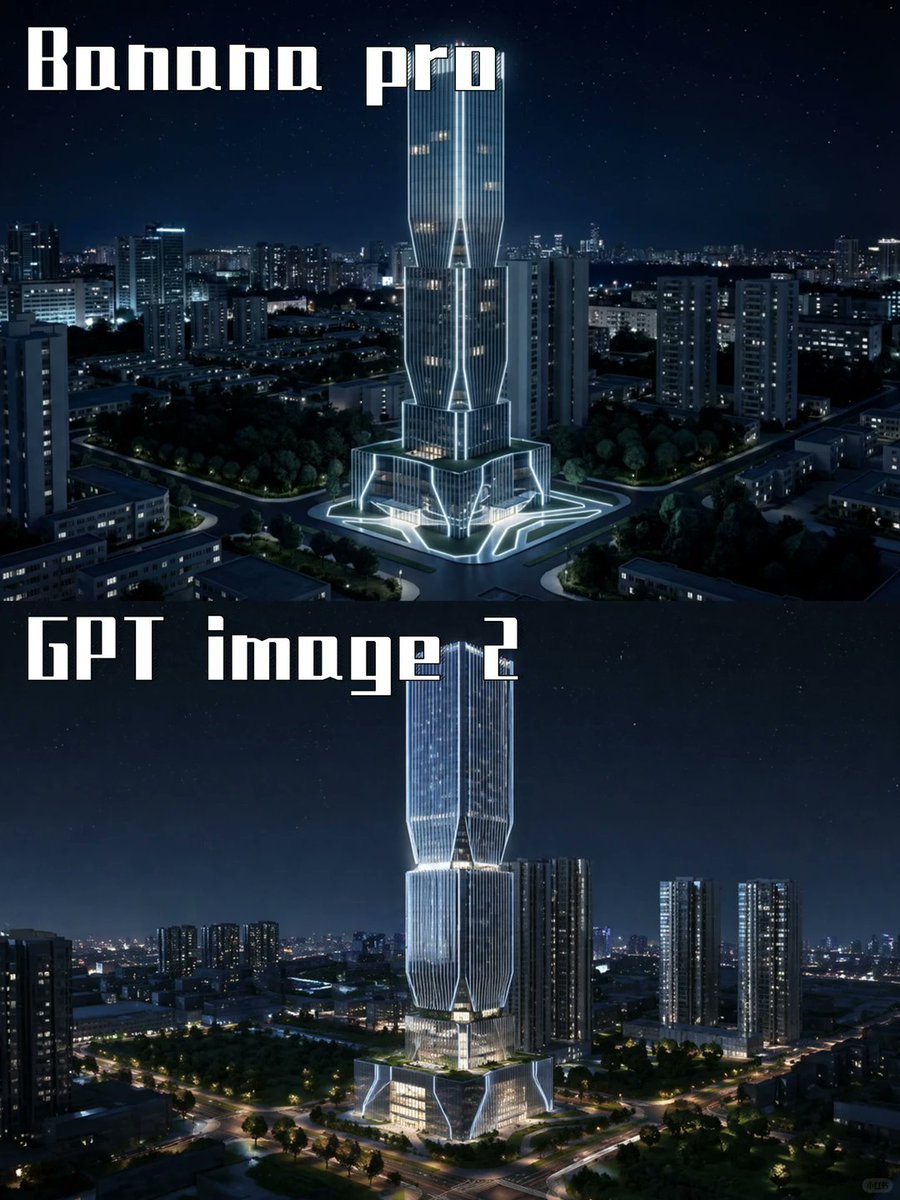
야경 고층 빌딩 AI 모델 비교
두 개의 AI 모델 출력 결과를 미래적인 조명이 켜진 야경 속 고층 빌딩과 비교하는 두 개의 패널로 구성된 건축 렌더링 이미지를 생성합니다.
이것은 인테리어 및 건축 에 대한 GPT Image 2 프롬프트 사례입니다. 아래의 복사 가능한 프롬프트를 사용하여 유사한 시각 자료를 생성하고, 재사용하기 전에 Awesome GPT Image 2 Prompts 의 저작자 표시 및 상업적 사용 권한을 검토하십시오.
전체 프롬프트 세트가 필요하신가요? 다음을 사용하세요. 인테리어 및 건축 더 많은 관련 예시를 보려면 주제 허브를 열거나 다음을 열어보세요. GPT Image 2 프롬프트 카탈로그 전체 예제 색인, 재사용 가능한 구조 및 출처 표기는 다음을 참조하십시오.
Free 1K preview
Generate one preview image instantly, no sign-up required.
2186/4000
프롬프트
복사 준비 프롬프트
Goal: Create a two-panel vertical comparison image showing the same futuristic skyscraper concept rendered by two different image models at night.

Canvas: Portrait 3:4 aspect ratio, 768×1024 feel, split horizontally into exactly 2 equal stacked panels with no visible border line. Both panels show a dark blue nighttime cityscape with a starry sky and glowing urban lights.

Panel 1: Top half labeled {argument name="top label" default="Banana pro"} in large white blocky stencil/gothic display lettering at the upper left. Show a futuristic illuminated skyscraper centered in a dense city district, surrounded by mid-rise apartment towers, roads, trees, and a plaza. The tower has a tall twin-volume form with vertical ribbed glass, bright white outline lighting, warm lit windows, angular cutouts, and a glowing geometric base/plaza. Camera angle is elevated aerial view, looking slightly downward, crisp cinematic night lighting.

Panel 2: Bottom half labeled {argument name="bottom label" default="GPT image 2"} in the same large white blocky display lettering at the upper left. Show a similar but more refined futuristic skyscraper centered in a nighttime urban landscape, taller and sleeker, with stacked faceted glass sections, luminous vertical lines, bright white edge lighting, warm interior floors, and a glowing multi-level podium. Surround it with high-rise residential towers, tree-lined roads, intersections, and distant city lights. Camera angle is elevated aerial view, cinematic and realistic.

Visual style: Photorealistic architectural visualization, dramatic blue-black night palette, crisp high contrast, cool white neon accents, realistic city depth, subtle stars, polished glass reflections, high detail, no people visible.

Text content: Use exactly 2 visible text labels: {argument name="top label" default="Banana pro"} and {argument name="bottom label" default="GPT image 2"}. Keep the typography large, white, angular, and slightly retro-futuristic.

Constraints: Include exactly 2 comparison panels, exactly 2 central skyscraper subjects, and exactly 2 large labels. Do not add logos, watermarks, captions, UI elements, arrows, or extra explanatory text.
프롬프트 변수
프롬프트에 있는 편집 가능한 인수 자리 표시자와 해당 기본값입니다.
변하기 쉬운
top label
기본
Banana pro
변하기 쉬운
bottom label
기본
GPT image 2
Best for
- - 인테리어 및 건축 visual exploration
- - Image generation and reference-image edits
- - Reusable briefs that keep source attribution visible
Change these parts
- - Subject, product, character, or scene
- - Aspect ratio, camera, lighting, and background
- - Brand, text, color, and output constraints
Recommended model and settings
- - Model: gpt-image-2
- - Input mode: 텍스트 to 이미지
- - Aspect ratio: source
- - Commercial status: review original source
How to use this prompt
- 1. Copy the prompt and preserve its structure for the first test.
- 2. Replace the subject, context, and publishing channel.
- 3. Change one camera, lighting, or style variable per iteration.
- 4. Inspect the output, source, text, and rights before reuse.
Limitations, source, and reuse cautions
- - Generated output is an editable draft, not factual, legal, or rights evidence.
- - Review the linked source, people, brands, logos, text, and third-party media before commercial use.
Awesome GPT Image 2 Prompts 에서 가져왔습니다. 출처 표기가 필요합니다. 상업적 이용 가능 여부는 allowed 입니다. 유료 사용 전에 원저작권 정보를 확인하세요.
Related prompt packs
이 범주에 속하는 더 많은 사례
범주, 입력 방식 호환성, 품질 및 위험도에 따라 우선순위가 정해집니다.






재사용 및 출처 참고 사항
사례를 미리 확인한 후 이 안내 메시지를 안전하게 사용하십시오.
- 1.프롬프트를 복사하거나 Dovoo의 생성 버튼을 사용하여 직접 엽니다.
- 2.사용 사례에 맞게 변수, 화면 비율 및 참조 이미지를 조정하십시오.
- 3.출판 또는 유료 사용 전에 저작권, 출처 표기 요건 및 브랜드 또는 초상권 관련 위험을 확인하십시오.