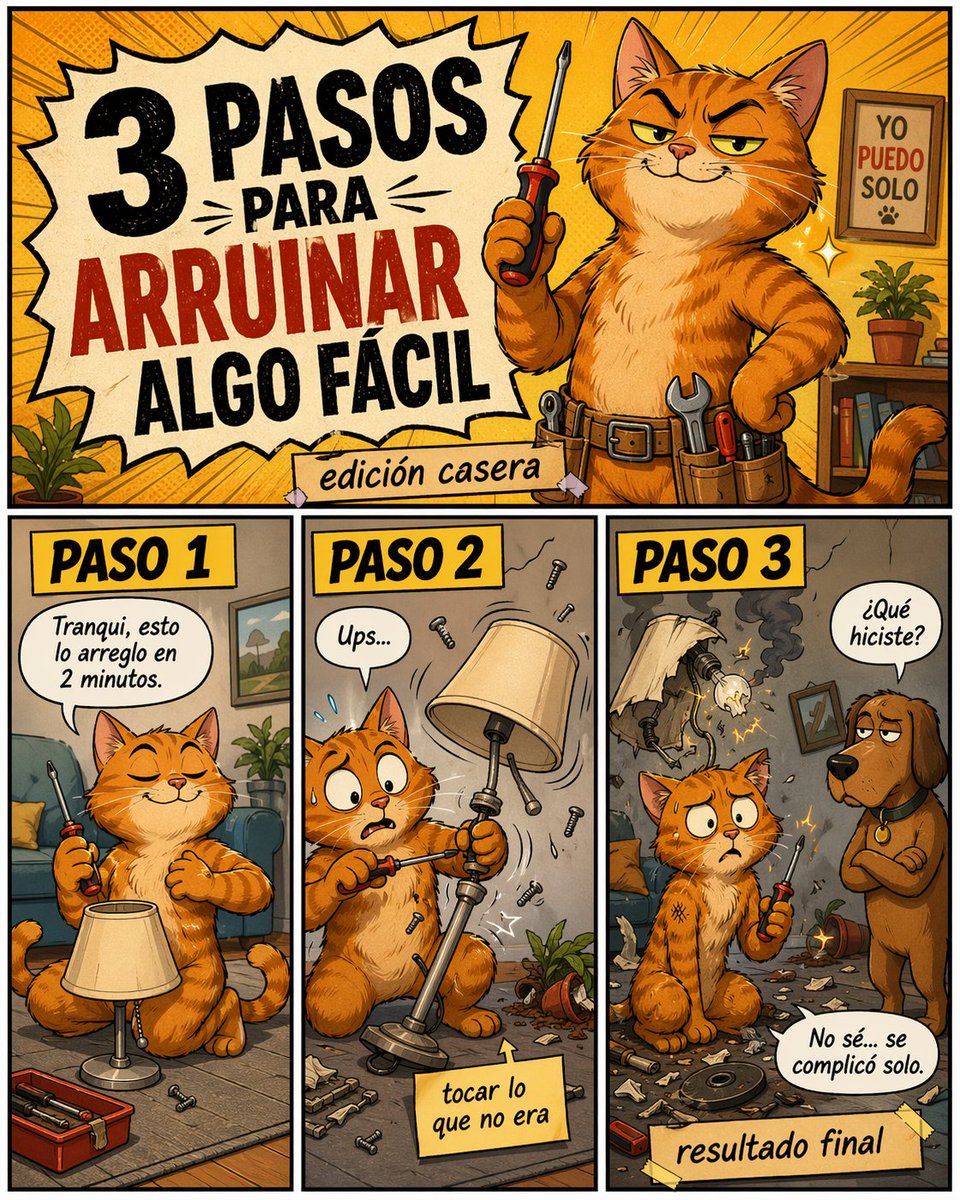
웃긴 DIY 재앙 고양이 만화
얄미운 주황색 고양이가 간단한 집 수리를 망치는 모습을 그린 복고풍 만화 포스터로, 스페인어로 된 세 단계 설명이 곁들여져 있습니다. 밈, 소셜 미디어 게시물, 유머러스한 DIY 콘텐츠에 안성맞춤입니다.
이것은 일러스트레이션 및 미술 에 대한 GPT Image 2 프롬프트 사례입니다. 아래의 복사 가능한 프롬프트를 사용하여 유사한 시각 자료를 생성하고, 재사용하기 전에 Awesome GPT Image 2 Prompts 의 저작자 표시 및 상업적 사용 권한을 검토하십시오.
전체 프롬프트 세트가 필요하신가요? 다음을 사용하세요. 일러스트레이션 및 미술 더 많은 관련 예시를 보려면 주제 허브를 열거나 다음을 열어보세요. GPT Image 2 프롬프트 카탈로그 전체 예제 색인, 재사용 가능한 구조 및 출처 표기는 다음을 참조하십시오.
Free 1K preview
Generate one preview image instantly, no sign-up required.
2407/4000
프롬프트
복사 준비 프롬프트
Create a colorful humorous comic-style poster in Spanish, vertical format, with a retro cartoon look, thick black outlines, warm orange and yellow palette, halftone texture, and exaggerated expressive characters. The layout has 4 distinct panels: 1 large title panel across the top and 3 equal vertical panels along the bottom row. In the top panel, show a smug orange tabby cat handyman standing upright like a person in a cozy living room workshop, holding a screwdriver in one paw and the other paw on the hip, wearing a utility belt with visible tools. The cat has narrowed confident eyes and a sly grin. On the left side of this top panel, place a large jagged comic burst with the Spanish headline in bold distressed lettering: "3 PASOS PARA ARRUINAR ALGO FÁCIL", with "ARRUINAR" in red and the rest in black. Below it, add a taped paper strip that says "edición casera". In the background of the top panel, include a framed sign on the wall that reads "YO PUEDO SOLO" with a small paw print, a small potted plant, shelves, and dynamic radial lines behind the cat. In the bottom row, create 3 labeled step panels, each with a yellow header box and bold black text. Panel 1 header: "PASO 1". Show the same orange cat sitting calmly on the floor beside a standing lamp, eyes closed with overconfidence, casually holding a screwdriver. Add a speech bubble that says "Tranqui, esto lo arreglo en 2 minutos." Include a small open toolbox and a few screws on the floor. Panel 2 header: "PASO 2". Show the cat mid-repair, now alarmed with wide eyes, awkwardly unscrewing the wrong part of the lamp while pieces and screws fly through the air. Add a speech bubble that says "Ups..." and a sticky note near the bottom that says "tocar lo que no era". Include visual motion lines, scattered debris, and a toppled plant pot. Panel 3 header: "PASO 3". Show the aftermath: the lamp is broken and smoking with exposed wires and sparks, the room is messy with shattered parts everywhere, and the cat sits stunned holding the screwdriver. A brown dog stands to the right, looking disappointed, asking in a speech bubble "¿Qué hiciste?" The cat replies in another speech bubble "No sé... se complicó solo." Add a taped label at the bottom that says "resultado final". Make the entire image playful, chaotic, and meme-like, with polished digital illustration, expressive faces, comic lettering, and a DIY disaster tone.
Best for
- - 일러스트레이션 및 미술 visual exploration
- - Image generation and reference-image edits
- - Reusable briefs that keep source attribution visible
Change these parts
- - Subject, product, character, or scene
- - Aspect ratio, camera, lighting, and background
- - Brand, text, color, and output constraints
Recommended model and settings
- - Model: gpt-image-2
- - Input mode: 텍스트 to 이미지
- - Aspect ratio: source
- - Commercial status: review original source
How to use this prompt
- 1. Copy the prompt and preserve its structure for the first test.
- 2. Replace the subject, context, and publishing channel.
- 3. Change one camera, lighting, or style variable per iteration.
- 4. Inspect the output, source, text, and rights before reuse.
Limitations, source, and reuse cautions
- - Generated output is an editable draft, not factual, legal, or rights evidence.
- - Review the linked source, people, brands, logos, text, and third-party media before commercial use.
Awesome GPT Image 2 Prompts 에서 가져왔습니다. 출처 표기가 필요합니다. 상업적 이용 가능 여부는 allowed 입니다. 유료 사용 전에 원저작권 정보를 확인하세요.
이 범주에 속하는 더 많은 사례
범주, 입력 방식 호환성, 품질 및 위험도에 따라 우선순위가 정해집니다.






재사용 및 출처 참고 사항
사례를 미리 확인한 후 이 안내 메시지를 안전하게 사용하십시오.
- 1.프롬프트를 복사하거나 Dovoo의 생성 버튼을 사용하여 직접 엽니다.
- 2.사용 사례에 맞게 변수, 화면 비율 및 참조 이미지를 조정하십시오.
- 3.출판 또는 유료 사용 전에 저작권, 출처 표기 요건 및 브랜드 또는 초상권 관련 위험을 확인하십시오.