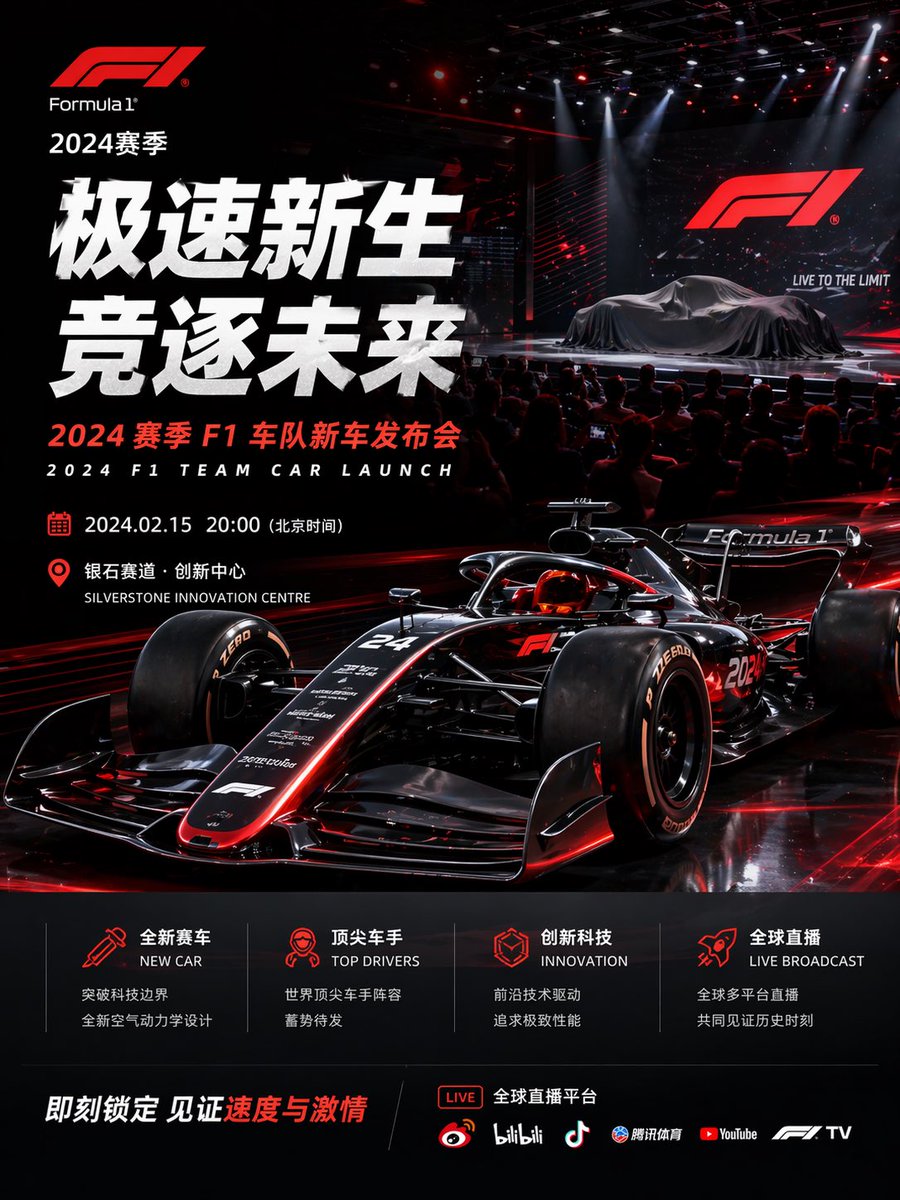
포뮬러 1 팀 차량 출시 포스터
2024년 포뮬러 1 팀 차량 출시를 위한 영화 같은 분위기의 2개 국어 모터스포츠 이벤트 포스터로, 고급 홍보 그래픽, 소셜 미디어 캠페인 및 출시 발표에 적합합니다.
이것은 그래픽 및 포스터 에 대한 GPT Image 2 프롬프트 사례입니다. 아래의 복사 가능한 프롬프트를 사용하여 유사한 시각 자료를 생성하고, 재사용하기 전에 Awesome GPT Image 2 Prompts 의 저작자 표시 및 상업적 사용 권한을 검토하십시오.
전체 프롬프트 세트가 필요하신가요? 다음을 사용하세요. 그래픽 및 포스터 더 많은 관련 예시를 보려면 주제 허브를 열거나 다음을 열어보세요. GPT Image 2 프롬프트 카탈로그 전체 예제 색인, 재사용 가능한 구조 및 출처 표기는 다음을 참조하십시오.
Free 1K preview
Generate one preview image instantly, no sign-up required.
3031/4000
프롬프트
복사 준비 프롬프트
{
  "type": "Formula 1 event poster",
  "style": "ultra-polished cinematic sports marketing key visual, high-end launch event advertising, photorealistic 3D render look, glossy black and crimson red color scheme, dramatic contrast, premium motorsport branding",
  "brand": {
    "logo": "Formula 1",
    "season": "2024 Season"
  },
  "headline": {
    "primary": "Speedy Rebirth",
    "secondary": "Chasing the Future",
    "subheadline_cn": "2024 Season F1 Team New Car Launch Event",
    "subheadline_en": "2024 F1 TEAM CAR LAUNCH"
  },
  "scene": {
    "environment": "dark indoor presentation arena with a live audience in silhouette, concert-style stage lighting, red laser accents, overhead spotlights, reflective black floor, giant LED screen on the right showing the F1 logo and the slogan LIVE TO THE LIMIT",
    "stage": {
      "count": 2,
      "elements": [
        "covered Formula 1 car on the stage under a dark silk drape",
        "large presentation screen behind it"
      ]
    },
    "foreground": {
      "main_subject": "a futuristic black Formula 1 race car with glowing red trim, low front three-quarter angle, aggressive aerodynamic bodywork, exposed suspension, halo cockpit, slick tires, reflective carbon-fiber surfaces, subtle white sponsor decals, car number 24 visible on the nose and 2024 on the side"
    }
  },
  "layout": {
    "composition": "portrait poster, dense left-aligned typography block, hero race car dominating the lower center and right, launch-stage vignette in the upper right, informational footer panels across the bottom",
    "sections": [
      {
        "title": "event details",
        "position": "left-middle",
        "count": 2,
        "labels": [
          "2024.02.15 20:00 (Beijing Time)",
          "Silverstone Innovation Centre"
        ]
      },
      {
        "title": "feature icons",
        "position": "bottom-center",
        "count": 4,
        "labels": [
          "NEW CAR",
          "TOP DRIVERS",
          "INNOVATION",
          "LIVE BROADCAST"
        ]
      },
      {
        "title": "streaming platforms",
        "position": "bottom-right",
        "count": 6,
        "labels": [
          "LIVE",
          "Weibo",
          "bilibili",
          "Douyin",
          "Tencent Sports",
          "YouTube",
          "F1 TV"
        ]
      }
    ],
    "footer": {
      "cta": "Lock it in now and witness the speed and passion",
      "accent_text": "Speed and Passion"
    }
  },
  "text_treatment": "oversized bold white Chinese headline on the left, compact red and white supporting text, bilingual Chinese-English labels, modern sans-serif typography, glowing red iconography, premium commercial poster spacing",
  "lighting": "high-contrast red rim lighting on the car, glossy reflections, theatrical white spotlights from above, subtle haze and particles in the stage area",
  "palette": {
    "count": 4,
    "colors": [
      "deep black",
      "crimson red",
      "bright white",
      "dark charcoal gray"
    ]
  }
}
Best for
- - 그래픽 및 포스터 visual exploration
- - Image generation and reference-image edits
- - Reusable briefs that keep source attribution visible
Change these parts
- - Subject, product, character, or scene
- - Aspect ratio, camera, lighting, and background
- - Brand, text, color, and output constraints
Recommended model and settings
- - Model: gpt-image-2
- - Input mode: 텍스트 to 이미지
- - Aspect ratio: source
- - Commercial status: review original source
How to use this prompt
- 1. Copy the prompt and preserve its structure for the first test.
- 2. Replace the subject, context, and publishing channel.
- 3. Change one camera, lighting, or style variable per iteration.
- 4. Inspect the output, source, text, and rights before reuse.
Limitations, source, and reuse cautions
- - Generated output is an editable draft, not factual, legal, or rights evidence.
- - Review the linked source, people, brands, logos, text, and third-party media before commercial use.
Awesome GPT Image 2 Prompts 에서 가져왔습니다. 출처 표기가 필요합니다. 상업적 이용 가능 여부는 allowed 입니다. 유료 사용 전에 원저작권 정보를 확인하세요.
이 범주에 속하는 더 많은 사례
범주, 입력 방식 호환성, 품질 및 위험도에 따라 우선순위가 정해집니다.






재사용 및 출처 참고 사항
사례를 미리 확인한 후 이 안내 메시지를 안전하게 사용하십시오.
- 1.프롬프트를 복사하거나 Dovoo의 생성 버튼을 사용하여 직접 엽니다.
- 2.사용 사례에 맞게 변수, 화면 비율 및 참조 이미지를 조정하십시오.
- 3.출판 또는 유료 사용 전에 저작권, 출처 표기 요건 및 브랜드 또는 초상권 관련 위험을 확인하십시오.