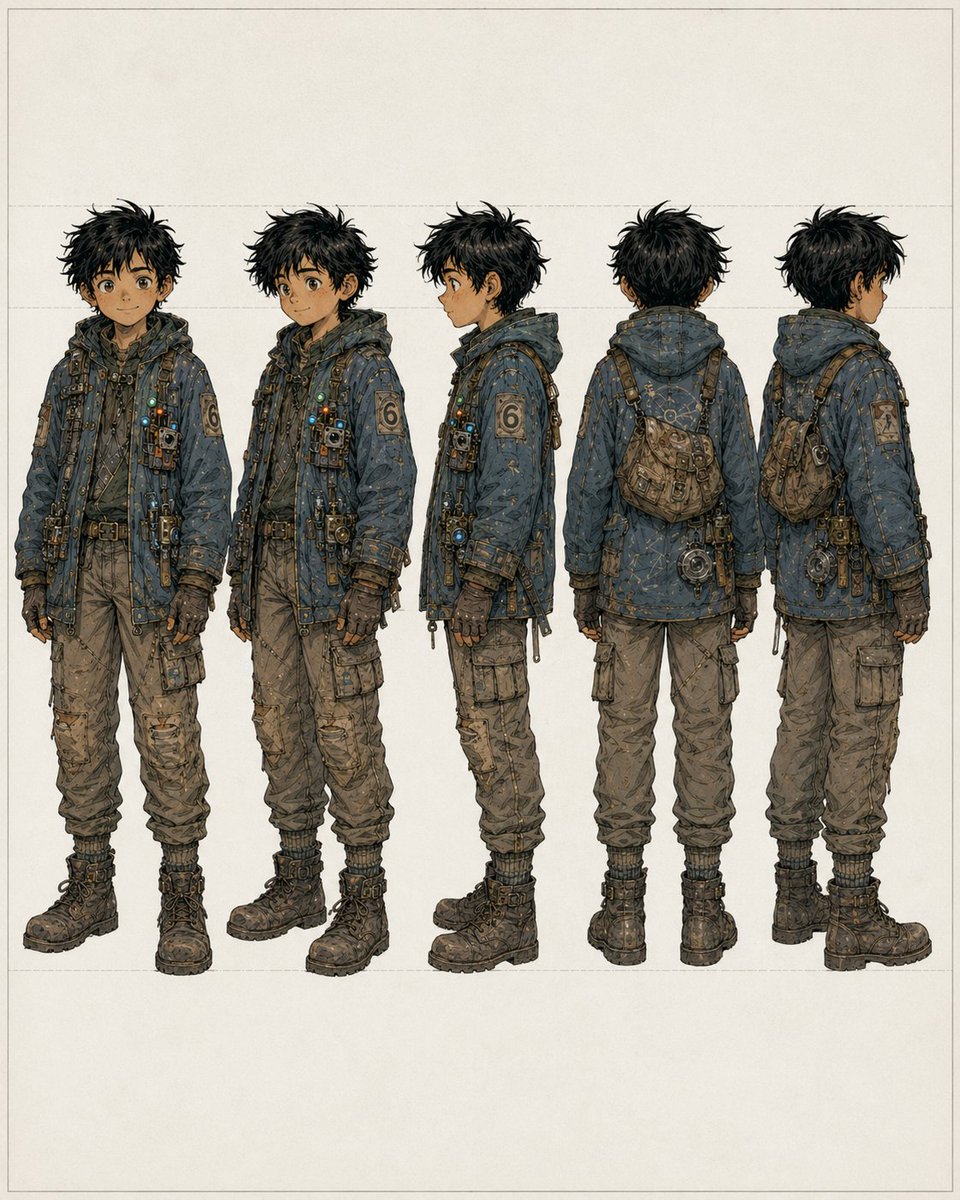
소년이 쓰레기를 뒤지는 모습을 다섯 가지 관점에서 살펴본 결과
컨셉 아트, 모델 시트 및 시각적 캐릭터 개발에 적합한, 거친 젊은 고물상 소년의 모습을 다섯 가지 각도에서 상세하게 보여주는 캐릭터 턴어라운드 시트입니다.
이것은 인물과 캐릭터 에 대한 GPT Image 2 프롬프트 사례입니다. 아래의 복사 가능한 프롬프트를 사용하여 유사한 시각 자료를 생성하고, 재사용하기 전에 Awesome GPT Image 2 Prompts 의 저작자 표시 및 상업적 사용 권한을 검토하십시오.
전체 프롬프트 세트가 필요하신가요? 다음을 사용하세요. 인물과 캐릭터 더 많은 관련 예시를 보려면 주제 허브를 열거나 다음을 열어보세요. GPT Image 2 프롬프트 카탈로그 전체 예제 색인, 재사용 가능한 구조 및 출처 표기는 다음을 참조하십시오.
이 프롬프트는 여러 개의 참조 이미지를 사용하도록 설계되었습니다. Dovoo를 열고 프롬프트와 미리보기 이미지를 표시한 다음, Dovoo에서 나머지 참조 이미지를 추가한 후 생성하겠습니다.
Free 1K preview
Generate one preview image instantly, no sign-up required.
Free text preview doesn’t preserve reference-image consistency.
2091/4000
프롬프트
복사 준비 프롬프트
{
  "background": {
    "color": "warm off-white paper",
    "details": "minimal blank backdrop with faint rectangular guide lines and generous margins"
  },
  "character": {
    "accessories": [
      "cross-body harness straps",
      "small chest-mounted pouches and devices",
      "belt with attached tools and hanging hardware",
      "compact worn satchel worn across the back/side",
      "round mechanical device hanging near the hip in rear views"
    ],
    "age_appearance": "teenage boy",
    "build": "slim, slightly short, practical proportions",
    "face": {
      "visibility": "Show every face clearly with natural, detailed facial features, no clear facial detail"
    },
    "hair": {
      "color": "{argument name=\"hair color\" default=\"messy black\"}",
      "style": "thick tousled short hair with spiky, unkempt silhouette"
    },
    "outfit": {
      "boots": "heavy dark lace-up combat boots with thick soles",
      "gloves": "dark fingerless or fitted utility gloves",
      "left_sleeve_patch": "large numeral 6 patch",
      "outerwear": "oversized hooded utility jacket in desaturated blue-gray, heavily stitched and patched, covered with small straps, fasteners, dangling cords, metal clips, tiny lights, and technical trinkets",
      "pants": "baggy tan cargo pants with multiple pockets, wrinkles, wear, and gathered cuffs"
    },
    "palette": "dusty blue, charcoal, brown, tan, brass, and muted metallic accents"
  },
  "layout": {
    "composition": "five evenly spaced full-body figures aligned horizontally",
    "count": 5,
    "presentation": "consistent scale, turnaround/reference-sheet format, centered on page",
    "views": [
      "front view",
      "three-quarter front view",
      "left side profile",
      "back view",
      "three-quarter back view"
    ]
  },
  "style": "high-detail anime-inspired concept design with fine ink linework, muted earthy colors, lightly weathered texture, clean studio presentation",
  "subject": "full-body concept art of a young male scavenger/adventurer",
  "type": "character turnaround sheet"
}
프롬프트 변수
프롬프트에 있는 편집 가능한 인수 자리 표시자와 해당 기본값입니다.
변하기 쉬운
hair color
기본
messy black
Best for
- - 인물과 캐릭터 visual exploration
- - Image generation and reference-image edits
- - Reusable briefs that keep source attribution visible
Change these parts
- - Subject, product, character, or scene
- - Aspect ratio, camera, lighting, and background
- - Brand, text, color, and output constraints
Recommended model and settings
- - Model: gpt-image-2
- - Input mode: 다중 이미지 대 이미지
- - Aspect ratio: source
- - Commercial status: review original source
How to use this prompt
- 1. Copy the prompt and preserve its structure for the first test.
- 2. Replace the subject, context, and publishing channel.
- 3. Change one camera, lighting, or style variable per iteration.
- 4. Inspect the output, source, text, and rights before reuse.
Limitations, source, and reuse cautions
- - Generated output is an editable draft, not factual, legal, or rights evidence.
- - Review the linked source, people, brands, logos, text, and third-party media before commercial use.
Awesome GPT Image 2 Prompts 에서 가져왔습니다. 출처 표기가 필요합니다. 상업적 이용 가능 여부는 allowed 입니다. 유료 사용 전에 원저작권 정보를 확인하세요.
이 범주에 속하는 더 많은 사례
범주, 입력 방식 호환성, 품질 및 위험도에 따라 우선순위가 정해집니다.






재사용 및 출처 참고 사항
사례를 미리 확인한 후 이 안내 메시지를 안전하게 사용하십시오.
- 1.프롬프트를 복사하거나 Dovoo의 생성 버튼을 사용하여 직접 엽니다.
- 2.사용 사례에 맞게 변수, 화면 비율 및 참조 이미지를 조정하십시오.
- 3.출판 또는 유료 사용 전에 저작권, 출처 표기 요건 및 브랜드 또는 초상권 관련 위험을 확인하십시오.