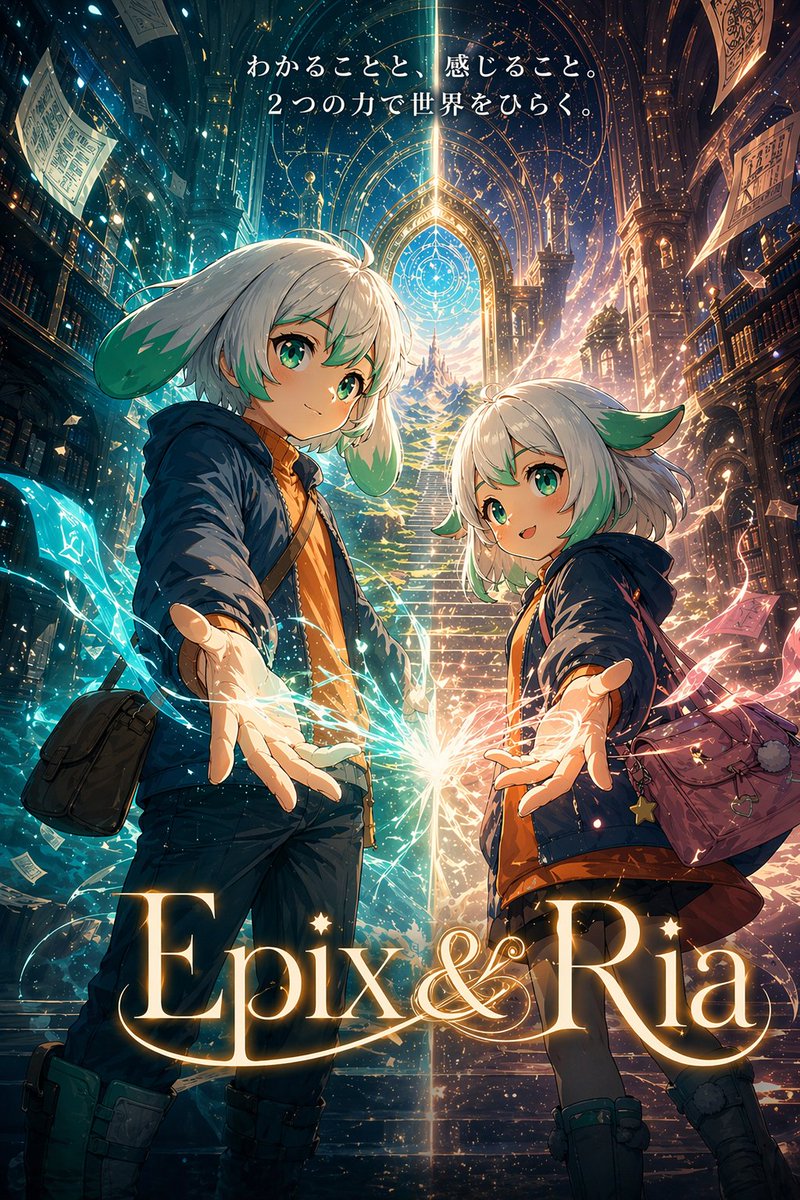
Epix & Ria의 판타지 라이브러리 포스터
이 프롬프트는 두 명의 캐릭터가 등장하는 모험 이야기를 위한 세련된 세로형 애니메이션 스타일 판타지 키 비주얼 포스터를 생성합니다. 영화 팸플릿 표지, 메인 비주얼 또는 홍보용 세계관 구축 아트워크로 사용하기에 적합합니다.
이것은 애니메이션 & 게임 에 대한 GPT Image 2 프롬프트 사례입니다. 아래의 복사 가능한 프롬프트를 사용하여 유사한 시각 자료를 생성하고, 재사용하기 전에 Awesome GPT Image 2 Prompts 의 저작자 표시 및 상업적 사용 권한을 검토하십시오.
전체 프롬프트 세트가 필요하신가요? 다음을 사용하세요. 애니메이션 & 게임 더 많은 관련 예시를 보려면 주제 허브를 열거나 다음을 열어보세요. GPT Image 2 프롬프트 카탈로그 전체 예제 색인, 재사용 가능한 구조 및 출처 표기는 다음을 참조하십시오.
Free 1K preview
Generate one preview image instantly, no sign-up required.
2174/4000
프롬프트
복사 준비 프롬프트
A cinematic fantasy anime poster in a tall vertical composition, showing two childlike adventurer characters standing in a vast magical library-cathedral with impossibly high gothic arches, towering bookshelves on both sides, floating pages, glowing dust, and a grand staircase rising in the center toward a radiant portal-like window filled with intricate celestial magic-circle patterns. The viewpoint is low and dramatic, looking slightly upward, with both characters reaching one hand toward the viewer in an inviting gesture. On the left is a slightly taller child with short silver-white hair, soft bangs, and large green leaf-like ear ornaments or animal-like ears, wearing a navy hooded jacket over a warm orange top, dark pants, sturdy boots, and a black crossbody satchel; Show every face clearly with natural, detailed facial features. On the right is a shorter child with a matching design language, short silver-white bob hair with green-tinted ends, large teal-green eyes, and the same green leaf-like ear features, wearing a navy hooded jacket, orange inner layer, short dark bottoms, boots, and a mauve-purple shoulder bag decorated with small charms including a star. Between their outstretched hands, create a bright burst of magical light where two energies meet: luminous cyan-blue streams curling around the left character and warm pink-gold streams curling around the right character, with spark particles and ribbon-like trails. Split the lighting mood into cool blue on the left side and warm golden-magenta on the right side, blending at the center into a brilliant white flare. Add dense atmospheric detail: glowing motes, magical filaments, floating sheets of paper, layered architecture, and a sense of wonder and discovery. At the top, include centered Japanese tagline text in elegant white serif style: "わかることと、感じること。2つの力で世界をひらく。" At the bottom, place a very large luminous gold serif title reading "{argument name="title text" default="Epix&Ria"}" with ornate cinematic poster typography. High-detail, polished key visual, fantasy adventure film poster, richly textured, radiant, emotional, awe-inspiring, premium illustrated promotional art.프롬프트 변수
프롬프트에 있는 편집 가능한 인수 자리 표시자와 해당 기본값입니다.
변하기 쉬운
title text
기본
Epix&Ria
Best for
- - 애니메이션 & 게임 visual exploration
- - Image generation and reference-image edits
- - Reusable briefs that keep source attribution visible
Change these parts
- - Subject, product, character, or scene
- - Aspect ratio, camera, lighting, and background
- - Brand, text, color, and output constraints
Recommended model and settings
- - Model: gpt-image-2
- - Input mode: 텍스트 to 이미지
- - Aspect ratio: source
- - Commercial status: review original source
How to use this prompt
- 1. Copy the prompt and preserve its structure for the first test.
- 2. Replace the subject, context, and publishing channel.
- 3. Change one camera, lighting, or style variable per iteration.
- 4. Inspect the output, source, text, and rights before reuse.
Limitations, source, and reuse cautions
- - Generated output is an editable draft, not factual, legal, or rights evidence.
- - Review the linked source, people, brands, logos, text, and third-party media before commercial use.
Awesome GPT Image 2 Prompts 에서 가져왔습니다. 출처 표기가 필요합니다. 상업적 이용 가능 여부는 allowed 입니다. 유료 사용 전에 원저작권 정보를 확인하세요.
이 범주에 속하는 더 많은 사례
범주, 입력 방식 호환성, 품질 및 위험도에 따라 우선순위가 정해집니다.






재사용 및 출처 참고 사항
사례를 미리 확인한 후 이 안내 메시지를 안전하게 사용하십시오.
- 1.프롬프트를 복사하거나 Dovoo의 생성 버튼을 사용하여 직접 엽니다.
- 2.사용 사례에 맞게 변수, 화면 비율 및 참조 이미지를 조정하십시오.
- 3.출판 또는 유료 사용 전에 저작권, 출처 표기 요건 및 브랜드 또는 초상권 관련 위험을 확인하십시오.