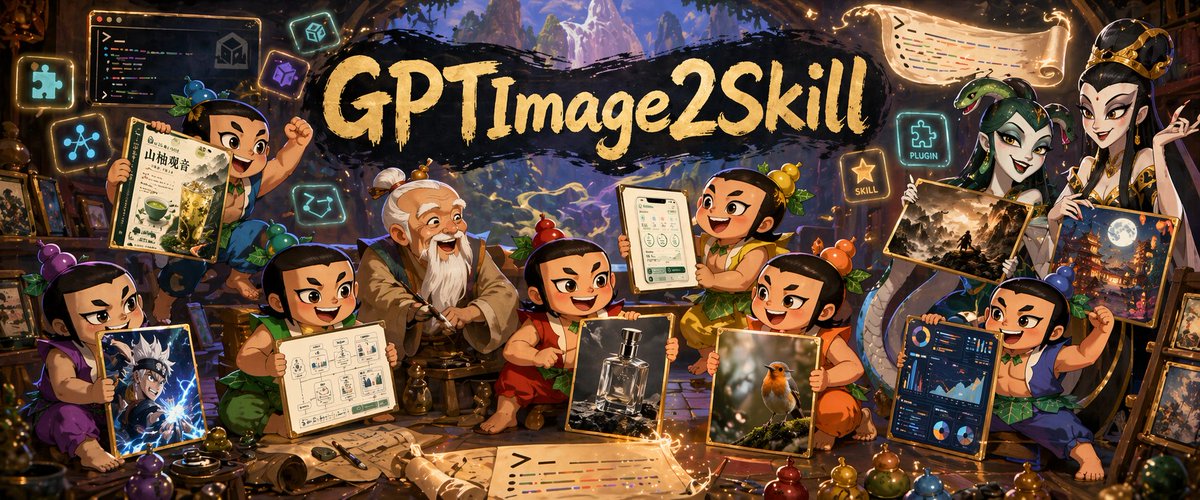
판타지 GPT 이미지 스킬 배너
스승을 중심으로 다양한 AI 생성 이미지 스타일을 선보이는 치비 견습생들을 묘사한 넓은 판타지 작업실 배너입니다. 소셜 미디어 헤더나 창의적인 이미지 생성 기술에 대한 홍보 이미지로 활용하기에 이상적입니다.
이것은 일러스트레이션 및 미술 에 대한 GPT Image 2 프롬프트 사례입니다. 아래의 복사 가능한 프롬프트를 사용하여 유사한 시각 자료를 생성하고, 재사용하기 전에 Awesome GPT Image 2 Prompts 의 저작자 표시 및 상업적 사용 권한을 검토하십시오.
전체 프롬프트 세트가 필요하신가요? 다음을 사용하세요. 일러스트레이션 및 미술 더 많은 관련 예시를 보려면 주제 허브를 열거나 다음을 열어보세요. GPT Image 2 프롬프트 카탈로그 전체 예제 색인, 재사용 가능한 구조 및 출처 표기는 다음을 참조하십시오.
Free 1K preview
Generate one preview image instantly, no sign-up required.
2908/4000
프롬프트
복사 준비 프롬프트
A richly detailed fantasy workshop illustration in a wide cinematic banner format, crowded with playful young apprentice characters gathered around an elderly master in the center. The scene has a magical artisan studio atmosphere with warm amber lighting, glowing runes, floating icons, scrolls, framed artworks, and shelves full of tools and curios. At the top center, a dramatic black brushstroke banner carries large hand-painted gold lettering reading {argument name="headline text" default="GPTImage2Skill"}. In the middle sits an old sage-like teacher with white hair in a topknot and a long white beard, wearing layered tan and gray robes, seated calmly on a low stool as if mentoring the group. Around him are 8 chibi-style apprentices with exaggerated expressive faces, black hair tied in small topknots, colorful traditional outfits in purple, green, red, orange, yellow, blue, and teal, each proudly presenting a different creation. Count and show exactly 8 apprentices plus the central master. On the far left, one purple-clad child kneels and holds a framed anime-style action portrait with electric blue effects. Above left, one green-clad child raises a drink poster featuring a matcha beverage and East Asian typography. Near lower left-center, one apprentice in green presents a clean schematic page with small UI-like boxes and diagrams. Near center-right, one orange-red-clad child holds a realistic luxury perfume bottle product shot. To the right of that, one yellow-orange child presents a realistic bird photograph with soft bokeh. Upper center-right, one cheerful child lifts a tablet or framed mobile app screen showing a clean interface. Far right lower side, one blue-clad child displays a dark-themed analytics dashboard full of charts and graphs. On the upper right, a tall regal figure in ornate white-and-gold robes and crown-like headpiece stands holding 2 framed fantasy artworks: one darker landscape scene and one moonlit city or temple scene. Include exactly 2 artworks in this upper-right display. Scatter glowing floating UI-style icons around the room; include exactly 6 floating icon/sign elements: a puzzle-piece icon, a network-node icon, a code window, a cube icon, a glowing sign reading "PLUGIN" beside a puzzle icon, and a glowing star sign reading "SKILL". Also add 2 magical scroll banners with glowing edges, one near the top right and one across the bottom foreground, both covered in stylized code-like colored lines. The environment should feel like a blend of ancient atelier, fantasy library, and creative AI studio, with stone arches, wooden beams, distant mountainous scenery visible through openings, and golden magical particles swirling through the air. Highly polished digital illustration, dense composition, whimsical epic tone, saturated jewel colors, dramatic rim lighting, crisp detail, painterly textures, fantasy promotional poster quality.프롬프트 변수
프롬프트에 있는 편집 가능한 인수 자리 표시자와 해당 기본값입니다.
변하기 쉬운
headline text
기본
GPTImage2Skill
Best for
- - 일러스트레이션 및 미술 visual exploration
- - Image generation and reference-image edits
- - Reusable briefs that keep source attribution visible
Change these parts
- - Subject, product, character, or scene
- - Aspect ratio, camera, lighting, and background
- - Brand, text, color, and output constraints
Recommended model and settings
- - Model: gpt-image-2
- - Input mode: 텍스트 to 이미지
- - Aspect ratio: source
- - Commercial status: review original source
How to use this prompt
- 1. Copy the prompt and preserve its structure for the first test.
- 2. Replace the subject, context, and publishing channel.
- 3. Change one camera, lighting, or style variable per iteration.
- 4. Inspect the output, source, text, and rights before reuse.
Limitations, source, and reuse cautions
- - Generated output is an editable draft, not factual, legal, or rights evidence.
- - Review the linked source, people, brands, logos, text, and third-party media before commercial use.
Awesome GPT Image 2 Prompts 에서 가져왔습니다. 출처 표기가 필요합니다. 상업적 이용 가능 여부는 allowed 입니다. 유료 사용 전에 원저작권 정보를 확인하세요.
이 범주에 속하는 더 많은 사례
범주, 입력 방식 호환성, 품질 및 위험도에 따라 우선순위가 정해집니다.






재사용 및 출처 참고 사항
사례를 미리 확인한 후 이 안내 메시지를 안전하게 사용하십시오.
- 1.프롬프트를 복사하거나 Dovoo의 생성 버튼을 사용하여 직접 엽니다.
- 2.사용 사례에 맞게 변수, 화면 비율 및 참조 이미지를 조정하십시오.
- 3.출판 또는 유료 사용 전에 저작권, 출처 표기 요건 및 브랜드 또는 초상권 관련 위험을 확인하십시오.