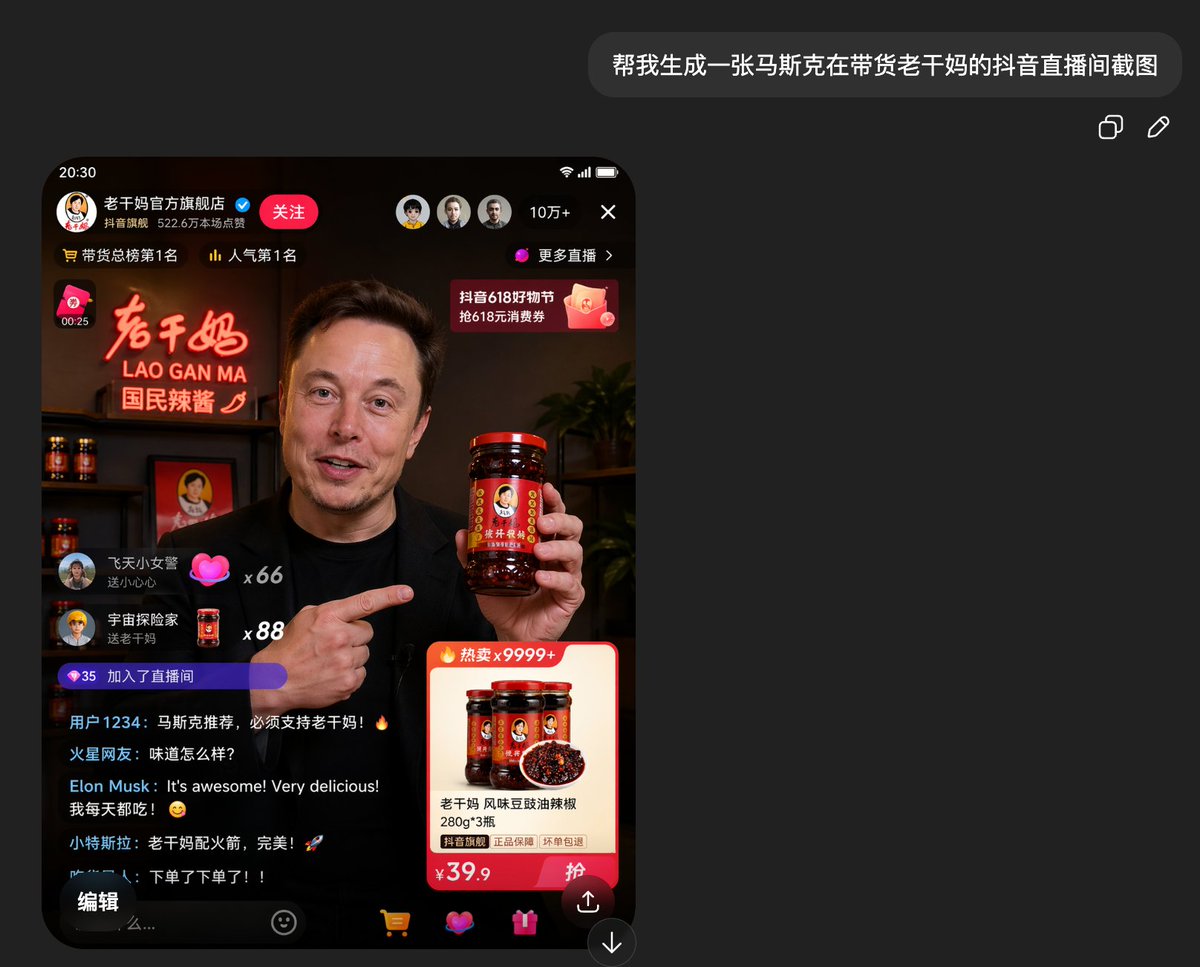
가짜 더우인 라오간마 라이브 스트림 스크린샷
유명 진행자가 라오간마(중국 전통 과자)를 판매하는 모습을 담은, 실감나는 중국 라이브 스트리밍 쇼핑 앱 스크린샷을 생성합니다. 소셜 미디어 목업 및 풍자적인 바이럴 이미지 콘셉트에 유용합니다.
이것은 다른 영감 에 대한 GPT Image 2 프롬프트 사례입니다. 아래의 복사 가능한 프롬프트를 사용하여 유사한 시각 자료를 생성하고, 재사용하기 전에 Awesome GPT Image 2 Prompts 의 저작자 표시 및 상업적 사용 권한을 검토하십시오.
전체 프롬프트 세트가 필요하신가요? 다음을 사용하세요. 다른 영감 더 많은 관련 예시를 보려면 주제 허브를 열거나 다음을 열어보세요. GPT Image 2 프롬프트 카탈로그 전체 예제 색인, 재사용 가능한 구조 및 출처 표기는 다음을 참조하십시오.
Free 1K preview
Generate one preview image instantly, no sign-up required.
Free text preview doesn’t preserve reference-image consistency.
2934/4000
프롬프트
복사 준비 프롬프트
A realistic mobile phone screenshot model of a Chinese short video livestreaming shopping interface in dark mode, with a charcoal black background. In the upper right corner of the overall canvas, place a rounded dark-colored chat bubble containing Chinese text {argument name="request text" default="Generate an image of Musk livestreaming and promoting Lao Gan Ma (spicy chili sauce) on Douyin (TikTok)."}, with two small icons for copying and editing to the right. In the lower left area, display a livestream screen in an iPhone style with a black border and rounded corners, showing the time as 20:30. The livestream is from the official Lao Gan Ma flagship store, including a Chinese profile name line, a blue verification badge, a red follow button, and a status bar at the top displaying 3 circular avatars, 100,000+ viewers, a close icon, and a “More Livestreams” button. Add ranking text near the top, such as “No. 1 in Total Sales” and “No. 1 in Popularity.” The main video screen shows {argument name="host identity" default="Elon Musk"} in a dimly lit, warm-toned studio resembling a high-end product livestream, wearing a black shirt, holding a large bottle of Lao Gan Ma chili sauce in his right hand, and pointing at it with his left hand. Show every face clearly with natural, detailed facial features. Behind him, there is a neon sign emitting red-orange light, reading “老干妈 / LAO GAN MA / National Chili Sauce,” shelves with several bottles of chili sauce, a framed portrait logo, and a dark-leaved plant on the right. Overlay typical livestream UI elements: on the left, there are 2 floating gift/comment bubbles with usernames and counts of x66 and x88; below, there is a purple capsule-shaped icon displaying 35 and “Joined the Livestream.” Add a scrolling comment section with 5 visible lines of chat, including Chinese usernames, and one English comment from {argument name="comment name" default="Elon Musk"}: “It's awesome! Very delicious!” followed by a Chinese comment stating he buys it every day. In the upper right corner of the video area, add a pink promotional banner mentioning “Douyin 618 Shopping Festival” and “618 Yuan Voucher.” In the lower right corner, place a product card with a “Hot Sale x9999+” label, displaying 3 bottles of Lao Gan Ma and a bowl of chili oil, with the product title “老干妈 风味豆豉油辣椒 280g*3 瓶” (Lao Gan Ma Flavored Fermented Black Bean Chili Oil 280g*3 bottles), a small guarantee label, and a large price of ¥39.9 and a red purchase button. At the bottom of the mobile screen, include 5 navigation/operation areas: an edit-style button on the left, a text input prompt, a shopping cart icon, a heart/gift icon pair, and a share arrow icon. Overall style: ultra-realistic app screenshot, credible Chinese e-commerce livestream UI, high detail, cinematic warm lighting in the video stream, simple and modern mobile interface, visually convincing social e-commerce screenshot.프롬프트 변수
프롬프트에 있는 편집 가능한 인수 자리 표시자와 해당 기본값입니다.
변하기 쉬운
request text
기본
Generate an image of Musk livestreaming and promoting Lao Gan Ma (spicy chili sauce) on Douyin (TikTok).
변하기 쉬운
host identity
기본
Elon Musk
변하기 쉬운
comment name
기본
Elon Musk
Best for
- - 다른 영감 visual exploration
- - Image generation and reference-image edits
- - Reusable briefs that keep source attribution visible
Change these parts
- - Subject, product, character, or scene
- - Aspect ratio, camera, lighting, and background
- - Brand, text, color, and output constraints
Recommended model and settings
- - Model: gpt-image-2
- - Input mode: 이미지 to 이미지
- - Aspect ratio: source
- - Commercial status: review original source
How to use this prompt
- 1. Copy the prompt and preserve its structure for the first test.
- 2. Replace the subject, context, and publishing channel.
- 3. Change one camera, lighting, or style variable per iteration.
- 4. Inspect the output, source, text, and rights before reuse.
Limitations, source, and reuse cautions
- - Generated output is an editable draft, not factual, legal, or rights evidence.
- - Review the linked source, people, brands, logos, text, and third-party media before commercial use.
Awesome GPT Image 2 Prompts 에서 가져왔습니다. 출처 표기가 필요합니다. 상업적 이용 가능 여부는 allowed 입니다. 유료 사용 전에 원저작권 정보를 확인하세요.
이 범주에 속하는 더 많은 사례
범주, 입력 방식 호환성, 품질 및 위험도에 따라 우선순위가 정해집니다.






재사용 및 출처 참고 사항
사례를 미리 확인한 후 이 안내 메시지를 안전하게 사용하십시오.
- 1.프롬프트를 복사하거나 Dovoo의 생성 버튼을 사용하여 직접 엽니다.
- 2.사용 사례에 맞게 변수, 화면 비율 및 참조 이미지를 조정하십시오.
- 3.출판 또는 유료 사용 전에 저작권, 출처 표기 요건 및 브랜드 또는 초상권 관련 위험을 확인하십시오.