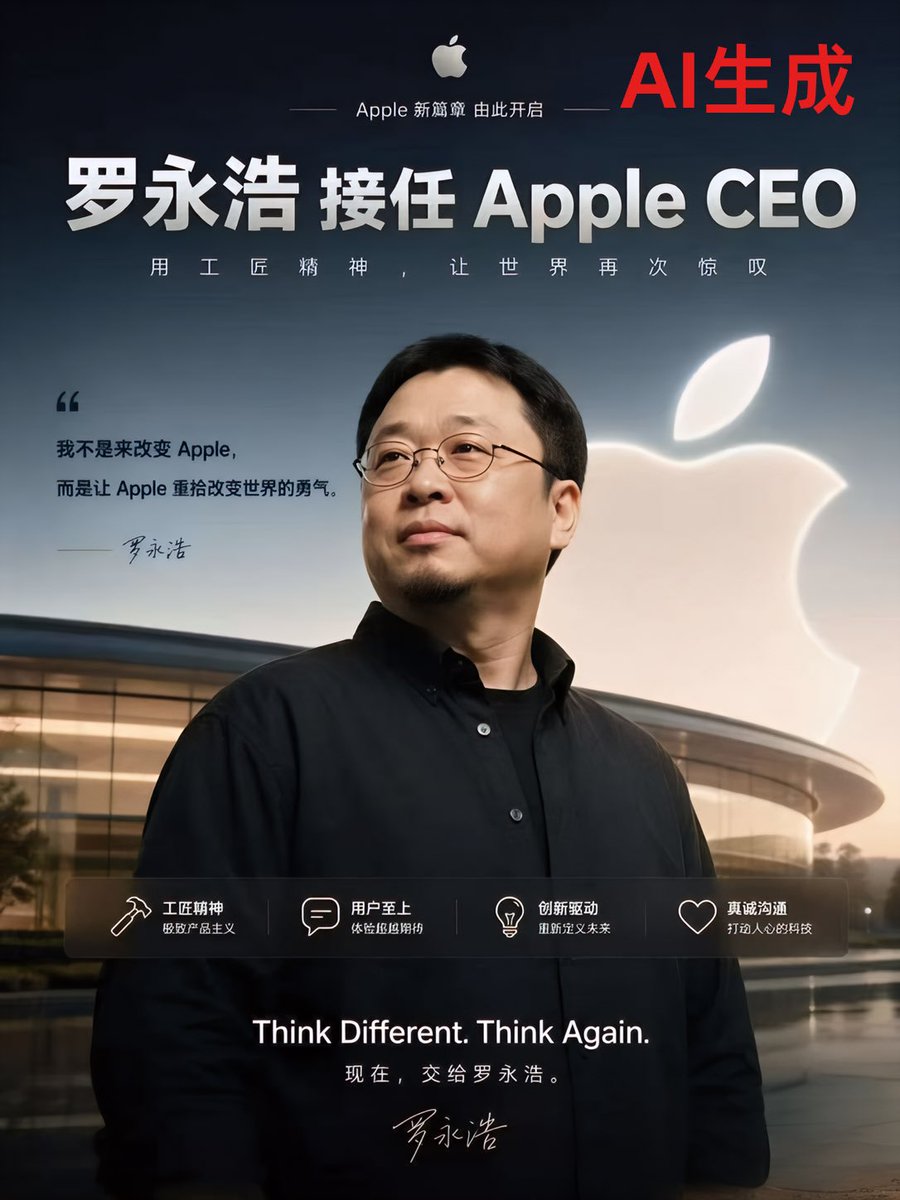
가짜 애플 CEO 발표 포스터
바이러스처럼 퍼져나갈 수 있는 AI 기반 기술 풍자 콘텐츠 또는 가상 브랜딩 이미지에 활용하기 위해 디자인된, 애플 스타일의 중국 기업 발표 포스터를 사진처럼 사실적으로 묘사한 작품입니다.
이것은 그래픽 및 포스터 에 대한 GPT Image 2 프롬프트 사례입니다. 아래의 복사 가능한 프롬프트를 사용하여 유사한 시각 자료를 생성하고, 재사용하기 전에 Awesome GPT Image 2 Prompts 의 저작자 표시 및 상업적 사용 권한을 검토하십시오.
전체 프롬프트 세트가 필요하신가요? 다음을 사용하세요. 그래픽 및 포스터 더 많은 관련 예시를 보려면 주제 허브를 열거나 다음을 열어보세요. GPT Image 2 프롬프트 카탈로그 전체 예제 색인, 재사용 가능한 구조 및 출처 표기는 다음을 참조하십시오.
Free 1K preview
Generate one preview image instantly, no sign-up required.
2317/4000
프롬프트
복사 준비 프롬프트
An extremely minimalist, photorealistic Apple advertisement-style technology announcement poster, using a 4:5 vertical composition. The background is a deep navy blue gradient transitioning to a twilight-to-night sky towards the horizon. In the foreground center, the upper body of a middle-aged East Asian man is placed, wearing a black minimalist shirt over a black undershirt, standing confidently in front of the curved glass architecture of Apple Park with a calm, executive demeanor. His face is mostly facing forward and slightly turned, with short black hair and wearing thin-framed dark glasses, presenting a serious corporate portrait style. To his right rear, a large white glowing Apple Logo is suspended in the air. At the top center, include a small white Apple Logo, followed by a delicate and slender sans-serif Chinese slogan: “Apple’s New Chapter Begins Here”. In the upper right corner, add a prominent large red Chinese text: “AI Generated”. In the upper-middle area, place a large white bold Chinese title: “Lu Yonghao Takes Over as Apple CEO”. Below it, add a line of spaced-out white Chinese slogan: “With Artisan Spirit, Let the World Be Amazed Once Again”. In the mid-left area, add a dark text quote block, with a very large left quotation mark, containing: “I’m not here to change Apple, but to restore Apple’s courage to change the world.” Below it, include a handwritten-style signature “Lu Yonghao”. Across the mid-lower section, cover with a semi-transparent dark function bar, containing 4 columns of text and image content with thin white line icons: 1) Hammer icon, title “Artisan Spirit”, subtitle “Extreme Productism”; 2) Bubble icon, title “User First”, subtitle “Experience Detail Control”; 3) Lightbulb icon, title “Innovation Driven”, subtitle “Redefine the Future”; 4) Heart outline icon, title “Sincere Communication”, subtitle “Build Human Technology”. At the bottom center, add large white English text: “Think Different. Think Again.”, followed by smaller Chinese text: “Now, Leave it to Lu Yonghao.” And again, include a handwritten signature below. Adopt a high-end technology launch poster aesthetic, cinematic soft lighting, gloss reflections on the architecture, high contrast, concise layout, high-quality Apple-style brand visuals, and exquisite commercial realism.
Best for
- - 그래픽 및 포스터 visual exploration
- - Image generation and reference-image edits
- - Reusable briefs that keep source attribution visible
Change these parts
- - Subject, product, character, or scene
- - Aspect ratio, camera, lighting, and background
- - Brand, text, color, and output constraints
Recommended model and settings
- - Model: gpt-image-2
- - Input mode: 텍스트 to 이미지
- - Aspect ratio: source
- - Commercial status: review original source
How to use this prompt
- 1. Copy the prompt and preserve its structure for the first test.
- 2. Replace the subject, context, and publishing channel.
- 3. Change one camera, lighting, or style variable per iteration.
- 4. Inspect the output, source, text, and rights before reuse.
Limitations, source, and reuse cautions
- - Generated output is an editable draft, not factual, legal, or rights evidence.
- - Review the linked source, people, brands, logos, text, and third-party media before commercial use.
Awesome GPT Image 2 Prompts 에서 가져왔습니다. 출처 표기가 필요합니다. 상업적 이용 가능 여부는 allowed 입니다. 유료 사용 전에 원저작권 정보를 확인하세요.
이 범주에 속하는 더 많은 사례
범주, 입력 방식 호환성, 품질 및 위험도에 따라 우선순위가 정해집니다.






재사용 및 출처 참고 사항
사례를 미리 확인한 후 이 안내 메시지를 안전하게 사용하십시오.
- 1.프롬프트를 복사하거나 Dovoo의 생성 버튼을 사용하여 직접 엽니다.
- 2.사용 사례에 맞게 변수, 화면 비율 및 참조 이미지를 조정하십시오.
- 3.출판 또는 유료 사용 전에 저작권, 출처 표기 요건 및 브랜드 또는 초상권 관련 위험을 확인하십시오.