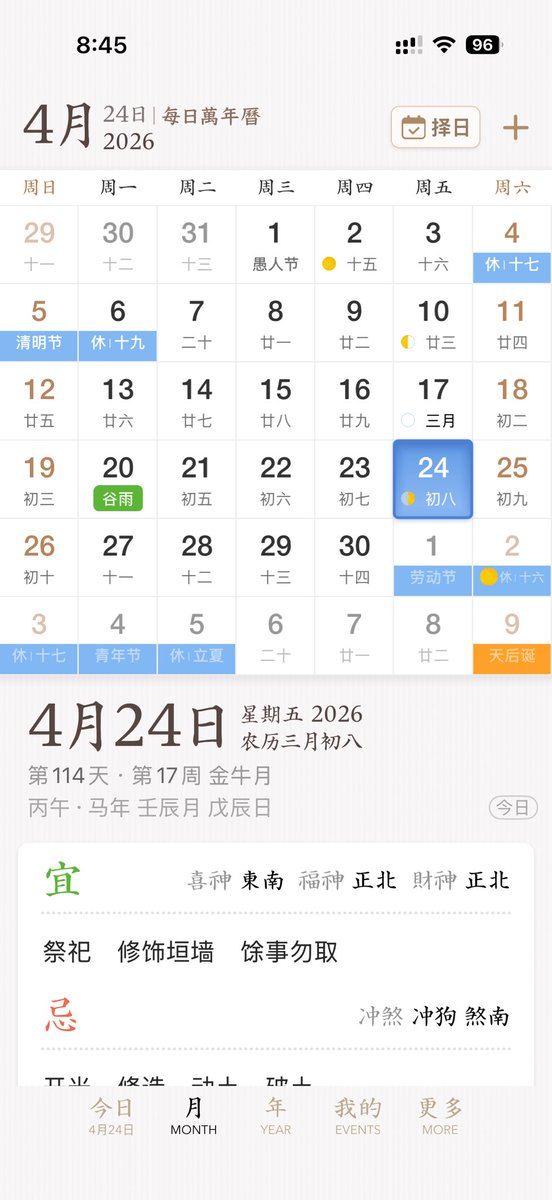
세련된 중국 달력 앱 UI
이 프롬프트는 앱 디자인 쇼케이스 또는 제품 목업에 적합한 중국 달력 및 역법 앱을 위한 세련된 모바일 UI 컨셉을 생성합니다.
이것은 그래픽 및 포스터 에 대한 GPT Image 2 프롬프트 사례입니다. 아래의 복사 가능한 프롬프트를 사용하여 유사한 시각 자료를 생성하고, 재사용하기 전에 Awesome GPT Image 2 Prompts 의 저작자 표시 및 상업적 사용 권한을 검토하십시오.
전체 프롬프트 세트가 필요하신가요? 다음을 사용하세요. 그래픽 및 포스터 더 많은 관련 예시를 보려면 주제 허브를 열거나 다음을 열어보세요. GPT Image 2 프롬프트 카탈로그 전체 예제 색인, 재사용 가능한 구조 및 출처 표기는 다음을 참조하십시오.
Free 1K preview
Generate one preview image instantly, no sign-up required.
3728/4000
프롬프트
복사 준비 프롬프트
A sleek and elegant iPhone App UI prototype showcasing a Chinese perpetual calendar and almanac application. The image is a full-screen mobile screenshot with a soft, warm white background featuring a delicate paper texture, embodying refined East Asian editorial aesthetics. The interface combines minimalist serif and sans-serif typography, with a color palette of soft browns, grays, blacks, light blues, greens, and golden accents, and a spacious layout with delicate dividers. The top displays the iOS status bar, showing 8:45 with cellular signal, Wi-Fi icon, and 96% battery. Below is the title of {argument name="month" default="April"}, accompanied by the subtitle “24th | Daily Perpetual Calendar,” with a rounded rectangle date selection button labeled “Choose Date” on the right, featuring a calendar icon and a plus icon. The main section presents the monthly calendar grid for {argument name="year" default="2026"}, with 7 columns for the days of the week, labeled in Chinese as: Sunday, Monday, Tuesday, Wednesday, Thursday, Friday, Saturday. It renders 6 rows of monthly views, totaling 42 date cells, including dates from adjacent months. Visible dates should be: first row 29, 30, 31, 1, 2, 3, 4; second row 5, 6, 7, 8, 9, 10, 11; third row 12, 13, 14, 15, 16, 17, 18; fourth row 19, 20, 21, 22, 23, 24, 25; fifth row 26, 27, 28, 29, 30, 1, 2; sixth row 3, 4, 5, 6, 7, 8, 9. Each date cell contains a larger Gregorian date with a smaller lunar date or note below. Colored holiday and solar term labels are added to specific cells, displaying 10 highlighted labels: “Rest 17th” on the 4th, “Qingming Festival” on the 5th, “Rest 19th” on the 6th, green “Grain Rain” on the 20th, “Labor Day” on the 1st of next month, “Rest 16th” on the 2nd of next month, “Rest 17th” on the 3rd of the last row, “Youth Day” on the 4th of the last row, “Rest Lichia” on the 5th of the last row, and orange “Tianhou Birthday” on the 9th of the last row. Small lunar phase markings are added to certain dates, including yellow crescent moons or dots around the 2nd, 10th, 17th, 24th, and the 2nd of next month. The cell for {argument name="selected date" default="24"} in the Friday column is highlighted with a rounded blue gradient tile and soft shadow, displaying the smaller text “8th.” A detailed daily information panel is separated from the calendar below with whitespace. On the left is a prominent date title “April 24th”; on the right, “Friday 2026” and “Lunar March 8th” are stacked. Below is a smaller gray metadata row, such as “114th Day · 17th Week Golden Moon,” and the traditional sexagenary cycle/date string, such as “Prophet Horse Year Ren Chen Month Wu Chen Day.” A rounded outline capsule button labeled “Today” is placed at the far right of this metadata area. Below is a white rounded large card with almanac guidance. The card contains two main sections with 2 titles: a green “Favorable” section and a red “Unfavorable” section, separated by a fine dotted line. The “Favorable” section includes the directional fortune row “Lucky God Southeast, Wealth God Northeast, Fortune God Northeast” and three activities: “Worship,” “Repair Walls,” and “Avoid Other Activities.” The “Unfavorable” section includes the conflict row “Clash Dog, Direction South.” At the bottom, there is a 5-item iOS-style tab bar with the labels “Today,” “MONTH,” “YEAR,” “EVENTS,” and “MORE”; the first tab is active and includes a small sub-label “April 24th.” Overall style: high-end App design concept, stable Chinese traditional calendar aesthetics, high-fidelity mobile product screenshot, a realistic yet idealized interface, perfect alignment, delicate shadows, soft contrast, and the sophistication of an early-stage product.프롬프트 변수
프롬프트에 있는 편집 가능한 인수 자리 표시자와 해당 기본값입니다.
변하기 쉬운
month
기본
April
변하기 쉬운
year
기본
2026
변하기 쉬운
selected date
기본
24
Best for
- - 그래픽 및 포스터 visual exploration
- - Image generation and reference-image edits
- - Reusable briefs that keep source attribution visible
Change these parts
- - Subject, product, character, or scene
- - Aspect ratio, camera, lighting, and background
- - Brand, text, color, and output constraints
Recommended model and settings
- - Model: gpt-image-2
- - Input mode: 텍스트 to 이미지
- - Aspect ratio: source
- - Commercial status: review original source
How to use this prompt
- 1. Copy the prompt and preserve its structure for the first test.
- 2. Replace the subject, context, and publishing channel.
- 3. Change one camera, lighting, or style variable per iteration.
- 4. Inspect the output, source, text, and rights before reuse.
Limitations, source, and reuse cautions
- - Generated output is an editable draft, not factual, legal, or rights evidence.
- - Review the linked source, people, brands, logos, text, and third-party media before commercial use.
Awesome GPT Image 2 Prompts 에서 가져왔습니다. 출처 표기가 필요합니다. 상업적 이용 가능 여부는 allowed 입니다. 유료 사용 전에 원저작권 정보를 확인하세요.
이 범주에 속하는 더 많은 사례
범주, 입력 방식 호환성, 품질 및 위험도에 따라 우선순위가 정해집니다.






재사용 및 출처 참고 사항
사례를 미리 확인한 후 이 안내 메시지를 안전하게 사용하십시오.
- 1.프롬프트를 복사하거나 Dovoo의 생성 버튼을 사용하여 직접 엽니다.
- 2.사용 사례에 맞게 변수, 화면 비율 및 참조 이미지를 조정하십시오.
- 3.출판 또는 유료 사용 전에 저작권, 출처 표기 요건 및 브랜드 또는 초상권 관련 위험을 확인하십시오.