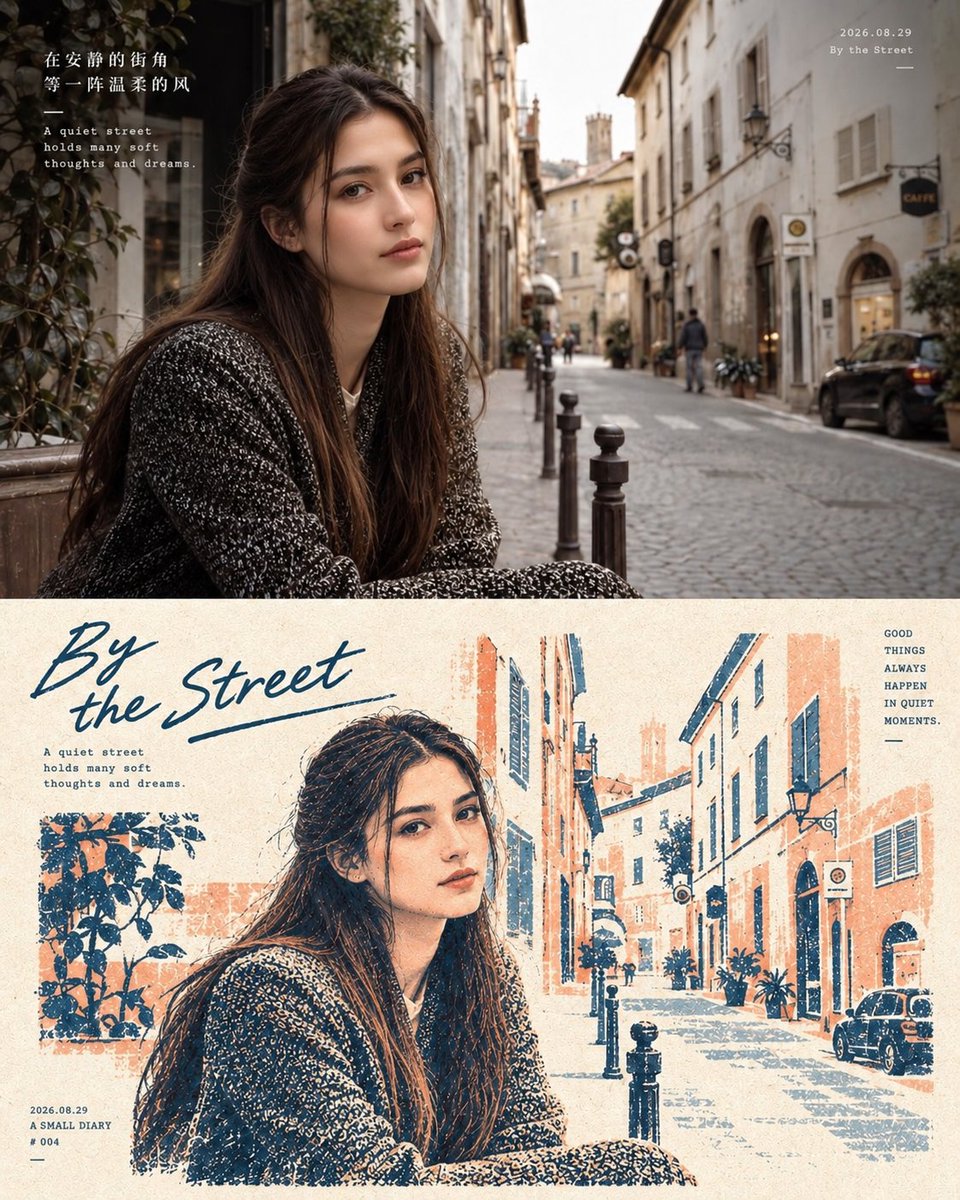
Two-Panel Editorial Travel Diary Poster
A complex prompt that creates a split-view poster featuring a photorealistic travel scene alongside a matching vintage-style ink illustration, preserving facial identity from a reference image.
이것은 그래픽 및 포스터 에 대한 GPT Image 2 프롬프트 사례입니다. 아래의 복사 가능한 프롬프트를 사용하여 유사한 시각 자료를 생성하고, 재사용하기 전에 Awesome GPT Image 2 Prompts 의 저작자 표시 및 상업적 사용 권한을 검토하십시오.
전체 프롬프트 세트가 필요하신가요? 다음을 사용하세요. 그래픽 및 포스터 더 많은 관련 예시를 보려면 주제 허브를 열거나 다음을 열어보세요. GPT Image 2 프롬프트 카탈로그 전체 예제 색인, 재사용 가능한 구조 및 출처 표기는 다음을 참조하십시오.
Free 1K preview
Generate one preview image instantly, no sign-up required.
Free text preview doesn’t preserve reference-image consistency.
2224/4000
프롬프트
복사 준비 프롬프트
Create a realistic two-panel editorial travel diary poster using the first image as the exact composition/reference and the second uploaded image as the facial reference.\n\nReplace the woman in the original poster with the woman from my reference photo. Preserve my facial identity and recognizable facial features accurately—face shape, eyes, eyebrows, nose, lips, skin tone, and natural proportions. Do not beautify, alter, or redesign my face.\n\nTOP PANEL\n\nRecreate the original street scene exactly:\n\nEuropean-style narrow cobblestone street\n\nHistoric cream-colored buildings\n\nCafé signs, windows, balconies, street lamps and bollards\n\nSame camera angle, framing, perspective and composition\n\nSame seated/leaning pose and body position\n\nSame black textured sweater/coat\n\nNatural long dark hair\n\nSoft cinematic daylight\n\nPhotorealistic skin texture and realistic lighting\n\nIntegrate my face naturally with the original pose, head angle and lighting\n\nBOTTOM PANEL\n\nCreate the matching hand-drawn/printed illustration version of the same scene.\n\nKeep the same pose, clothing, hairstyle and facial identity\n\nConvert the photograph into a textured vintage editorial illustration\n\nBlue, cream and muted warm-orange ink palette\n\nVisible paper grain and imperfect ink texture\n\nKeep my facial features recognizable while matching the illustrated style\n\nPreserve the street, buildings, plants, cars and perspective from the original\n\nTYPOGRAPHY & LAYOUT\n\nKeep the original poster layout and typography style:\n\nLarge handwritten title: “{argument name="title" default="By the Street"}”\n\nSmall English diary text\n\nChinese text in the upper-left\n\nDate: {argument name="date" default="2026.08.29"}\n\nSmall diary number/details\n\nRight-side phrase: “{argument name="quote" default="GOOD THINGS ALWAYS HAPPEN IN QUIET MOMENTS."}”\n\nMost important: My face should be the only facial identity used. Do not copy the original woman's face. Keep the overall poster composition, pose, clothing, background and artistic style as close to the reference as possible. High-quality, natural, seamless face integration, photorealistic top panel and authentic printed illustration bottom panel.프롬프트 변수
프롬프트에 있는 편집 가능한 인수 자리 표시자와 해당 기본값입니다.
변하기 쉬운
title
기본
By the Street
변하기 쉬운
date
기본
2026.08.29
변하기 쉬운
quote
기본
GOOD THINGS ALWAYS HAPPEN IN QUIET MOMENTS.
Best for
- - 그래픽 및 포스터 visual exploration
- - Image generation and reference-image edits
- - Reusable briefs that keep source attribution visible
Change these parts
- - Subject, product, character, or scene
- - Aspect ratio, camera, lighting, and background
- - Brand, text, color, and output constraints
Recommended model and settings
- - Model: gpt-image-2
- - Input mode: 이미지 to 이미지
- - Aspect ratio: source
- - Commercial status: review original source
How to use this prompt
- 1. Copy the prompt and preserve its structure for the first test.
- 2. Replace the subject, context, and publishing channel.
- 3. Change one camera, lighting, or style variable per iteration.
- 4. Inspect the output, source, text, and rights before reuse.
Limitations, source, and reuse cautions
- - Generated output is an editable draft, not factual, legal, or rights evidence.
- - Review the linked source, people, brands, logos, text, and third-party media before commercial use.
Awesome GPT Image 2 Prompts 에서 가져왔습니다. 출처 표기가 필요합니다. 상업적 이용 가능 여부는 allowed 입니다. 유료 사용 전에 원저작권 정보를 확인하세요.
이 범주에 속하는 더 많은 사례
범주, 입력 방식 호환성, 품질 및 위험도에 따라 우선순위가 정해집니다.






재사용 및 출처 참고 사항
사례를 미리 확인한 후 이 안내 메시지를 안전하게 사용하십시오.
- 1.프롬프트를 복사하거나 Dovoo의 생성 버튼을 사용하여 직접 엽니다.
- 2.사용 사례에 맞게 변수, 화면 비율 및 참조 이미지를 조정하십시오.
- 3.출판 또는 유료 사용 전에 저작권, 출처 표기 요건 및 브랜드 또는 초상권 관련 위험을 확인하십시오.