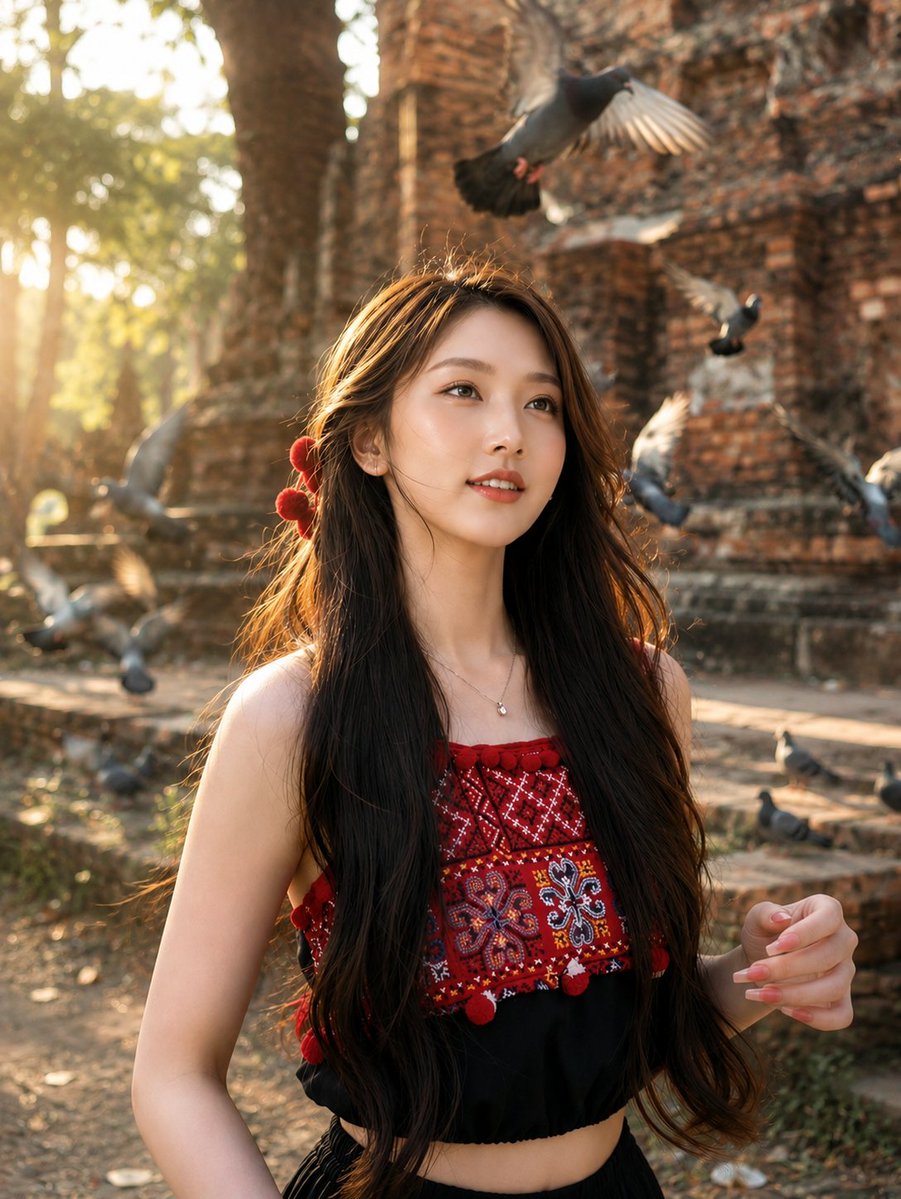
Travel Portrait at Temple Ruins
A travel-style cinematic portrait prompt featuring a woman at ancient temple ruins with flying pigeons and golden hour lighting.
이것은 인물과 캐릭터 에 대한 GPT Image 2 프롬프트 사례입니다. 아래의 복사 가능한 프롬프트를 사용하여 유사한 시각 자료를 생성하고, 재사용하기 전에 Awesome GPT Image 2 Prompts 의 저작자 표시 및 상업적 사용 권한을 검토하십시오.
전체 프롬프트 세트가 필요하신가요? 다음을 사용하세요. 인물과 캐릭터 더 많은 관련 예시를 보려면 주제 허브를 열거나 다음을 열어보세요. GPT Image 2 프롬프트 카탈로그 전체 예제 색인, 재사용 가능한 구조 및 출처 표기는 다음을 참조하십시오.
Free 1K preview
Generate one preview image instantly, no sign-up required.
2058/4000
프롬프트
복사 준비 프롬프트
Ultra realistic cinematic travel portrait of {argument name="subject" default="a beautiful young East Asian woman"} standing in front of {argument name="location" default="ancient weathered brick temple ruins during golden hour"}. She has long silky dark brown hair with soft natural waves, subtle wind movement, fair glowing skin, delicate facial features, warm brown eyes, natural makeup, and a gentle dreamy smile while looking slightly upward into the distance. She wears {argument name="outfit" default="a sleeveless black crop top with intricate red traditional embroidered geometric patterns across the chest and small red pom-pom tassels"}, a delicate silver necklace with a tiny pendant, and red floral hair accessories behind one ear.

Several pigeons are flying dynamically around her with realistic motion blur, one pigeon passing directly above her head and others flying through the foreground and background, creating depth and storytelling. Massive ancient reddish-brown brick temple ruins fill the background with detailed textures, surrounded by tall tropical trees. Warm golden sunlight streams through the trees from the left side, producing soft volumetric rays, cinematic rim lighting around her hair, realistic highlights, and a warm atmospheric glow.

Natural candid pose, upper body portrait, right hand slightly raised mid-motion, shallow depth of field, creamy background bokeh, razor-sharp focus on the face, lifelike skin texture, realistic hair strands, HDR photography, DSLR quality, 85mm lens, f/1.8, ISO 100, soft golden-hour lighting, ultra detailed, photorealistic, cinematic color grading, high dynamic range, natural colors, travel photography, National Geographic style, masterpiece, 8K.
Negative Prompt:

> low quality, blurry, overprocessed skin, plastic face, extra fingers, deformed hands, duplicate birds, bad anatomy, low resolution, cartoon, CGI, oversaturated colors, noise, watermark, logo, text, cropped face, distorted proportions, artificial lighting, flat lighting, unrealistic background, motion artifacts.
프롬프트 변수
프롬프트에 있는 편집 가능한 인수 자리 표시자와 해당 기본값입니다.
변하기 쉬운
subject
기본
a beautiful young East Asian woman
변하기 쉬운
location
기본
ancient weathered brick temple ruins during golden hour
변하기 쉬운
outfit
기본
a sleeveless black crop top with intricate red traditional embroidered geometric patterns across the chest and small red pom-pom tassels
Best for
- - 인물과 캐릭터 visual exploration
- - Image generation and reference-image edits
- - Reusable briefs that keep source attribution visible
Change these parts
- - Subject, product, character, or scene
- - Aspect ratio, camera, lighting, and background
- - Brand, text, color, and output constraints
Recommended model and settings
- - Model: gpt-image-2
- - Input mode: 텍스트 to 이미지
- - Aspect ratio: source
- - Commercial status: review original source
How to use this prompt
- 1. Copy the prompt and preserve its structure for the first test.
- 2. Replace the subject, context, and publishing channel.
- 3. Change one camera, lighting, or style variable per iteration.
- 4. Inspect the output, source, text, and rights before reuse.
Limitations, source, and reuse cautions
- - Generated output is an editable draft, not factual, legal, or rights evidence.
- - Review the linked source, people, brands, logos, text, and third-party media before commercial use.
Awesome GPT Image 2 Prompts 에서 가져왔습니다. 출처 표기가 필요합니다. 상업적 이용 가능 여부는 allowed 입니다. 유료 사용 전에 원저작권 정보를 확인하세요.
이 범주에 속하는 더 많은 사례
범주, 입력 방식 호환성, 품질 및 위험도에 따라 우선순위가 정해집니다.






재사용 및 출처 참고 사항
사례를 미리 확인한 후 이 안내 메시지를 안전하게 사용하십시오.
- 1.프롬프트를 복사하거나 Dovoo의 생성 버튼을 사용하여 직접 엽니다.
- 2.사용 사례에 맞게 변수, 화면 비율 및 참조 이미지를 조정하십시오.
- 3.출판 또는 유료 사용 전에 저작권, 출처 표기 요건 및 브랜드 또는 초상권 관련 위험을 확인하십시오.