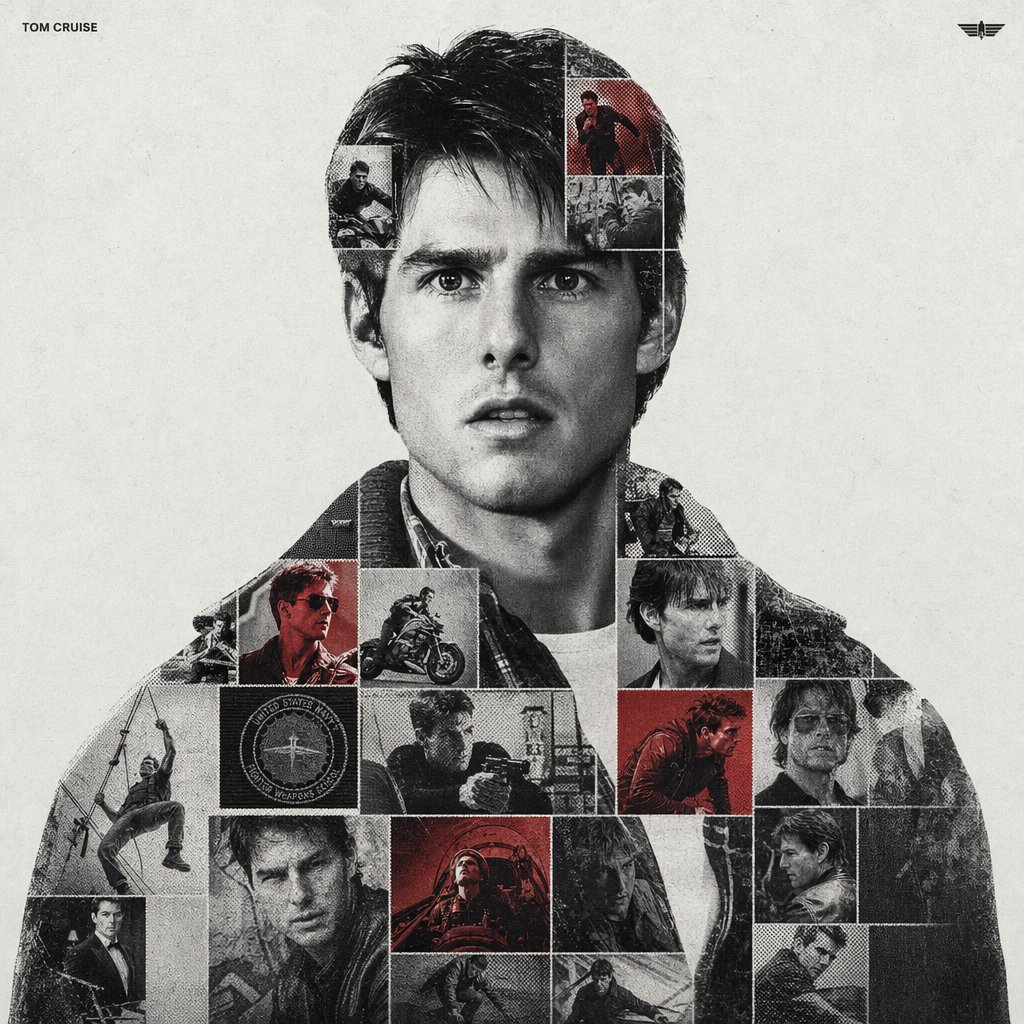
이중 노출 스포츠 그래픽
실루엣 컨테이너, 사진 모자이크 격자, 하프톤 도트 및 필름 그레인과 같은 촉각적 질감을 활용하여 혼합 매체 스포츠 기념 포스터를 제작하기 위한 정교한 프롬프트입니다.
이것은 그래픽 및 포스터 에 대한 GPT Image 2 프롬프트 사례입니다. 아래의 복사 가능한 프롬프트를 사용하여 유사한 시각 자료를 생성하고, 재사용하기 전에 Awesome GPT Image 2 Prompts 의 저작자 표시 및 상업적 사용 권한을 검토하십시오.
전체 프롬프트 세트가 필요하신가요? 다음을 사용하세요. 그래픽 및 포스터 더 많은 관련 예시를 보려면 주제 허브를 열거나 다음을 열어보세요. GPT Image 2 프롬프트 카탈로그 전체 예제 색인, 재사용 가능한 구조 및 출처 표기는 다음을 참조하십시오.
Free 1K preview
Generate one preview image instantly, no sign-up required.
1844/4000
프롬프트
복사 준비 프롬프트
{argument name="subject name" default="[PERSON NAME]"}.
Act as a high-end sports graphic designer creating a conceptual tribute poster. The style is a complex "dual exposure photo-grid composite" with mixed-media textures.
CENTRAL STRUCTURE (THE VESSEL):
The central focus is a large-scale, high-contrast black and white portrait silhouette of {argument name="subject name" default="[PERSON NAME]"}. This main portrait acts as the container.
THE GRID FILL & TEXTURES (MIXED MEDIA):
The interior of the silhouette is populated by a dense "photo mosaic grid" of action shots from the person's career.
CRITICAL TEXTURE INSTRUCTION: Do not just paste flat photos. Apply artistic textures to various grid cells to create a tactile, collage feel. Use effects like:
Halftone Dots: Comic-book style raster patterns on some cells.
Fabric/Embroidery: Subtle thread or canvas textures suggesting a jersey or patch.
Film Grain: Heavy noise on specific high-contrast action shots.
COLOR STRATEGY:
The base is Monochrome B&W. Use selective color overlays (relevant to the team/flag) ONLY on specific grid cells to create a rhythm.
TYPOGRAPHY & BRANDING (STRICT MICRO-SCALING):
Top Left (The Name): Write "{argument name="subject name" default="[PERSON NAME]"}" strictly using the font {argument name="font family" default="Inter Semibold"}.
Kerning: Tight negative kerning (-4%).
Size: SMALL and discreet. It must occupy MAXIMUM 20% of the canvas width. Do NOT make it large or loud.
Top Right (The Symbol): Place the primary logo (Team/Brand/Flag).
Size: VERY SMALL. It must occupy MAXIMUM 10% of the canvas width.
COMPOSITION & BACKGROUND:
Background: Off-white or light grey with a visible high-quality paper or concrete texture. It should not be flat digital white.
Alignment: Center the figure perfectly. Maintain wide negative space around the object.
프롬프트 변수
프롬프트에 있는 편집 가능한 인수 자리 표시자와 해당 기본값입니다.
변하기 쉬운
subject name
기본
[PERSON NAME]
변하기 쉬운
font family
기본
Inter Semibold
Best for
- - 그래픽 및 포스터 visual exploration
- - Image generation and reference-image edits
- - Reusable briefs that keep source attribution visible
Change these parts
- - Subject, product, character, or scene
- - Aspect ratio, camera, lighting, and background
- - Brand, text, color, and output constraints
Recommended model and settings
- - Model: gpt-image-2
- - Input mode: 텍스트 to 이미지
- - Aspect ratio: source
- - Commercial status: review original source
How to use this prompt
- 1. Copy the prompt and preserve its structure for the first test.
- 2. Replace the subject, context, and publishing channel.
- 3. Change one camera, lighting, or style variable per iteration.
- 4. Inspect the output, source, text, and rights before reuse.
Limitations, source, and reuse cautions
- - Generated output is an editable draft, not factual, legal, or rights evidence.
- - Review the linked source, people, brands, logos, text, and third-party media before commercial use.
Awesome GPT Image 2 Prompts 에서 가져왔습니다. 출처 표기가 필요합니다. 상업적 이용 가능 여부는 allowed 입니다. 유료 사용 전에 원저작권 정보를 확인하세요.
이 범주에 속하는 더 많은 사례
범주, 입력 방식 호환성, 품질 및 위험도에 따라 우선순위가 정해집니다.






재사용 및 출처 참고 사항
사례를 미리 확인한 후 이 안내 메시지를 안전하게 사용하십시오.
- 1.프롬프트를 복사하거나 Dovoo의 생성 버튼을 사용하여 직접 엽니다.
- 2.사용 사례에 맞게 변수, 화면 비율 및 참조 이미지를 조정하십시오.
- 3.출판 또는 유료 사용 전에 저작권, 출처 표기 요건 및 브랜드 또는 초상권 관련 위험을 확인하십시오.